CSS vertical-align Property
Use the text-align CSS property to set vertical alignment of an inline element. Read about property values and see examples.
The vertical-align property sets the vertical alignment of an inline, inline-block, or table-cell box. Inline-level elements include images, text, buttons, and any element with display: inline or display: inline-block.
This page explains where vertical-align actually applies, the line-box model that makes its values make sense, every keyword and what it does, and the gotchas that trip people up the most.
Where vertical-align works
The property only does something in two situations:
- Inside a line box — to align an inline or inline-block box relative to the line of text it sits on. For example, aligning an
<img>icon with the surrounding text. - Inside table cells — to align the content of a
<td>,<th>, or any element withdisplay: table-cell.
Outside those contexts it is silently ignored.
What it does NOT do
This is the single biggest source of confusion: vertical-align does not center block-level elements. Setting vertical-align: middle on a <div> does nothing. To center a regular block, reach for Flexbox (align-items: center), Grid, or margin: 0 auto (horizontal only). The keyword middle, despite its name, only centers an inline box against the surrounding text — not a block inside its parent.
| Initial Value | baseline |
|---|---|
| Applies to | Inline-level and table-cell elements, also applies to ::first-letter and ::first-line. |
| Inherited | No. |
| Animatable | No. |
| Version | CSS1 |
| DOM Syntax | object.style.verticalAlign = "middle"; |
How vertical-align works
To use the property well you need a quick mental model.
Every line of text is laid out inside an invisible line box. Within that line box there are two reference lines you care about:
- The baseline — the line the bottoms of most letters sit on (letters like "g" and "y" dip below it).
- The content area — the full em-box of the font, roughly from the top of the tallest glyph to the bottom of the lowest descender.
Most vertical-align keywords shift a box relative to one of those lines (baseline, text-top, text-bottom, middle), while top and bottom align to the edges of the whole line box instead.
In a table cell the rules are simpler: vertical-align controls where the cell's content sits within the cell's height, and only top, middle, bottom, and baseline are meaningful.
Syntax
Syntax of CSS vertical-align Property
vertical-align: baseline | length | sub | super | top | text-top | middle | bottom | text-bottom | initial | inherit;Example of the vertical-align property with the "sub" value:
Example of CSS vertical-align Property with sub value
<!DOCTYPE html>
<html>
  <head>
    <title>Title of the document</title>
    <style>
      span {
        vertical-align: sub;
      }
    </style>
  </head>
  <body>
    <h2>Vertical-align property example</h2>
    <p>This is some paragraph with
      <span>vertical-align</span> property.
    </p>
  </body>
</html>Result
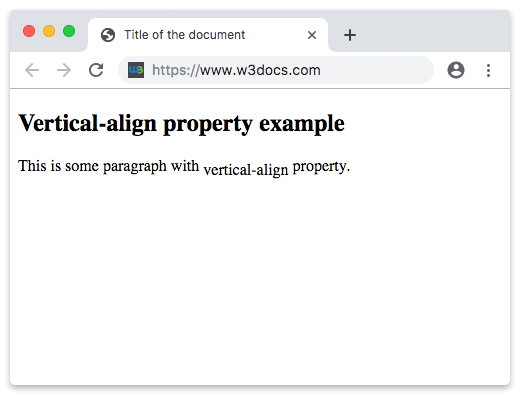
Example of the vertical-align property with the "middle" value:
Example of CSS vertical-align Property with middle value
<!DOCTYPE html>
<html>
  <head>
    <title>Title of the document</title>
    <style>
      span {
        vertical-align: middle;
      }
    </style>
  </head>
  <body>
    <h2>Vertical-align property example</h2>
    <p>This is some paragraph with
      <span>vertical-align</span> property.
    </p>
  </body>
</html>Example of the vertical-align property with the "super" value:
Example of CSS vertical-align Property with super value
<!DOCTYPE html>
<html>
  <head>
    <title>Title of the document</title>
    <style>
      span {
        vertical-align: super;
      }
    </style>
  </head>
  <body>
    <h2>Vertical-align property example</h2>
    <p>This is some paragraph with
      <span>vertical-align</span> property.
    </p>
  </body>
</html>Example of the vertical-align property with the "top" and "bottom" values:
Example of CSS vertical-align Property with top and bottom values
<!DOCTYPE html>
<html>
  <head>
    <title>Title of the document</title>
    <style>
      table {
        width: 100%;
        border-collapse: collapse;
      }
      table,
      th,
      td {
        border: 1px solid #cccccc;
      }
      td {
        height: 100px;
      }
      .top {
        vertical-align: top;
      }
      .bottom {
        vertical-align: bottom;
      }
    </style>
  </head>
  <body>
    <h2>Vertical-align property example</h2>
    <table>
      <tr>
        <th>Bottom</th>
        <th>Middle</th>
        <th>Top</th>
      </tr>
      <tr>
        <td class="bottom">Some text</td>
        <td>Some text</td>
        <td class="top">Some text</td>
      </tr>
    </table>
  </body>
</html>Example with a length value (aligning an icon to text)
A length value nudges the box up (positive) or down (negative) from the baseline. This is the cleanest way to line up an inline image or icon with the text next to it:
<!DOCTYPE html>
<html>
  <head>
    <title>Title of the document</title>
    <style>
      .label {
        font-size: 20px;
      }
      .icon {
        width: 18px;
        height: 18px;
        vertical-align: -3px; /* drop it 3px to sit on the text */
      }
    </style>
  </head>
  <body>
    <p class="label">
      <img class="icon" src="https://api.w3docs.com/uploads/media/default/0001/03/4624f58ca574eae0a734eb0d43fd87bc2326a306.png" alt="icon">
      Aligned with the text baseline
    </p>
  </body>
</html>Common gotchas
- The "mysterious gap" under an image. A standalone
<img>inside a block often has a few pixels of space below it. That is because, as an inline element, the image sits on the text baseline, leaving room for descenders. Fix it withvertical-align: bottom(ormiddle/top), or make the imagedisplay: block. middleis not true centering.vertical-align: middlealigns the box to the baseline plus half the parent's x-height — visually close to center for small icons, but not exact, and it does nothing for block elements.- It does not inherit. Each box must declare its own
vertical-align; setting it on a parent has no effect on children. top/bottomdepend on the tallest content. They align to the line box, so a single tall element on the line can change where everything else lands.- Negative
lengthvalues are allowed and are often more predictable than the keywords for pixel-perfect icon alignment.
Values
| Value | Descriptions | Play it |
|---|---|---|
| baseline | Aligns the baseline of the element with the baseline of its parent. This is a default value. | Play it » |
| length | Shifts the baseline of the box up (positive value) or down (negative value) relative to the parent's baseline. | Play it » |
| sub | Lower the baseline of the box to the proper position for subscripts of the parent's box. | Play it » |
| super | Raise the baseline of the box to the proper position for superscripts of the parent's box. | Play it » |
| top | Align the top of the aligned subtree with the top of the line box. | Play it » |
| text-top | Align the top of the box with the top of the parent's content area. | Play it » |
| middle | Align the vertical midpoint of the box with the baseline of the parent box plus half the x-height of the parent. | Play it » |
| bottom | Align the bottom of the aligned subtree with the bottom of the line box. | Play it » |
| text-bottom | Align the bottom of the box with the bottom of the parent's content area. | Play it » |
| initial | It makes the property use its default value. | Play it » |
| inherit | It inherits the property from its parents element. |
Practice
Related properties
- text-align — horizontal alignment of inline content.
- line-height — sets the line box height that
top/bottomalign against. - display — switch between
inline,inline-block,block, andtable-cell.