CSS id and class
Use CSS ID selector to identify one HTML element, that you want to style with CSS. To identify more than one elements use ID selector. See examples.
In our previous chapter, we learned about selectors. Now we will speak about id and class selectors, which are the two attribute-based selectors you will reach for most often when styling a web page.
This chapter covers what each selector does, how to write it, how they differ, and — just as importantly — when to choose one over the other.
CSS id selector
An id selector targets the single HTML element whose id attribute matches the given name. Because an id must be unique within a page, an id selector is meant for styling one specific element, not a group of them.
In both internal and external style sheets, you write an id selector with a hash (#) followed by the id value: #name { ... }.
Example of an ID selector:
CSS ID Selector for HTML Element
<!DOCTYPE html>
<html>
  <head>
    <title>Title of the document</title>
    <style>
      #blue {
        color: #1c87c9;
      }
    </style>
  </head>
  <body>
    <p>The first paragraph.</p>
    <p id="blue">The second paragraph.</p>
    <p>The third paragraph.</p>
  </body>
</html>Here we gave the second paragraph the id blue (id="blue") and declared its style with the color property — #blue { color: #1c87c9; } — inside the <head> section. Only that one element is matched, so only the second paragraph turns blue; the first and third keep their default color.
An id value cannot contain spaces and, by convention, should not start with a digit. Open the example in the editor to confirm that just the second paragraph is #1c87c9.
CSS class selector
A class selector targets every element whose class attribute contains the given name. Use it when the same style should apply to multiple elements — for example, a .warning style shared by several notices, or a .btn style reused across many buttons.
In both internal and external style sheets, you write a class selector with a dot (.) followed by the class name: .name { ... }.
Example of a class selector:
CSS Class Selector Example
<!DOCTYPE html>
<html>
  <head>
    <title>Title of the document</title>
    <style>
      .blue {
        color: #1c87c9;
      }
    </style>
  </head>
  <body>
    <h2 class="blue">This is some heading.</h2>
    <p>The second paragraph.</p>
    <p class="blue">The third paragraph.</p>
  </body>
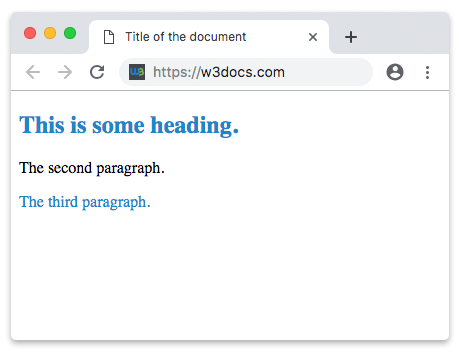
</html>Here the same class blue is applied to two different elements — a heading and a paragraph (class="blue") — and styled once with .blue { color: #1c87c9; }. Both the heading and the third paragraph turn #1c87c9, while the middle paragraph (which has no class) is unaffected. Defining the rule once and reusing it is exactly what classes are for.
Multiple classes on one element
An element can carry several classes at the same time. List them in the class attribute separated by spaces, and every matching rule applies:
<!DOCTYPE html>
<html>
  <head>
    <title>Title of the document</title>
    <style>
      .text {
        font-size: 20px;
      }
      .highlight {
        background-color: #ffe69e;
      }
    </style>
  </head>
  <body>
    <p class="text highlight">This paragraph is both larger and highlighted.</p>
  </body>
</html>This composability is why classes are the workhorse of CSS: small, single-purpose classes can be mixed and matched across the page.
The difference between id and class
The core distinction is uniqueness:
- An id is unique — each element may have only one id, and each page should contain only one element with a given id. Reusing the same id on several elements is invalid HTML and may break scripts and accessibility features that expect ids to be unique.
- A class is reusable — the same class may appear on many elements, and a single element may have many classes.
| id | class | |
|---|---|---|
| Symbol in CSS | # | . |
| Times per page | once | unlimited |
| Per element | one id | many classes |
| Typical use | a unique element (e.g. a page header, an anchor target) | repeated styling, components |
Ids also carry more weight in the cascade than classes. When an id rule and a class rule both target the same element, the id rule wins regardless of source order — see CSS specificity through selectors. That extra weight is a reason many style guides prefer classes for styling and reserve ids for in-page links (href="#section") and JavaScript hooks.
Which one should I use?
In practice, use classes for styling. They are reusable, easy to override, and keep specificity low and predictable. Reach for an id only when you genuinely need a unique handle on an element — for fragment links, form label/for associations, or getElementById in JavaScript.