CSS text-decoration Property
Use the CSS text-decoration shorthand property to specify the kind of line, style and color of the text decoration. See property values and try examples.
The CSS text-decoration property adds decorative lines to text — most commonly the underline beneath a link, a line through deleted text, or an overline for emphasis. It is the property you reach for when you want to add (or, just as often, remove) those lines.
This page covers the shorthand syntax, every value it accepts, how it interacts with its longhand pieces, and the practical cases where you actually use it (such as styling links).
What text-decoration does
In CSS3, text-decoration is a shorthand that sets three longhand properties at once:
- text-decoration-line — which lines appear (
underline,overline,line-through, or several at once). - text-decoration-color — the line color (defaults to the element's text color,
currentColor). - text-decoration-style — the line style (
solid,double,dotted,dashed,wavy).
Because it is a shorthand, any longhand you leave out is reset to its initial value. The line itself, text-decoration-line, defaults to none — so text-decoration: none is the canonical way to strip the underline off a link.
In the original CSS1 specification, text-decoration was not a shorthand. It was a single property that only accepted these keywords:
noneunderlineoverlineline-throughblink(now deprecated and ignored by modern browsers)
The CSS3 shorthand is a superset of that list, so old single-keyword declarations like text-decoration: underline still work exactly as before.
When to use it
- Removing link underlines:
a { text-decoration: none; }— then add your own hover styling. - Marking edits:
line-throughfor removed text,underlinefor inserted text. - Custom underlines: combine color and
wavy/dottedstyles for spell-check-style underlines or branded link decorations.
Accessibility tip: Underlines are the conventional cue that text is a link. If you remove them, make links distinguishable some other way (a clear color difference plus a hover/focus underline), so the link is still obvious to every reader.
| Property | Detail |
|---|---|
| Initial Value | none currentColor solid (the initial value of each longhand) |
| Applies to | All elements. It also applies to ::first-letter and ::first-line. |
| Inherited | No. |
| Animatable | No. |
| Version | CSS1, CSS3 |
| DOM Syntax | object.style.textDecoration = "underline dotted red"; |
Syntax
text-decoration: <line> <color> <style> | initial | inherit;<line>is one or moretext-decoration-linekeywords (none,underline,overline,line-through).<color>is any CSS color value.<style>is onetext-decoration-stylekeyword (solid,double,dotted,dashed,wavy).
The order of the three parts does not matter, and you can omit any of them. Multiple line values can be combined — for example underline overline draws both at once:
/* underline, in red, with a wavy style */
text-decoration: underline wavy red;

/* two lines at once; color and style fall back to defaults */
text-decoration: underline overline;Example of the text-decoration property:
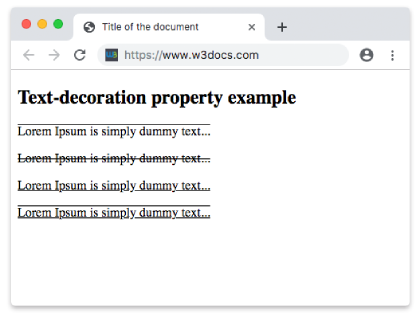
Example of CSS text-decoration Property with overline, line-through, underline and overline values
<!DOCTYPE html>
<html>
  <head>
    <title>Title of the document</title>
    <style>
      .a {
        text-decoration: overline;
      }
      .b {
        text-decoration: line-through;
      }
      .c {
        text-decoration: underline;
      }
      .d {
        text-decoration: underline overline;
      }
    </style>
  </head>
  <body>
    <h2>Text-decoration property example</h2>
    <p class="a">Lorem Ipsum is simply dummy text...</p>
    <p class="b">Lorem Ipsum is simply dummy text...</p>
    <p class="c">Lorem Ipsum is simply dummy text...</p>
    <p class="d">Lorem Ipsum is simply dummy text...</p>
  </body>
</html>Result
Example of the text-decoration property with a specified color:
Example of CSS text-decoration Property with text-decoration-color property
<!DOCTYPE html>
<html>
  <head>
    <title>Title of the document</title>
    <style>
      p {
        text-decoration: underline;
        text-decoration-color: #1c87c9;
      }
    </style>
  </head>
  <body>
    <h2>Text-decoration property example</h2>
    <p>Lorem ipsum is simply dummy text...</p>
  </body>
</html>The -webkit- prefix is omitted here as modern browsers fully support the standard property.
Example of the text-decoration property with a specified style:
Example of CSS text-decoration Property with text-decoration-line and text-decoration-style properties
<!DOCTYPE html>
<html>
  <head>
    <title>Title of the document</title>
    <style>
      div {
        text-decoration-line: underline;
      }
      div.t1 {
        text-decoration-style: dotted;
      }
      div.t2 {
        text-decoration-style: wavy;
      }
      div.t3 {
        text-decoration-style: solid;
      }
      div.t4 {
        text-decoration-line: overline underline;
        text-decoration-style: double;
      }
    </style>
  </head>
  <body>
    <h2>Text-decoration property example</h2>
    <div class="t1">Lorem ipsum is simply dummy text...</div>
    <br />
    <div class="t2">Lorem ipsum is simply dummy text...</div>
    <br />
    <div class="t3">Lorem ipsum is simply dummy text...</div>
    <br />
    <div class="t4">Lorem ipsum is simply dummy text...</div>
  </body>
</html>Values
| Value | Description |
|---|---|
| text-decoration-line | Specifies the kind of the text decoration. |
| text-decoration-color | Specifies the color of the text decoration. |
| text-decoration-style | Specifies the style of the text decoration. |
| initial | Makes the property use its default value. |
| inherit | Inherits the property from its parents element. |
Related properties
- text-decoration-line — set the line(s) on their own.
- text-decoration-color — set the decoration color independently of the text color.
- text-decoration-style — choose solid, double, dotted, dashed, or wavy lines.