CSS stroke-width Property
How to use the stroke-width CSS property to set the width of the stroke. Read about the property and see the values with examples.
The CSS stroke-width property sets the thickness of the outline (the "stroke") drawn around an SVG shape or text. The stroke is the painted line that follows the shape's path; stroke-width controls how thick that line is.
This page covers the syntax, the accepted values (lengths and percentages), how stroke-width interacts with SVG presentation attributes, and the gotchas around units and viewBox scaling.
Why use stroke-width
In SVG, a shape's outline and its interior are painted separately: the stroke property paints the outline and fill paints the inside. A stroke is only visible once it has a non-zero width, so stroke-width is what makes an outline actually appear. Use it to make borders thicker or thinner, to draw hairline grids, or to create bold outlined icons and text.
stroke-width vs. the SVG attribute
You can set the stroke width two ways: as an SVG presentation attribute in the markup (stroke-width="3") or as a CSS property. When both are present, CSS wins — a CSS rule (or an inline style) takes precedence over the presentation attribute. This is the usual reason a value set in the SVG markup appears to be "ignored": a stylesheet is overriding it.
<!-- The CSS stroke-width: 1px wins over the attribute stroke-width="5". -->
<circle cx="5" cy="5" r="3" stroke-width="5" style="stroke-width: 1px;" />The stroke-width is a presentation attribute and can be applied to any element but can have an effect only on the following elements: <altGlyph>, <circle>, <ellipse>, <line>, <path>, <polygon>, <polyline>, <rect>, <text>, <textPath>, <tref>, and <tspan>.
Units like px or em are required, except when the value is 0.
| Initial Value | 1 |
|---|---|
| Applies to | Shapes and text content elements. |
| Inherited | Yes. |
| Animatable | Yes. |
| Version | SVG 1.1 Specification |
| DOM Syntax | Object.strokeWidth = "0.5"; |
Syntax
stroke-width: length | percentage | initial | inherit;The width is centered on the path: half of it is painted inside the shape's edge and half outside. So a stroke-width of 4 on a circle of radius 3 adds 2 units beyond the radius and overlaps 2 units inward.
Example of the stroke-width property:
CSS stroke-width code example
<!DOCTYPE html>
<html>
  <head>
    <title>Title of the document</title>
  </head>
  <body>
    <h2>Stroke-width property example</h2>
    <svg viewBox="0 0 30 10">
      <circle cx="5" cy="5" r="3" stroke="#1c87c9" style="stroke-width: 1px;" />
    </svg>
  </body>
</html>Result
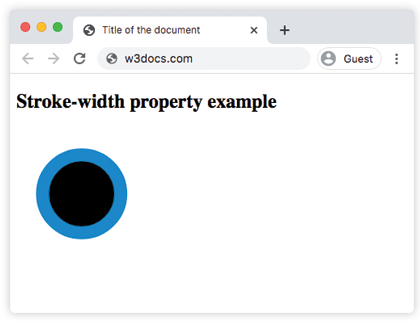
Example of the stroke-width property with the "length" value:
CSS stroke-width another code example
<!DOCTYPE html>
<html>
  <head>
    <title>Title of the document</title>
  </head>
  <body>
    <h2>Stroke-width property example</h2>
    <svg viewBox="0 0 30 10">
      <circle cx="5" cy="5" r="3" stroke="#1c87c9" style="stroke-width: 3px;" />
    </svg>
  </body>
</html>Example of the stroke-width property with the "%" value:
A percentage is resolved against the SVG's diagonal — specifically the diagonal of the viewport (sqrt(width² + height²) / sqrt(2)), not against the shape's own size. This makes percentage widths handy when you want the stroke to scale with the drawing.
CSS stroke-width percentage value example
<!DOCTYPE html>
<html>
  <head>
    <title>Title of the document</title>
  </head>
  <body>
    <h2>Stroke-width property example</h2>
    <svg viewBox="0 0 30 10">
      <circle cx="5" cy="5" r="3" stroke="#1c87c9" style="stroke-width: 2%;" />
    </svg>
  </body>
</html>Values
| Value | Description |
|---|---|
| length | Specifies the width of the stroke. |
| percentage | Specifies the width of the stroke in %. |
| initial | Makes the property use its default value. |
| inherit | Inherits the property from its parents element. |
Notes and gotchas
- A zero width hides the stroke.
stroke-width: 0draws nothing, even if astrokecolor is set. - Units are required for non-zero CSS values. Inside a
style/stylesheet use2px,0.5em, etc. The bare-number form (stroke-width="3") is only valid as an SVG attribute, where the number is interpreted in user-space units. - The stroke straddles the path. Because half the width sits outside the shape's edge, a thick stroke can spill past the
viewBoxand get clipped. Add padding to theviewBoxif your outline is cut off. - It scales with the
viewBox. Astroke-widthgiven in user units grows and shrinks as the SVG is scaled to fit its container. To keep a constant on-screen thickness regardless of scaling, add the SVG attributevector-effect="non-scaling-stroke"to the element.
Related properties
stroke— the color (paint) of the outline.stroke-linecap— the shape of open path ends.stroke-dasharray— turns the stroke into a dashed line.stroke-dashoffset— shifts where the dash pattern starts.fill— the color of a shape's interior.