CSS outline Property
The outline CSS property is a shorthand for setting the outline-width, outline-style, outline-color CSS properties. See property values and examples.
An outline is a line drawn around an element, just outside its border edge. Unlike a border, an outline does not take up space in the layout and is the same on all four sides — you cannot set it per-side. This page covers the outline shorthand, how it differs from a border, and why it matters for keyboard accessibility.
The outline property is a shorthand that sets these longhand properties in a single declaration:
- outline-width — the thickness of the line.
- outline-style — the line style (
solid,dashed,dotted, …). Required for the outline to appear. - outline-color — the line color.
- outline-offset — the gap between the outline and the border edge. (Set separately; it is not part of the
outlineshorthand.)
The default outline style is none, so setting only outline-color does nothing — you must also give a style. Because outlines are painted outside the element and ignored by the box model, they never shift surrounding content or change the element's layout dimensions.
Outlines vs. Borders
An outline and a border look alike, but they behave differently:
- Layout: a border is part of the box model and pushes neighbouring content; an outline is painted on top and takes up no space.
- Sides: borders can be styled per side (
border-top,border-left, …); an outline is always uniform on all four sides. - Shape: in most browsers an outline is strictly rectangular and is not rounded by border-radius, even when the border is.
- Position: the outline is drawn outside the border edge, so when an element has both, the outline sits beyond the border.
| Initial Value | medium none currentcolor |
|---|---|
| Applies to | All elements. It also applies to ::first-letter. |
| Inherited | No. |
| Animatable | Yes. Outline of the element is animatable. |
| Version | CSS2 |
| DOM Syntax | object.style.outline = "#eee dashed 10px"; |
Syntax
CSS outline
outline: outline-width | outline-style | outline-color | outline-offset | initial | inherit;Example of the outline property:
CSS outline code example
<!DOCTYPE html>
<html>
  <head>
    <title>Title of the document</title>
    <style>
      p.dotted {
        outline: dotted;
      }
      p.dashed {
        outline: dashed;
      }
    </style>
  </head>
  <body>
    <h2>Outline property example</h2>
    <p class="dotted">Lorem Ipsum is simply dummy text of the printing... </p>
    <p class="dashed">Lorem Ipsum is simply dummy text of the printing...</p>
  </body>
</html>Result
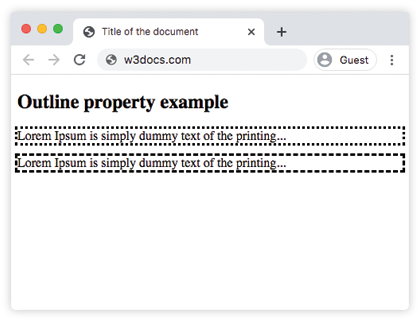
In the given example, the outline-style of the first element is dotted, and that of the second element is dashed.
In the following example, the first element does not have a border, the second one has. Notice that the outline of the second element is outside of its border:
Example of the outline property with an element having a border:
CSS outline and border together, example
<!DOCTYPE html>
<html>
  <head>
    <title>Title of the document</title>
    <style>
      div.ex1 {
        outline-style: solid;
        outline-width: thick;
      }
      div.ex2 {
        border: 1px solid #fc7f01;
        outline-style: solid;
        outline-width: thick;
      }
    </style>
  </head>
  <body>
    <h2>Outline property example</h2>
    <div class="ex1">Lorem Ipsum is simply dummy text of the printing...</div>
    <br />
    <div class="ex2">Lorem Ipsum is simply dummy text of the printing...</div>
  </body>
</html>In the following example, the outline is outside of the second element’s border.
Example of the outline-color property with the outline-style property:
CSS outline, color code example
<!DOCTYPE html>
<html>
  <head>
    <title>Title of the document</title>
    <style>
      div.blue {
        outline-style: solid;
        outline-color: #1c87c9;
      }
      div.green {
        border: 1px solid black;
        outline-style: solid;
        outline-color: #8ebf42;
      }
    </style>
  </head>
  <body>
    <h2>Outline property example</h2>
    <div class="blue">Lorem Ipsum is simply dummy text of the printing...</div>
    <br />
    <div class="green">Lorem Ipsum is simply dummy text of the printing...</div>
  </body>
</html>Spacing the outline with outline-offset
By default the outline hugs the border edge. The outline-offset property pushes it away (or, with a negative value, pulls it inside). It is a separate property, not part of the outline shorthand:
button {
  outline: 2px solid #1c87c9;
  outline-offset: 4px; /* 4px gap between the border and the outline */
}Outlines and keyboard accessibility
The most important real-world use of outlines is the focus indicator. When a user moves through a page with the Tab key, the browser draws a default outline around the focused element so they can see where they are. Removing it without a replacement is a serious accessibility problem:
/* Do NOT do this — keyboard users lose track of focus */
button:focus {
  outline: none;
}If the default focus ring clashes with your design, restyle it instead of removing it:
button:focus-visible {
  outline: 2px solid #1c87c9;
  outline-offset: 2px;
}This uses the :focus state together with the modern :focus-visible pseudo-class, which shows the outline only for keyboard interaction — so mouse clicks don't trigger a ring while keyboard users stay oriented.
Values
| Value | Description |
|---|---|
| outline-width | Defines the width of the outline. |
| outline-style | Defines the style of the outline. |
| outline-color | Sets the color of the outline. |
| outline-offset | Offsets the outline from the border edge. |
| initial | Makes the property use its default value. |
| inherit | Inherits the property from its parents element. |
Related properties
- outline-style — the required style component of the shorthand.
- outline-width — controls the outline thickness.
- outline-color — controls the outline color.
- outline-offset — spaces the outline away from the border.
- border — the box-model counterpart that does affect layout.