CSS :fullscreen Pseudo Class
Use the :fullscreen CSS selector for selecting the element displaying in fullscreen mode. Read about the pseudo-class and practice with examples.
The :fullscreen pseudo-class matches an element that is currently being displayed in fullscreen mode. It lets you apply a separate set of styles for the fullscreen state without touching the element's normal styles.
This page explains what :fullscreen does, how it relates to the JavaScript Fullscreen API, how to write fullscreen-only styles, and the common gotchas to watch for.
What :fullscreen is for
A web page does not enter fullscreen on its own. Fullscreen is requested through the JavaScript Fullscreen API (element.requestFullscreen()), and that call must happen in response to a user gesture such as a click — browsers block it otherwise to prevent abuse.
Once an element is in fullscreen, the browser sets the :fullscreen state on it. That is your cue in CSS: rules written under :fullscreen apply only while the element fills the screen, and revert automatically the moment the user exits (for example by pressing Esc).
This is useful when the fullscreen layout should differ from the inline one — a video player that hides its surrounding chrome, an image gallery that goes edge-to-edge, or a slideshow that switches to a dark background.
Modern browsers support the unprefixed :fullscreen pseudo-class. Legacy -webkit- and -moz- prefixes are largely obsolete, and -ms- is no longer supported. The F11 browser shortcut puts the whole window into fullscreen but does not trigger the :fullscreen state on a specific element — only the Fullscreen API does.
Specification
Syntax
:fullscreen {
  /* styles that apply only in fullscreen mode */
}You can also scope it to a specific element so unrelated elements are not affected:
.player:fullscreen {
  background-color: #000;
}

/* descendants of the fullscreen element */
.player:fullscreen .controls {
  display: flex;
}Because fullscreen is entered through script, you almost always pair :fullscreen styling with a button that calls requestFullscreen(), as shown below.
Example of the :fullscreen selector
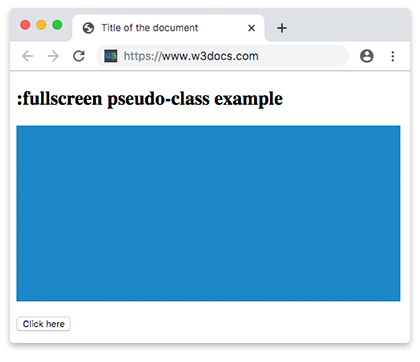
The container is small while inline. When the button puts it into fullscreen, the :fullscreen rule changes its color, stretches it to fill the screen, and reveals the previously hidden text.
<!DOCTYPE html>
<html>
  <head>
    <title>Title of the document</title>
    <style>
      .example {
        padding: 10px;
        height: 200px;
        width: 95%;
        background-color: #1c87c9;
      }
      .example p {
        visibility: hidden;
        text-align: center;
        color: #eeeeee;
        font-size: 3em;
      }
      .example:fullscreen {
        background-color: #8ebf42;
        width: 100vw;
        height: 100vh;
      }
      .example:fullscreen p {
        visibility: visible;
      }
    </style>
  </head>
  <body>
    <h2>:fullscreen pseudo-class example</h2>
    <div class="container">
      <div class="example" id="example">
        <p>Fullscreen mode</p>
      </div>
      <br />
      <button onclick="document.getElementById('example').requestFullscreen();">Click here</button>
    </div>
  </body>
</html>Styling the backdrop
When an element goes fullscreen, the browser paints a ::backdrop behind it that fills any area the element does not cover (it defaults to black). You can restyle it with the ::backdrop pseudo-element:
.example:fullscreen::backdrop {
  background-color: #1c87c9;
}::backdrop is also used by other top-layer elements such as <dialog> opened with showModal(), so it is handy beyond fullscreen too.
Common gotchas
- Nothing happens on page load.
:fullscreenonly matches afterrequestFullscreen()runs; there is no CSS-only way to enter fullscreen. - The request must come from a user gesture. Calling
requestFullscreen()outside of a click, key press, or similar event is rejected by the browser. - Use viewport units for sizing. In fullscreen the element should usually be
width: 100vw; height: 100vhso it actually fills the screen. F11is not the same thing. It fullscreens the browser window, not a chosen element, and does not flip:fullscreen.
Related selectors
- CSS :hover selector — style an element on pointer hover.
- CSS :focus selector — style an element that has keyboard focus.
- CSS :active selector — style an element while it is being activated.
- CSS visibility property — show or hide content, as used in the example above.