CSS border-width Property
CSS border-width is a shorthand property which allows you to set widths of four sides of the element’s border. See examples and try it for yourself.
The CSS border-width property sets the width (thickness) of an element's border. It is a shorthand that applies to all four sides at once, and it is the width component of the broader border shorthand.
You can set each side independently with the longhand properties:
- border-top-width defines the width of the top border.
- border-right-width defines the width of the right border.
- border-bottom-width defines the width of the bottom border.
- border-left-width defines the width of the left border.
A border is only painted when border-style is something other than its default none. If you set border-width but no border style, the border stays invisible — this is the most common reason a border "doesn't work."
How the shorthand maps values to sides
border-width accepts one to four values, and the number of values you give decides which sides they apply to:
| Values given | Top | Right | Bottom | Left |
|---|---|---|---|---|
border-width: a | a | a | a | a |
border-width: a b | a | b | a | b |
border-width: a b c | a | b | c | b |
border-width: a b c d | a | b | c | d |
The four-value form follows the clockwise top → right → bottom → left order used by every CSS box shorthand (the same order as margin and padding).
Each value is a <line-width>: either a length (px, em, rem, etc.) or one of the keywords thin, medium, or thick. Percentages are not allowed.
| Initial Value | medium |
|---|---|
| Inherited | No |
| Animatable | Yes. The width of the border is animatable. |
| Version | CSS1 |
| JavaScript Syntax | object.style.borderWidth = "1px 5px"; |
Syntax
border-width: <line-width>{1,4} | initial | inherit;A single value (all four sides)
<!DOCTYPE html>
<html>
  <head>
    <style>
      p {
        border-style: solid;
        border-width: 1px;
        padding: 5px;
      }
    </style>
  </head>
  <body>
    <p>This paragraph's border width is set to 1px.</p>
  </body>
</html>Different width per side
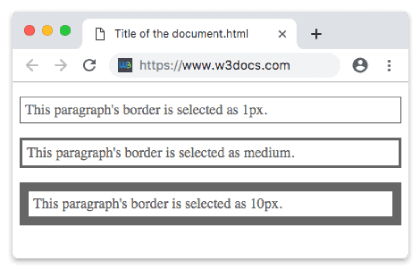
Here all three keyword sizes are compared side by side, plus a four-value box where every edge gets a different thickness.
<!DOCTYPE html>
<html>
  <head>
    <style>
      p {
        color: #666;
        padding: 5px;
        border-style: solid;
      }
      .thin {
        border-width: 1px;
      }
      .medium {
        border-width: medium;
      }
      .thick {
        border-width: 10px;
      }
      .mixed {
        /* top right bottom left */
        border-width: 2px 8px 12px 24px;
      }
    </style>
  </head>
  <body>
    <p class="thin">This paragraph's border width is set to 1px.</p>
    <p class="medium">This paragraph's border width is set to medium.</p>
    <p class="thick">This paragraph's border width is set to 10px.</p>
    <p class="mixed">Each side has its own width: 2px 8px 12px 24px.</p>
  </body>
</html>Result
Keyword vs. length: when to use which
- Use a length (
px,em,rem) when you need an exact, predictable thickness — this is the common case in real layouts. - Use the keywords
thin,medium, andthickwhen the precise pixel count doesn't matter and you're happy to let the browser pick. They map to small, browser-defined pixel values (roughly 1px, 3px, and 5px in most browsers, but the spec does not fix them). mediumis the initial value, so an element withborder-style: solidand noborder-widthalready shows a medium-width border.
Negative values are invalid and make the whole declaration be ignored.
Values
| Value | Description | Play it |
|---|---|---|
| medium | Defines a medium border. This is the default value. (Relative keyword with browser-defined pixel values.) | Play it » |
| thin | Defines a thin border. | Play it » |
| thick | Defines a thick border. | Play it » |
| length | Defines the thickness of border. | Play it » |
| initial | Sets the property to its default value. | Play it » |
| inherit | Inherits the property from its parent element. |