CSS border-top-width Property
The border-top-width property is used for defining the width of the top border of an element. See all property values illustrated with examples.
The CSS border-top-width property defines the width (thickness) of an element’s top border. It controls only the top edge, so it is useful when you want a top border that is heavier or lighter than the other three sides — for example, a thick accent line above a card or section.
You can set the top border width in two ways:
- Directly, with the longhand
border-top-width, when only the top edge differs. - As part of a shorthand, using border or border-width, when you want to set several sides at once.
border-top-width only has a visible effect once a border style is set. By default the border style is none, which means a border of any width renders nothing. So you must first declare a style with border-style or border-top-style, and that style must not be none or hidden.
/* Without a style the width is ignored — nothing shows */
.box {
  border-top-width: thick; /* has no effect on its own */
}

/* Add a style and the width becomes visible */
.box {
  border-top-style: solid;
  border-top-width: thick;
}The sibling longhands border-right-width, border-bottom-width and border-left-width work the same way for the other edges.
The specification doesn't define the exact thickness of each keyword. However, they always have the following order: thin ≤ medium ≤ thick.
The specification does not define how borders of different styles and width connect in the corners.
| Initial Value | medium |
|---|---|
| Applies to | All elements. It also applies to ::first-letter. |
| Inherited | No |
| Animatable | Yes. The width of the border is animatable. |
| Version | CSS1 |
| DOM Syntax | object.style.borderTopWidth = "5px"; |
Syntax
Syntax of CSS border-top-width Property
border-top-width: medium | thin | thick | length | initial | inherit;Example of the border-top-width property:
Example of CSS border-top-width Property with thick value
<!DOCTYPE html>
<html>
  <head>
    <title>Title of the document</title>
    <style>
      p {
        padding: 8px;
        border-style: dotted;
        border-top-width: thick;
      }
    </style>
  </head>
  <body>
    <h2>Border-top-width example</h2>
    <p>As you can see the width of the top border is set to thick.</p>
  </body>
</html>Result

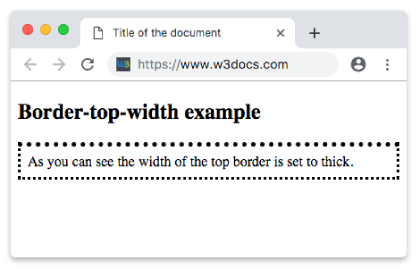
Example of the border-top-width property with all the values:
Example of CSS border-top-width Property with medium, thin, thick, initial and inherit values
<!DOCTYPE html>
<html>
  <head>
    <title>Title of the document</title>
    <style>
      body {
        background: #ccc;
        font-size: 20px;
        text-align: center;
      }
      main div {
        display: flex;
        align-items: center;
        justify-content: center;
        color: black;
        padding-top: 30px;
        padding-bottom: 30px;
        width: 200px;
        height: 100px;
        margin: 15px;
        font-weight: bold;
        border: solid;
      }
      .flex-center {
        display: flex;
        justify-content: center;
      }
      /* border-top-width example classes */
      .b1 {
        border-top-width: medium;
      }
      .b2 {
        border-top-width: thin;
      }
      .b3 {
        border-top-width: thick;
      }
      .b4 {
        border-top-width: 10px;
      }
      .b5 {
        border-top-width: initial;
      }
      .b6 {
        border-top-width: inherit;
      }
    </style>
  </head>
  <body>
    <h1>Border-top-width value examples</h1>
    <main class="flex-center">
      <div class="b1">
        medium
      </div>
      <div class="b2">
        thin
      </div>
      <div class="b3">
        thick
      </div>
    </main>
    <main class="flex-center">
      <div class="b4">
        10px length
      </div>
      <div class="b5">
        initial
      </div>
      <div class="b6">
        inherit
      </div>
    </main>
  </body>
</html>Values
| Value | Descriptions | Play it |
|---|---|---|
| medium | Defines medium top border. It is the default value of this property. | Play it » |
| thin | Defines a thin top border. It is up to the user agent to determine the exact width. | Play it » |
| thick | Defines a thick top border. It is up to the user agent to determine the exact width. | Play it » |
| length | Defines the thickness length of the top border (e.g., 10px, 5em, 8pt). Percentage values are not supported. | Play it » |
| initial | Sets the property to its default value. | Play it » |
| inherit | Inherits the property from its parent element. |
Keywords vs. length values
You can express the width as one of three keywords (thin, medium, thick) or as an explicit length. The keywords are convenient but vague: the CSS specification does not fix an exact pixel size for them, only the order thin ≤ medium ≤ thick. Most browsers render them as roughly 1px, 3px and 5px, but you should not rely on that.
Use an explicit length (1px, 0.25em, 3pt) whenever you need a predictable, consistent thickness across browsers. Note that percentages are not allowed for border widths, and negative lengths are invalid.
Things to watch out for
- No visible border without a style. The most common mistake is setting only the width and forgetting
border-top-style. With the defaultnonestyle, the border simply doesn’t render. initialvs.inherit.initialresets the width to its specified default (medium), whileinheritcopies the computed width from the parent element.- Width affects layout. A wider border adds to the element’s rendered size unless box-sizing is set to
border-box, which keeps the declared width/height fixed and absorbs the border inside it. - Corners. The specification doesn’t define how borders of different widths or styles join at a corner, so a heavy top border meeting a thin side border may look slightly different between browsers.