CSS list-style Property
This property is a shorthand for setting the list-style-type, list-style-position, and list-style-image CSS properties. See examples.
The CSS list-style property is a shorthand that lets you set three list marker properties in a single declaration:
list-style-type— the marker shape or counter style (disc,circle,square,decimal,lower-roman,none…).list-style-position— whether the marker sitsoutsidethe content box (the default) orinsideit.list-style-image— an image to use as the marker instead of the type-based one.
This page covers the shorthand syntax, how its values map to the three longhands, and the common ways you'll use it in practice.
How the shorthand works
You can list the values in any order, but the conventional order is type → position → image:
list-style: square inside url('marker.png');You don't have to supply all three. Any longhand you omit is reset to its initial value — so writing list-style: square is the same as list-style: square outside none. That reset is why a shorthand can quietly undo an earlier list-style-position you set elsewhere, so prefer the longhands when you only want to change one part.
The property can be set on a list item, or on the list itself (<ul> or <ol>) where it cascades down to every item in that list.
When you provide both a list-style-type and a list-style-image, the type acts as a fallback: the image is shown if it loads, and the type marker appears if the image is missing or fails to load. Keeping a type value is a good safety net.
To hide markers entirely, use list-style: none; — handy for navigation menus built from <ul> lists.
| Initial Value | disc outside none |
|---|---|
| Applies to | List items. |
| Inherited | Yes. |
| Animatable | No. |
| Version | CSS1 |
| DOM Syntax | object.style.listStyle = "none"; |
Syntax
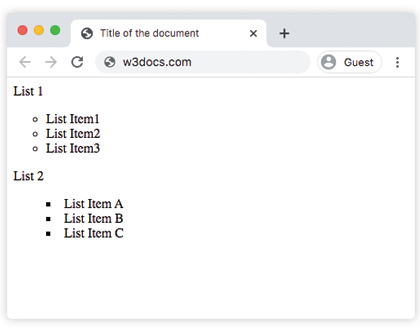
list-style: list-style-type list-style-position list-style-image | initial | inherit;Example with the circle and square inside markers
<!DOCTYPE html>
<html>
  <head>
    <title>Title of the document</title>
    <style>
      .example1 {
        list-style: circle;
      }
      .example2 {
        list-style: square inside;
      }
    </style>
  </head>
  <body>
    List 1
    <ul class="example1">
      <li>List Item1</li>
      <li>List Item2</li>
      <li>List Item3</li>
    </ul>
    List 2
    <ul class="example2">
      <li>List Item A</li>
      <li>List Item B</li>
      <li>List Item C</li>
    </ul>
  </body>
</html>Result
Example setting a marker type (lower-greek and lower-latin)
<!DOCTYPE html>
<html>
  <head>
    <title>Title of the document</title>
    <style>
      ul:nth-of-type(1) {
        list-style: lower-greek;
      }
      ul:nth-of-type(2) {
        list-style: lower-latin;
      }
    </style>
  </head>
  <body>
    <h2>List-style property example</h2>
    <ul>
      <li>Item</li>
      <li>Item</li>
      <li>Item</li>
    </ul>
    <ul>
      <li>Item</li>
      <li>Item</li>
      <li>Item</li>
    </ul>
  </body>
</html>Example setting the marker position (inside vs outside)
<!DOCTYPE html>
<html>
  <head>
    <title>Title of the document</title>
    <style>
      .inside {
        list-style: inside;
      }
      .outside {
        list-style: outside;
      }
      li {
        border: 1px solid #ccc;
      }
    </style>
  </head>
  <body>
    <h2>List-style property example</h2>
    <h3>List-style is positioned "inside":</h3>
    <ul class="inside">
      <li>Chocolate</li>
      <li>Candies</li>
      <li>Lollipops</li>
    </ul>
    <h3>List-style is positioned "outside":</h3>
    <ul class="outside">
      <li>Cold Drinks</li>
      <li>Hot Drinks</li>
      <li>Ice-Creams</li>
    </ul>
  </body>
</html>Example using an image as the marker
<!DOCTYPE html>
<html>
  <head>
    <title>Title of the document</title>
    <style>
      ul {
        list-style: url('/uploads/media/default/0001/01/03d3f916bd5c266dd5008d5c210478cc730437eb.png');
      }
    </style>
  </head>
  <body>
    <h2>List-style property example</h2>
    <ul>
      <li>Chocolate</li>
      <li>Candies</li>
      <li>Lollipops</li>
    </ul>
  </body>
</html>Values
| Value | Description |
|---|---|
| list-style-type | Is used to define the type of the list-item marker. See more here: CSS list-style-type property |
| list-style-position | Is used to define where the list item marker will be placed. See more here: CSS list-style-position property |
| list-style-image | Is used to place an image instead of a list-item marker. See more here: CSS list-style-image property |
| initial | Makes the property use its default value. |
| inherit | Inherits the property from its parents element. |