CSS text-underline-position Property
Use the text-underline-position CSS property to specify the position of an underline for the element. See property values and try examples.
The CSS text-underline-position property controls where an underline is drawn relative to the text. It only takes effect when an underline already exists — that is, when the element has text-decoration (or text-decoration-line) set to underline. On its own, text-underline-position never draws an underline; it only repositions one.
By default (auto), the browser places the underline close to the text's alphabetic baseline. That looks fine for most Latin text, but the line can collide with the descenders of letters like g, j, p, q, and y. Setting text-underline-position: under pushes the line below all descenders so it never crosses them — handy for code listings, math, or chemical formulas where a clean gap matters.
This page covers the syntax, every value, when to reach for each one, and runnable examples.
When would I use it?
- Cleaner underlines — use
underso the line clears descenders (p,y,g) instead of cutting through them. - Annotating formulas — under math or chemistry where overlapping the baseline would be ambiguous.
- Vertical text —
leftandrightchoose which side of the glyphs the line sits on whenwriting-modeis vertical.
The text-underline-position property is supported in all modern browsers.
| Initial Value | auto |
|---|---|
| Applies to | All elements. |
| Inherited | Yes. |
| Animatable | No. |
| Version | CSS3 |
| DOM Syntax | object.style.textUnderlinePosition = "under"; |
Note: In JavaScript, CSS properties with hyphens are converted to camelCase (e.g., text-underline-position becomes textUnderlinePosition).
Syntax
CSS text-underline-position values
text-underline-position: auto | [ under || left || right ] | initial | inherit;The auto keyword cannot be combined with any other value. The under, left, and right keywords can be combined (for example under left), but left and right are mutually exclusive — you may pick one of them, optionally alongside under.
Example of the text-underline-position property:
CSS text-underline-position code example
<!DOCTYPE html>
<html>
  <head>
    <title>Title of the document</title>
    <style>
      p {
        text-decoration: underline;
        text-underline-position: under;
      }
    </style>
  </head>
  <body>
    <h2>Text underline-position property example</h2>
    <p>Lorem Ipsum is simply dummy text...</p>
  </body>
</html>Result
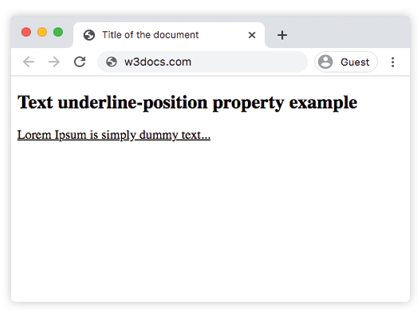
Example of the text-underline-position property with the "under" value:
CSS text-underline-position under value example
<!DOCTYPE html>
<html>
  <head>
    <title>Title of the document</title>
    <style>
      p {
        text-decoration: underline;
        text-underline-position: under;
        text-decoration-color: #1c87c9;
        font-size: 25px;
      }
    </style>
  </head>
  <body>
    <h2>Text underline-position property example</h2>
    <p>Lorem Ipsum is simply dummy text...</p>
  </body>
</html>Example with vertical writing-mode and the "left" value:
In vertical text, left and right decide which side of the characters the underline runs along.
<!DOCTYPE html>
<html>
  <head>
    <title>Title of the document</title>
    <style>
      p {
        writing-mode: vertical-rl;
        text-decoration: underline;
        text-underline-position: left;
        font-size: 25px;
      }
    </style>
  </head>
  <body>
    <h2>Vertical text with text-underline-position: left</h2>
    <p>Lorem Ipsum is simply dummy text.</p>
  </body>
</html>Values
| Value | Description |
|---|---|
| auto | Default. The browser uses its own algorithm to place the line at or just under the alphabetic baseline. |
| under | Forces the underline below the text content so it clears the descenders of letters like g, p, and y. |
| left | In a vertical writing-mode, places the underline on the left side of the text. Ignored in horizontal text. |
| right | In a vertical writing-mode, places the underline on the right side of the text. Ignored in horizontal text. |
| initial | Makes the property use its default value (auto). |
| inherit | Inherits the property from its parent element. |
Related properties
- text-decoration — the shorthand that actually draws the line (
text-underline-positiononly repositions it). - text-decoration-line — choose
underline,overline, orline-through. - text-decoration-color — set the underline's color.
- text-decoration-style — solid, dashed, dotted, double, or wavy lines.