CSS border Property
The border is a shorthand CSS property which sets values to all four sides of an element. Find some examples here and try them yourself.
The CSS border property is a shorthand that sets border-width, border-style and border-color for all four sides of an element in a single declaration. Negative width values are not allowed.
This page covers the shorthand syntax, the values it accepts, how to give each side a different appearance, and the related properties you reach for when the shorthand is not enough.
Reach for the border shorthand when you want the same border on all four sides:
/* shorthand — all four sides identical */
border: 2px solid #1c87c9;

/* equivalent longhand */
border-width: 2px;
border-style: solid;
border-color: #1c87c9;When the sides should differ, set the longhand properties individually — each of them accepts up to four values in top–right–bottom–left order. You can also target one side with border-top, border-right, border-bottom and border-left.
The border-style value is what makes a border show. If you set only a width and a color but leave the style at its default of none, the border stays invisible.
| Initial Value | medium none currentColor |
|---|---|
| Applies to | All elements. It also applies to ::first-letter. |
| Inherited | No. |
| Animatable | Yes. Width, color and style of the border are animatable. |
| Version | CSS1 |
| DOM Syntax | object.style.border = "5px solid green"; |
Syntax
Syntax of CSS border Property
border: border-width border-style border-color | initial | inherit;Example of the border property:
Example of CSS border Property with solid value
<!DOCTYPE html>
<html>
  <head>
    <title>The title of the document</title>
    <style>
      p {
        border: thick solid #8ebf42;
        padding: 5px;
      }
    </style>
  </head>
  <body>
    <h2>Border property example</h2>
    <p>This paragraph's border is set to "thick solid green".</p>
  </body>
</html>Result
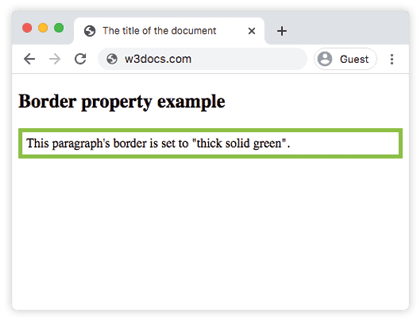
See another example where the style of the border is dashed, the width is set to 3px and the color of the border is blue.
Example of the border property with the "dashed" value:
Example of CSS border Property with the dashed value
<!DOCTYPE html>
<html>
  <head>
    <title>Title of the document</title>
    <style>
      p {
        border: 3px dashed #1c87c9;
        padding: 10px;
      }
    </style>
  </head>
  <body>
    <h2>Border property example</h2>
    <p>This paragraph's border is set to "3px dashed blue".</p>
  </body>
</html>The border shorthand always paints all four sides the same. To vary a side, override one of the longhand properties after it. In the next example a single border-color declaration takes three values: the first applies to the top, the second to the right and left, and the third to the bottom. The first one is applied to the top border, the second one to the right and left, and the third one to the bottom.
Example of the border property with 3 border-color values:
Example of CSS border-color Property
<!DOCTYPE html>
<html>
  <head>
    <title>Title of the document</title>
    <style>
      div {
        border: 3px solid;
        border-color: #1c87c9 #666 #8ebf42;
        padding: 5px;
      }
    </style>
  </head>
  <body>
    <h2>Border property example</h2>
    <div>Here 3 values are applied to the border-color property.</div>
  </body>
</html>Example of the border-style property:
Example of CSS border Property with solid, dotted and double values
<!DOCTYPE html>
<html>
  <head>
    <title>The title of the document</title>
    <style>
      p,
      div {
        padding: 5px;
      }
      .border1 {
        border: 5px solid #ccc;
      }
      .border2 {
        border: 5px dotted #1c87c9;
      }
      div {
        border: thick double #8ebf42;
      }
    </style>
  </head>
  <body>
    <h2>Border property example</h2>
    <p class="border1">A heading with a solid gray border.</p>
    <p class="border2">A heading with a dotted blue border.</p>
    <div>A div element with a thick double green border.</div>
  </body>
</html>Rounded corners and related properties
The border shorthand does not control corner radius. To round corners, add the separate border-radius property:
p {
  border: 3px solid #1c87c9;
  border-radius: 8px;
}A few related properties are worth knowing:
- border-radius — rounds the corners.
- outline — draws a line outside the border that does not take up layout space.
- border-collapse — merges adjacent cell borders in tables into a single line.
Values
The shorthand accepts the three border longhands in any order, plus the global keywords.
| Value | Description |
|---|---|
| border-width | Defines the width of the border. Default value is "medium". |
| border-style | Defines the style of the border. Default value is "none". |
| border-color | Defines the color of the border. Default value is the current color of the element. |
| initial | Sets the property to its default value. |
| inherit | Inherits the property from its parent element. |