CSS flex Property
The flex CSS property defines how much items should grow or shrink inside the container. Find some examples.
The flex property defines the components of a flexible length. It is a shorthand for the following properties:
All three components are optional in the shorthand declaration. When omitted, flex-grow defaults to 1, flex-shrink defaults to 1, and flex-basis defaults to auto. Note that the flex-shrink factor is multiplied by the flex-basis value when distributing negative space.
The flex property is one of the CSS3 properties.
This property is a part of the Flexible Box Layout module. If there are no flexible items, the flex property won't have any effect.
The auto keyword is equivalent to 1 1 auto. It sizes the item based on the width/height properties. If the item’s main size property is set to auto, this will size the flex item based on its contents.
The initial keyword is equivalent to 1 0 auto. It sizes the item based on its width/height properties (or its content if not set). This makes the flex item inflexible when there is free space left, and it will not shrink when there is not enough space. The alignment techniques or auto margins are used for aligning the flex items along the main axis.
The none keyword is equivalent to 0 0 auto. It sizes the item according to the width and height properties. It is fully inflexible.
Note: The initial values of flex-grow and flex-shrink differ from their default values when they are not included in the flex shorthand declaration so that it can better accommodate common cases.
| Initial Value | 0 1 auto |
|---|---|
| Applies to | Flex items, including in-flow pseudo-elements. |
| Inherited | No. |
| Animatable | Yes. |
| Version | CSS3 |
| DOM Syntax | Object.style.flex = "1"; |
Syntax
Syntax of CSS flex Property
flex: flex-grow | flex-shrink | flex-basis | auto | initial | inherit;The values can be specified in any order. When using flex-basis, you can also apply min-width or min-height constraints to prevent the item from shrinking below a specified size.
Example of the flex property:
Example of CSS flex Property
<!DOCTYPE html>
<html>
  <head>
    <title>Title of the document</title>
    <style>
      .box {
        width: 350px;
        height: 200px;
        padding-left: 0;
        list-style-type: none;
        border: 1px dashed black;
        display: flex;
      }
      .box div {
        flex: 1;
      }
      .green {
        background-color: #8ebf42;
      }
      .blue {
        background-color: #1c87c9;
      }
      .gray {
        background-color: #666666;
      }
    </style>
  </head>
  <body>
    <h2>Flex property example</h2>
    <div class="box">
      <div class="green">GREEN</div>
      <div class="blue">BLUE</div>
      <div class="gray">GRAY</div>
    </div>
  </body>
</html>Result
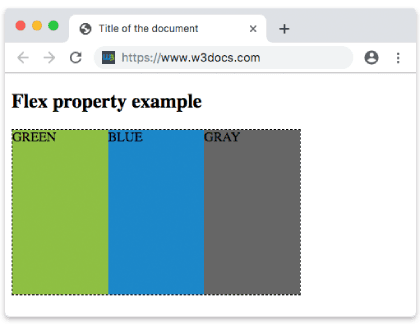
Example of the flex property with the "flex-grow" value:
Example of CSS flex Property with flex-grow value
<!DOCTYPE html>
<html>
  <head>
    <title>Title of the document</title>
    <style>
      .box {
        width: 320px;
        height: 120px;
        border: 1px solid #666;
        display: flex;
      }
      .box div:nth-of-type(1) {
        flex-grow: 1;
      }
      .box div:nth-of-type(2) {
        flex-grow: 4;
      }
      .box div:nth-of-type(3) {
        flex-grow: 1;
      }
      .box div:nth-of-type(4) {
        flex-grow: 1;
      }
      .box div:nth-of-type(5) {
        flex-grow: 1;
      }
    </style>
  </head>
  <body>
    <h2>Flex-grow example</h2>
    <div class="box">
      <div style="background-color: #eee;"></div>
      <div style="background-color: #1c87c9;"></div>
      <div style="background-color: #8ebf42;"></div>
      <div style="background-color: #ccc;"></div>
      <div style="background-color: #666;"></div>
    </div>
  </body>
</html>Example of the flex property with the "flex-shrink" value:
Example of CSS flex Property with flex-shrink value
<!DOCTYPE html>
<html>
  <head>
    <title>Title of the document</title>
    <style>
      .box {
        width: 320px;
        height: 120px;
        border: 1px solid #666;
        display: flex;
      }
      .box div {
        flex-grow: 1;
        flex-shrink: 2;
        flex-basis: 100px;
      }

      .box div:nth-of-type(2) {
        flex-shrink: 5;
      }
    </style>
  </head>
  <body>
    <h2>Flex-shrink example</h2>
    <div class="box">
      <div style="background-color: #eeeeee;"></div>
      <div style="background-color: #1c87c9;"></div>
      <div style="background-color: #8ebf42;"></div>
      <div style="background-color: #cccccc;"></div>
      <div style="background-color: #666666;"></div>
    </div>
  </body>
</html>Common shorthand patterns
A few flex values come up so often that it's worth memorizing them:
flex: 1(=1 1 0) — the item grows and shrinks freely, starting from a base size of0. Apply it to every child to split the container into equal-width columns, regardless of content.flex: auto(=1 1 auto) — grows and shrinks, but the starting size is the item's content/width. Items share leftover space but keep their natural proportions.flex: none(=0 0 auto) — a fixed, inflexible item. Use it for a sidebar or a button that must keep its size while siblings flex around it.flex: 0 0 200px— fixed at200px: it neither grows nor shrinks, useful for a fixed-width column.
A common gotcha: flex: 1 uses a flex-basis of 0, so the content's intrinsic width is ignored and columns become truly equal. If you instead want columns sized by their content but still able to stretch, reach for flex: auto.
Values
| Value | Description |
|---|---|
| flex-grow | Specifies how much the item will grow relative to the rest of the flexible items of the same container. |
| flex-shrink | Specifies how much the item will shrink relative to the rest of the flexible items of the same container. |
| flex-basis | Specifies the length of the item by "auto", "inherit", or a number followed by "%", "px", "em", etc. |
| auto | Equivalent to 1 1 auto. |
| initial | Equivalent to 1 0 auto. |
| none | Equivalent to 0 0 auto. |
| inherit | Inherits this property from its parent element. |