CSS offset-position Property
Use the offset-position CSS property for specifying the initial position of the offset path. Read about property values and try examples.
The offset-position CSS property defines the starting point of an element's offset path — the position where the element sits before it is moved along the path by offset-distance.
Motion-path properties let you animate an element along a custom route (a line, a curve, a ray) without using @keyframes on top/left. The path itself is set with offset-path; offset-position answers the question "where does that path begin?" when the path doesn't already define its own origin.
When you need it
offset-position only matters for paths whose starting point is not fixed by the path data itself:
- It applies when
offset-pathis aray()or a plainpath()that relies on an implicit origin. - It is ignored when
offset-pathis ageometry-box(likeborder-box) or a<basic-shape>(likecircle()), because those define their own reference point. - It is also ignored when the element's
positionisstatic, since the element isn't taken out of normal flow.
A typical value such as offset-position: 50% 50% starts the motion path at the centre of the containing block; auto starts it at the element's own laid-out box position.
This is still an experimental motion-path feature. Browser support is incomplete (Chromium ships it; Firefox and Safari lag), so check current support and provide a fallback before using it in production.
| Initial Value | auto |
|---|---|
| Applies to | Transformable elements. |
| Inherited | No. |
| Animatable | Yes. |
| Version | Motion Path Module Level 1 |
| DOM Syntax | Object.style.offsetPosition = "auto"; |
Syntax
CSS offset-position syntax
offset-position: auto | <position> | initial | inherit;Where <position> accepts one to four values, exactly like background-position: a single value sets the horizontal position (the vertical defaults to center), two values set horizontal then vertical, and keyword/length pairs may be combined.
Example of the offset-position property
The element below starts its motion path at 100px 100px inside its container and follows a ray(45deg):
<!DOCTYPE html>
<html>
  <head>
    <title>Title of the document</title>
    <style>
      #element1 {
        position: relative;
        width: 300px;
        height: 300px;
        border: 2px solid #666;
      }
      #element2 {
        width: 100px;
        height: 100px;
        background-color: #1c87c9;
        position: absolute;
        top: 90px;
        left: 100px;
        offset-position: 100px 100px;
        offset-anchor: center;
        offset-path: ray(45deg);
      }
    </style>
  </head>
  <body>
    <h2>Offset-position property example</h2>
    <div id="element1">
      <div id="element2"></div>
    </div>
  </body>
</html>Result
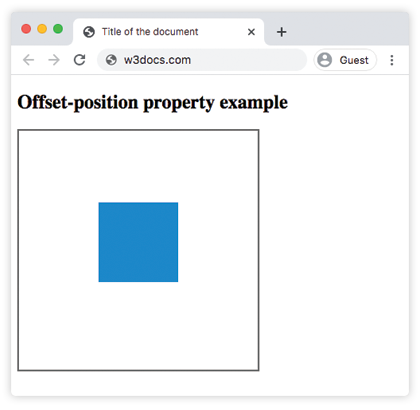
Values
| Value | Description |
|---|---|
| auto | Indicates that the initial position is the position of the box which is specified with position property. |
<position> | Specifies the initial position, with the containing block as the positioning area and a dimensionless point (zero-sized box) as the object area. This value can be specified using one to four values. If one value is defined, the second is assumed to be center. If two non-keyword values are specified, the first one represents the horizontal position and the second one represents the vertical position. If three or four values are specified, the length-percentage values are offsets for the preceding keyword values (Read the background-position property for more information). |
| initial | Makes the property use its default value. |
| inherit | Inherits the property from its parent element. |
Related motion-path properties
offset-position is one piece of the CSS Motion Path module. You will usually combine it with:
offset-path— the route the element travels along.offset-distance— how far along that route the element currently is (animate this to create movement).offset-anchor— which point of the element is placed on the path.offset-rotate— whether and how the element rotates as it follows the path.