CSS text-decoration-line Property
Use the text-decoration CSS shorthand property to specify the kind of line to use for text decoration. See property values and try examples.
The text-decoration-line property sets the kind of line used for text decoration — an underline, an overline, a line-through, or any combination of those.
It is one of the four longhand properties that make up the text-decoration shorthand, the others being text-decoration-color, text-decoration-style, and text-decoration-thickness. Use text-decoration-line on its own when you only need to change which lines appear and want to leave the color, style, and thickness alone.
This page covers the property's accepted values, how to combine several lines at once, the relationship to the shorthand, and a few practical gotchas.
The text-decoration-line property is fully supported in all modern browsers without vendor prefixes. It is one of the CSS3 properties.
Why use text-decoration-line
A common reason to reach for the longhand is to add or remove a single line without disturbing the rest of the decoration. For example, links are underlined by default; setting text-decoration-line: none removes that underline while still letting you set a custom underline color later through the shorthand. The property also accepts multiple keywords, so you can place an underline and an overline on the same text in one declaration.
| Initial Value | none |
|---|---|
| Applies to | All elements. It also applies to ::first-letter and ::first-line. |
| Inherited | No. |
| Animatable | No. |
| Version | CSS3 |
| DOM Syntax | object.style.textDecorationLine = "overline underline"; |
Syntax
CSS text-decoration-line syntax
text-decoration-line: none | [ underline || overline || line-through ] | initial | inherit;The none keyword stands alone, but underline, overline, and line-through can be combined in a single declaration, separated by spaces, and the order does not matter:
/* a single line */
text-decoration-line: underline;

/* two lines at once */
text-decoration-line: underline overline;

/* all three */
text-decoration-line: underline overline line-through;Example of the text-decoration-line property:
CSS text-decoration-line code example
<!DOCTYPE html>
<html>
  <head>
    <title>Title of the document</title>
    <style>
      p {
        text-decoration-line: overline;
      }
    </style>
  </head>
  <body>
    <h2>Text-decoration-line property example</h2>
    <p>Lorem Ipsum is simply dummy text...</p>
  </body>
</html>Result
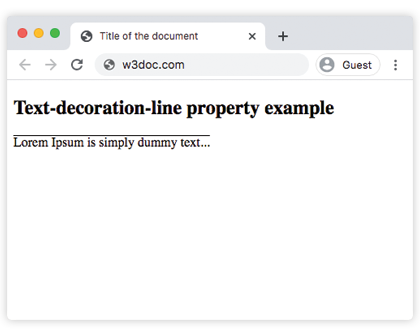
Example of the text-decoration-line property with the "underline" value:
CSS text-decoration-line with underline value example
<!DOCTYPE html>
<html>
  <head>
    <title>Title of the document</title>
    <style>
      p {
        text-decoration-line: underline;
      }
    </style>
  </head>
  <body>
    <h2>Text-decoration-line property example</h2>
    <p>Lorem Ipsum is simply dummy text...</p>
  </body>
</html>Example of the text-decoration-line property with the "line-through" value:
CSS text-decoration-line with line-through value example
<!DOCTYPE html>
<html>
  <head>
    <title>Title of the document</title>
    <style>
      p {
        text-decoration-line: line-through;
      }
    </style>
  </head>
  <body>
    <h2>Text-decoration-line property example</h2>
    <p>Lorem Ipsum is simply dummy text...</p>
  </body>
</html>Example of the text-decoration-line property with all the values:
CSS text-decoration-line all values example
<!DOCTYPE html>
<html>
  <head>
    <title>Title of the document</title>
    <style>
      div {
        margin: 20px 0;
      }
      div.t1 {
        text-decoration-line: none;
      }
      div.t2 {
        text-decoration-line: underline;
      }
      div.t3 {
        text-decoration-line: line-through;
      }
      div.t4 {
        text-decoration-line: overline;
      }
    </style>
  </head>
  <body>
    <h2>Text-decoration-line property example</h2>
    <div class="t1">
      Lorem Ipsum is simply dummy text...
    </div>
    <div class="t2">
      Lorem Ipsum is simply dummy text...
    </div>
    <div class="t3">
      Lorem Ipsum is simply dummy text...
    </div>
    <div class="t4">
      Lorem Ipsum is simply dummy text...
    </div>
  </body>
</html>Combining text-decoration-line with the shorthand
Because text-decoration-line only controls the lines, you usually pair it with the other longhands — or just use the text-decoration shorthand, which sets all of them at once. These two rules produce the same result:
/* longhands */
p {
  text-decoration-line: underline;
  text-decoration-color: red;
  text-decoration-style: wavy;
}

/* shorthand equivalent */
p {
  text-decoration: underline red wavy;
}Reaching for the longhand pays off when you want to override one piece without rewriting the whole decoration — for instance, changing only the line type on :hover while keeping an inherited color and style.
Accessibility note
text-decoration-line: line-through is purely visual: assistive technologies do not announce that the text is struck through. To convey "this content was removed" or "deleted" to screen-reader users, mark it up with the semantic <del> or <s> element rather than relying on CSS alone.
Values
| Value | Description | Play it |
|---|---|---|
| none | No line is specified. | Play it » |
| underline | Specifies a line under the text. | Play it » |
| overline | Specifies a line over the text. | Play it » |
| line-through | Specifies a line through the text. | Play it » |
| initial | Makes the property use its default value. | Play it » |
| inherit | Inherits the property from its parents element. |
The text-decoration-line property previously supported a blink value that made the text flash on and off. It is now deprecated and most browsers ignore it, so do not use it in new code.
Related properties
- text-decoration — the shorthand that sets line, color, style, and thickness together.
- text-decoration-color — sets the color of the decoration line.
- text-decoration-style — sets the line as
solid,double,dotted,dashed, orwavy.