CSS text-align Property
Use the text-align CSS property to set alignment of the text. Read about property values and see examples.
The CSS text-align property sets the horizontal alignment of the inline content inside a block container. In plain terms, it controls how text (and inline elements like <a>, <img>, or <span>) sits inside its parent box: pushed to the left edge, the right edge, centered, or stretched to fill the line.
This page covers the syntax, every value with what it actually does, runnable examples, common gotchas, and how text-align differs from centering a block itself.
Why text-align is not the same as centering a box
A frequent source of confusion: text-align: center centers the content within a block, not the block within its parent. The property aligns inline-level content relative to the block that contains it — it does not move the block itself with respect to its containing element or the viewport.
To center a block-level element (such as a fixed-width <div>) horizontally, you give it a width and use auto horizontal margins instead — see the margin property. Use text-align when you want to position the text inside an element; use margin: 0 auto when you want to position the element itself.
Alignment specified with text-align is not with respect to the containing block or viewport — it positions inline content inside its own block.
| Initial Value | left if direction is "ltr", right if direction is "rtl" |
|---|---|
| Applies to | Block containers. |
| Inherited | Yes |
| Animatable | No. |
| Version | CSS1 |
| DOM Syntax | object.style.textAlign = "right"; |
Syntax
Syntax of CSS text-align Property
text-align: left | right | center | justify | initial | inherit;Example of the text-align property with the "right" and "center" values:
Example of CSS text-align Property with right and center values
<!DOCTYPE html>
<html>
  <head>
    <title>Title of the document</title>
    <style>
      div {
        text-align: right;
      }
      p {
        text-align: center;
      }
    </style>
  </head>
  <body>
    <h2>Text-align property example</h2>
    <div>Example for the text-align property.</div>
    <p>Some paragraph for example.</p>
  </body>
</html>Result
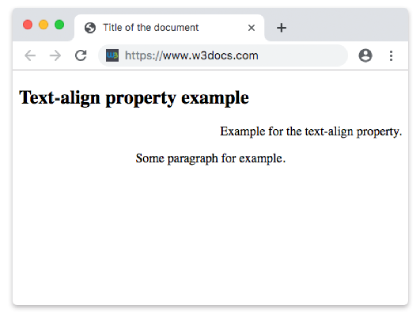
Example of the text-align property with the "center", "left" and "justify" values:
Example of CSS text-align Property with left, center and justify values
<!DOCTYPE html>
<html>
  <head>
    <title>Title of the document</title>
    <style>
      h2 {
        text-align: center;
      }
      p.date {
        text-align: left;
      }
      p.example {
        text-align: justify;
      }
    </style>
  </head>
  <body>
    <h2>Text-align property example</h2>
    <p class="date">March, 2019</p>
    <p class="example">
      Lorem Ipsum is dummy text of the printing and typesetting industry. Lorem Ipsum has been the industry's standard dummy text ever since the 1500s when an unknown printer took a galley of type and scrambled it to make a type specimen book. It has survived not only five centuries, but also the leap into electronic typesetting, remaining essentially unchanged. It was popularised in the 1960s with the release of Letraset sheets containing Lorem Ipsum passages, and more recently with desktop publishing software like Aldus PageMaker including versions of Lorem Ipsum.
    </p>
  </body>
</html>With justify, every line except the last is stretched so its left and right edges line up with the box edges; the browser adds extra space between words to make this happen. This is why justify looks best on wide, multi-line paragraphs and can create awkward gaps on narrow columns.
Values
The text-align property accepts the following values:
| Value | Descriptions | Play it |
|---|---|---|
| left | Aligns the text to the left. This is the default value of this property. | Play it » |
| right | Aligns the text to the right. | Play it » |
| center | Aligns the text to the center. | Play it » |
| justify | Extends the lines so that each line has equal width. | Play it » |
| initial | It makes the property use its default value. | Play it » |
| inherit | It inherits the property from its parents element. |
Notes and common gotchas
- It only affects inline content.
text-aligndoes nothing to a block-level child that is not inline. To horizontally position a block, give it a width andmargin: 0 auto, or use a flex/grid layout. - It is inherited. Because the property is inherited, setting
text-align: centeron<body>cascades to every descendant until something overrides it. Set it on the most specific element you can to avoid surprises. - It respects writing direction. The initial value depends on direction:
leftfor left-to-right (ltr) text andrightfor right-to-left (rtl) text. The logical valuesstartandendmap to the line's start/end edge regardless of direction. - Centering images. Since
<img>is an inline element,text-align: centeron its block parent will center the image too — handy for quick image centering without flexbox. justifyand the last line.justifynever stretches the final line of a paragraph; that line keeps the natural start alignment. Control it separately with text-align-last.
Related properties
- text-align-last — aligns the last line of a justified block.
- text-indent — indents the first line of text.
- text-justify — fine-tunes how
justifydistributes space. - direction — sets text direction, which drives the default alignment.
- vertical-align — aligns inline content vertically (the perpendicular axis).