CSS border-left Property
CSS border-left shorthand sets the width, style, and color of an element's left border in one declaration, with examples and values.
The CSS border-left property sets the width, line style, and color of an element's left border in a single declaration.
It is a shorthand for these three longhand properties:
- border-left-width — how thick the border is (e.g.
2px,thin,medium,thick). - border-left-style — the line style (e.g.
solid,dotted,dashed,double,ridge). - border-left-color — the line color.
Why use border-left
Use border-left when you only want a border on the left edge of an element rather than all four sides. It is a common pattern for blockquotes, sidebars, navigation indicators, and "callout" boxes where a single accent line marks the left side of a block. Because it is shorthand, it is shorter than writing the three longhand properties separately, and it also resets any value you leave out back to its default.
How the values work
The three values can be written in any order, and one or two of them can be omitted:
- If you omit the color, the border uses the element's color property — i.e. the same color as its text (the CSS-wide
currentColorkeyword). - If you omit the width, it defaults to
medium(roughly 3–4px, depending on the browser). - If you omit the style, it defaults to
none, which means no border is drawn at all — so a declaration likeborder-left: 5px blue;shows nothing. The style is the one value you almost always need to include.
| Initial Value | medium none currentColor |
|---|---|
| Applies to | All elements. It also applies to ::first-letter. |
| Inherited | No |
| Animatable | Yes. The color and width of the border are animatable. |
| Version | CSS1 |
| DOM Syntax | object.style.borderLeft = "1px solid black"; |
Syntax
Syntax of border-left
border-left: border-width border-style border-color | initial | inherit;Example of the border-left property:
Example of CSS border-left Property with solid value
<!DOCTYPE html>
<html>
  <head>
    <title>Title of the document</title>
    <style>
      div {
        border-left: 3px solid #1c87c9;
        padding: 10px;
      }
    </style>
  </head>
  <body>
    <h2>Border-left example</h2>
    <div> This is a simple example for the border-left property.</div>
  </body>
</html>Result
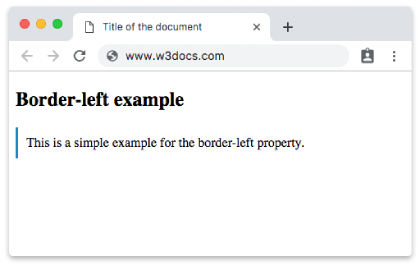
Example of the border-left property applied to different elements:
Example of CSS border-left Property with dotted, double and solid values
<!DOCTYPE html>
<html>
  <head>
    <style>
      h1,
      p,
      div {
        padding: 10px;
      }
      h1 {
        border-left: 5px solid #8ebf42;
      }
      p {
        border-left: 4px dotted #1c87c9;
      }
      div {
        border-left: thick double #666;
      }
    </style>
  </head>
  <body>
    <h1>A heading with a solid green left border</h1>
    <p>A heading with a dotted blue left border.</p>
    <div>A div element with a thick double left border.</div>
  </body>
</html>In this next example, a box is created with the <div> element, with a background-color set on the box and a ridge left border. Note that the ridge, groove, inset, and outset styles derive their 3D shading from the border color, so they look best against a contrasting background.
Example of the border-left property with the <div> element:
Example of CSS border-left Property with ridge value
<!DOCTYPE html>
<html>
  <head>
    <style>
      div {
        border-left: 20px ridge #8ebf42;
        background-color: #ccc;
        height: 100px;
        width: 200px;
        font-weight: bold;
        text-align: center;
        padding: 3px;
      }
    </style>
  </head>
  <body>
    <div>
      <p>This box has a ridge border on the left side.</p>
    </div>
  </body>
</html>Logical property note
border-left is a physical property — it always targets the left edge regardless of the text's writing direction. If you want the border to follow the start of the text (the left edge in left-to-right languages, the right edge in right-to-left languages), use the logical property border-inline-start instead. For most left-to-right English layouts the two behave the same, but logical properties make a layout adapt automatically when the direction changes.
Values
The border-left shorthand accepts the values of its three longhand properties, plus the CSS-wide keywords:
| Value | Description |
|---|---|
| border-left-width | Sets the left border width of an element. The default value is "medium". Required value. |
| border-left-style | Sets the line style of the left border of an element. The default value is "none". Required value. |
| border-left-color | Sets the color of the left border of an element. The default value is the current color of the text. |
| initial | Sets the property to its default value. |
| inherit | Inherits the property from its parent element. |