CSS clear Property
The clear CSS property defines on which sides the floating elements are not allowed to float. Find some examples and try them.
The clear property is directly related to floats. It controls whether an element is allowed to sit next to a preceding floated element, or whether it must be pushed down (cleared) below it.
When an element is floated, the content that follows it wraps around the float. clear lets you stop that wrapping: a cleared element drops below the bottom edge of the floats on the specified side instead of flowing alongside them.
This page covers what each clear value does, the most common reason to reach for clear (the "clearfix" pattern for containing floats), and the gotchas to watch for.
How clear works
clear accepts the values none, left, right, both, initial, and inherit:
none— the default. The element may sit next to floats on both sides.left— the element is moved below any left floats that come before it.right— the element is moved below any right floats that come before it.both— the element is moved below all floats on either side. This is the value you want most of the time.
Note: clear only reacts to floats that appear earlier in the source and only affects elements in normal block flow. It has no effect inside Flexbox or Grid layouts, where float itself is ignored.
When would I use clear?
The single most common use of clear is containing floats. A parent that contains only floated children collapses to zero height, because floats are taken out of normal flow. The classic fix — the "clearfix" — adds a cleared pseudo-element after the floats so the parent stretches to wrap them:
/* Clearfix: makes a container wrap its floated children */
.container::after {
  content: "";
  display: block;
  clear: both;
}The other common use is forcing a footer, heading, or section break to start below a floated image or sidebar instead of wrapping beside it — which is exactly what the examples below show.
| Initial Value | none |
|---|---|
| Applies to | Block-level elements. |
| Inherited | No. |
| Animatable | No. |
| Version | CSS1 |
| DOM Syntax | element.style.clear = "both"; |
Syntax
Syntax of CSS clear Property
clear: none | left | right | both | initial | inherit;Example of the clear property:
Example of CSS clear Property with left value
<!DOCTYPE html>
<html>
  <head>
    <title>Title of the document</title>
    <style>
      img {
        float: left;
        background: #ccc
      }
      .clear {
        clear: left;
      }
    </style>
  </head>
  <body>
    <img src="/uploads/media/default/0001/01/003e5c463668d174ab70bea245c192d81901a4a6.png" />
    <p class="clear">Lorem Ipsum is simply dummy text of the printing and typesetting industry. Lorem Ipsum has been the industry's standard dummy text ever since the 1500s when an unknown printer took a galley of type and scrambled it to make a type specimen book. It has survived not only five centuries, but also the leap into electronic typesetting, remaining essentially unchanged.</p>
  </body>
</html>Result
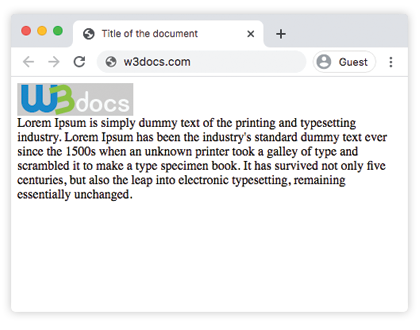
Example of the clear property with the "right" value:
Example of CSS clear Property with right value
<!DOCTYPE html>
<html>
  <head>
    <title>Title of the document</title>
    <style>
      img {
        float: right;
        background: #ccc
      }
      .clear {
        clear: right;
      }
    </style>
  </head>
  <body>
    <img src="/uploads/media/default/0001/01/003e5c463668d174ab70bea245c192d81901a4a6.png" />
    <p class="clear">
      Lorem Ipsum is simply dummy text of the printing and typesetting industry. Lorem Ipsum has been the industry's standard dummy text ever since the 1500s when an unknown printer took a galley of type and scrambled it to make a type specimen book. It has survived not only five centuries, but also the leap into electronic typesetting, remaining essentially unchanged.
    </p>
  </body>
</html>Example of the clear property with the "both" value:
Example of CSS clear Property with both value
<!DOCTYPE html>
<html>
  <head>
    <title>Title of the document</title>
    <style>
      img {
        float: right;
        background: #CCC;
      }
      p.clear {
        clear: both;
      }
    </style>
  </head>
  <body>
    <img src="/uploads/media/default/0001/01/003e5c463668d174ab70bea245c192d81901a4a6.png" width="220" height="80" />
    <p>
      Lorem Ipsum is simply dummy text of the printing and typesetting industry.
    </p>
    <p class="clear">
      Lorem Ipsum has been the industry's standard dummy text ever since the 1500s, when an unknown printer took a galley of type and scrambled it to make a type specimen book. It has survived not only five centuries, but also the leap into electronic typesetting, remaining essentially unchanged.
    </p>
  </body>
</html>Example of the clearfix pattern
This is clear doing its most useful job: without the clearfix rule, the bordered box would collapse to zero height because its only child is floated. The ::after pseudo-element with clear: both forces the box to wrap the float.
<!DOCTYPE html>
<html>
  <head>
    <title>Title of the document</title>
    <style>
      .box {
        border: 3px solid #1c87c9;
      }
      .box img {
        float: left;
        background: #ccc;
      }
      /* Remove this rule and the border collapses around nothing */
      .box::after {
        content: "";
        display: block;
        clear: both;
      }
    </style>
  </head>
  <body>
    <div class="box">
      <img src="/uploads/media/default/0001/01/003e5c463668d174ab70bea245c192d81901a4a6.png" width="220" height="80" alt="Floated image" />
    </div>
  </body>
</html>Common mistakes
clearonly sees earlier floats. It pushes an element below floats that appear before it in the source, not after. Order your markup accordingly.- Clearing the floated element itself rarely helps. To contain floats, clear a sibling after them (the clearfix
::after), not the floats. - It does nothing in Flexbox or Grid. Inside a flex or grid container,
floatis ignored, soclearhas nothing to act on. Reach for Flexbox or Grid instead of float-based layouts for new code.
Values
| Value | Description |
|---|---|
| none | Allows floating elements on both sides. It is the default value of this property. |
| left | Means that the floating elements are not allowed on the left side. |
| right | Means that the floating elements are not allowed on the right side. |
| both | Means that floating elements are not allowed on either side. |
| initial | Makes the property use its default value. |
| inherit | Inherits the property from its parents element. |