CSS list-style-position Property
The CSS list-style-position property sets the list marker inside or outside the list-item box. See values, examples and usage.
The list-style-position property controls whether a list item's marker (the bullet or number) sits inside or outside the list-item box. It is a small but visible detail: it decides whether wrapped text in a long list item lines up under the marker or under the first line of text.
This page explains both values, how the choice affects indentation and text wrapping, how the property relates to the list-style shorthand, and when you would reach for each value.
How it applies
list-style-position works on any element whose display is list-item. By default that means <li> elements. Because the property is inherited, you usually set it once on the parent list — <ul> or <ol> — and every item picks it up.
| Initial Value | outside |
|---|---|
| Applies to | List items. |
| Inherited | Yes. |
| Animatable | No. |
| Version | CSS1 |
| DOM Syntax | object.style.listStylePosition = "inside"; |
Syntax
list-style-position: inside | outside | initial | inherit;Examples
Example with the “inside” value
<!DOCTYPE html>
<html>
  <head>
    <title>Title of the document</title>
    <style>
      .inside {
        list-style-position: inside;
      }
      li {
        border: 1px solid #666;
        padding: 5px;
      }
    </style>
  </head>
  <body>
    <h2>List-style-position property example</h2>
    <p>Here the list-style is positioned "inside".</p>
    <ul class="inside">
      <li>List item 1</li>
      <li>List item 2</li>
      <li>List item 3</li>
    </ul>
  </body>
</html>Result

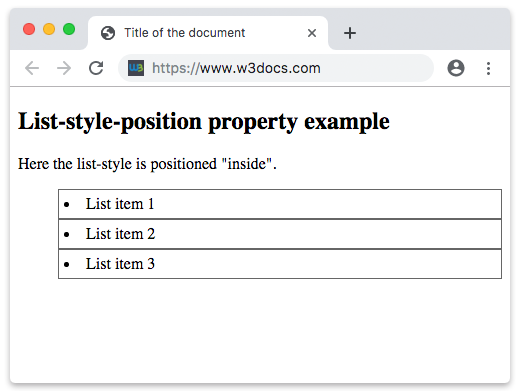
With inside, the marker becomes part of the item's content. It sits within the box, so the border of each <li> wraps around the marker, and any text that wraps to a second line aligns under the marker rather than under the first line of text.
Example with the “outside” value
<!DOCTYPE html>
<html>
  <head>
    <title>Title of the document</title>
    <style>
      .outside {
        list-style-position: outside;
      }
      li {
        border: 1px solid #666;
        padding: 5px;
        margin-bottom: 15px;
      }
    </style>
  </head>
  <body>
    <h2>List-style-position property example</h2>
    <p>Here the list-style is positioned "outside".</p>
    <ul class="outside">
      <li>List item 1</li>
      <li>List item 2</li>
      <li>List item 3</li>
    </ul>
  </body>
</html>With outside (the default), the marker is pushed into the area to the left of the box. The border now hugs only the text, and wrapped lines align with the first line of text instead of with the marker — the familiar look of most lists on the web.
Choosing a value
outsideis the conventional choice. Wrapped text stays neatly aligned, which is easier to scan for long items. Because the marker hangs outside the box, leave room for it with the list'spadding-left(browsers add a default left padding for this reason).insideis handy when you cannot afford the extra left gutter — for example, a tightly boxed list, a card, or a layout where each<li>has its own visible background or border that should enclose the marker too.
A common mistake is removing the list's left padding and then wondering why outside markers get clipped. If you set padding-left: 0, the marker may be pushed outside the visible area; switch to inside, or restore enough padding (see padding).
Relationship to the list-style shorthand
list-style-position is one of the three components of the list-style shorthand, alongside list-style-type and list-style-image. These two declarations are equivalent:
/* Longhand */
ul {
  list-style-type: square;
  list-style-position: inside;
}

/* Shorthand — type then position */
ul {
  list-style: square inside;
}Values
| Value | Description | Play it |
|---|---|---|
| outside | Puts marker box out of the principal block box. It is the default value of this property. | Play it » |
| inside | Sets the marker box as a first inline box in the principal block box. | Play it » |
| initial | Makes the property use its default value. | Play it » |
| inherit | Inherits the property from its parent element. |