CSS font-variant-caps Property
The font-variant-caps CSS property enables the selection of the alternate glyphs for small, petite capitals and titling. See the values and try examples.
The font-variant-caps CSS property controls the use of alternate glyphs for capital letters, such as small caps, petite caps, and titling caps. In CSS1 and CSS2 these were selected through the broader font-variant property; in CSS3, font-variant became a shorthand and font-variant-caps was split out as its own longhand.
This page covers what each value does, when to reach for it, the difference between font-variant-caps and text-transform, and the OpenType caveat that decides whether you see true small caps or a fallback.
The available values are:
normalsmall-capsall-small-capspetite-capsall-petite-capsunicasetitling-caps
When a font includes capital-letter glyphs at different sizes, font-variant-caps selects the most suitable ones. If a font does not ship dedicated small-capital glyphs, the browser synthesizes them by scaling down the regular uppercase glyphs — so the effect always works, but a synthesized result looks less polished than a true designed small-caps face.
Actual rendering therefore depends on the font's OpenType feature support.
Why use font-variant-caps
Small caps are a typographic convention, not just a styling trick. Reach for font-variant-caps when you want:
- Acronyms and abbreviations (NASA, HTML, PDF) to sit at the visual weight of surrounding lowercase text instead of shouting in full-height capitals.
- Subheadings, bylines, or the opening line of an article to feel set apart without changing font size or weight.
- Legal or running-head text where a refined, even color across the line matters.
Unlike text-transform: uppercase, font-variant-caps does not change the underlying text — screen readers still read the original casing, and the result uses purpose-designed glyphs rather than blown-up capitals. Prefer font-variant-caps whenever the goal is typographic style on text that is already cased correctly.
| Initial Value | normal |
|---|---|
| Applies to | All elements. It also applies to ::first-letter and ::first-line. |
| Inherited | Yes. |
| Animatable | No. |
| Version | CSS3 |
| DOM Syntax | object.style.fontVariantCaps = "petite-caps"; |
Syntax
Syntax of CSS font-variant-caps Property
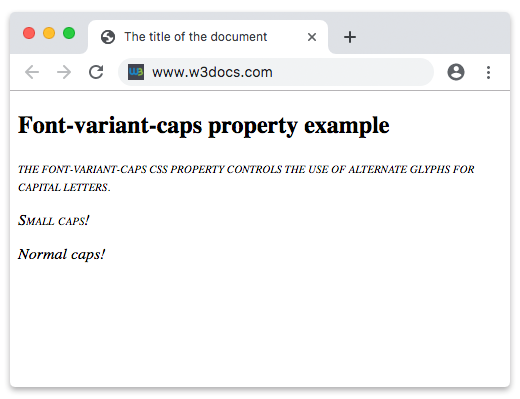
font-variant-caps: normal | small-caps | all-small-caps | petite-caps | all-petite-caps | unicase | titling-caps;Example of the font-variant-caps property:
Example of CSS font-variant-caps Property with all-small-caps, small-caps, and normal values
<!DOCTYPE html>
<html>
  <head>
    <title>The title of the document </title>
    <style>
      .all-small-caps {
        font-variant-caps: all-small-caps;
      }
      .small-caps {
        font-variant-caps: small-caps;
      }
      .normal {
        font-variant-caps: normal;
      }
    </style>
  </head>
  <body>
    <h2>Font-variant-caps property example</h2>
    <p class="all-small-caps">
      The font-variant-caps CSS property controls the use of alternate glyphs for capital letters.
    </p>
    <p class="small-caps">Small caps!</p>
    <p class="normal">Normal caps!</p>
  </body>
</html>Result

font-variant-caps vs. text-transform
It is easy to confuse font-variant-caps: small-caps with text-transform: uppercase. They look related but behave differently:
<!DOCTYPE html>
<html>
  <head>
    <title>small-caps vs. uppercase</title>
    <style>
      .smallcaps {
        font-variant-caps: small-caps;
      }
      .upper {
        text-transform: uppercase;
      }
    </style>
  </head>
  <body>
    <p class="smallcaps">The agency known as nasa.</p>
    <p class="upper">The agency known as nasa.</p>
  </body>
</html>In the first paragraph, the lowercase letters are shown as small capitals while the original lowercase text is preserved (a screen reader still reads "nasa"). In the second, every letter is forced to full-height uppercase and the rendered text reads "THE AGENCY KNOWN AS NASA". Use font-variant-caps for typographic refinement and text-transform when you actually need the casing changed.
Values
| Value | Description |
|---|---|
| normal | The use of alternate glyphs is not activated. |
| small-caps | Displays small capitals. Small-caps glyphs use the form of uppercase letters, but are reduced to the size of lowercase letters. |
| all-small-caps | Displays small capitals for both uppercase and lowercase letters. |
| petite-caps | Displays petite capitals. |
| all-petite-caps | Displays petite capitals for both uppercase and lowercase letters. |
| unicase | Displays a mixture of small capitals for uppercase letters with normal lowercase letters. |
| titling-caps | Displays titling capitals. |
Note: initial and inherit are CSS-wide keywords and can be used with any CSS property.
Browser Compatibility
| Browser | Support |
|---|---|
| Chrome | 48+ |
| Edge | 79+ |
| Firefox | 34+ |
| Safari | 9.1+ |
| Opera | 35+ |
Note: font-variant-caps is part of the font-variant shorthand. When using the shorthand, explicitly include font-variant-caps to preserve its value, as other shorthand values may override it.
Related properties
font-variant-caps is one of several longhands that the font-variant shorthand controls. The siblings let you fine-tune other OpenType features:
font-variant-ligatures— control common, discretionary, and historical ligatures.font-variant-numeric— choose between lining/oldstyle figures, fractions, and ordinals.font-variant-alternates— select stylistic and character alternates a font provides.font-feature-settings— the low-level escape hatch for any OpenType feature by its four-character tag.text-transform— change the actual letter casing of the text.