CSS outline-style Property
The outline-style CSS property is used to specify the style of an element’s outline. See property values and examples.
The CSS outline-style property sets the line style of an element's outline — for example a solid, dashed, or dotted line. An outline is a line drawn just outside the element's border, around all four sides at once.
This page explains what each outline style looks like, how outline-style differs from border-style, and shows runnable examples for every value.
Why use an outline?
Outlines are most often used to make focus visible. When a user tabs to a link, button, or form field with the keyboard, the browser draws an outline so they can see where they are. Removing that outline without a replacement breaks keyboard accessibility, so prefer restyling it over deleting it.
The outline differs from the border in two important ways:
- It takes up no space. The outline is painted outside the border edge and does not affect layout, so adding or changing an outline never shifts surrounding elements. The element's width and height do not include the outline.
- It cannot have individual side or corner control. Unlike borders, you cannot set a different outline on one side, and a basic outline follows the box, not its
border-radius.
To see any outline, outline-style must be set to a value other than none — this property is what "turns the outline on." Combine it with outline-color and outline-width, or use the outline shorthand to set all three at once.
The outline-style property accepts the following values:
- none
- hidden
- dotted
- dashed
- solid
- double
- groove
- ridge
- inset
- outset
The groove, ridge, inset, and outset values create a 3D effect by shading the outline based on the outline-color. The effect is most visible with a thicker width and a mid-tone color — it is nearly invisible on pure black or white.
| Initial Value | none |
|---|---|
| Applies to | All elements. |
| Inherited | No. |
| Animatable | No. |
| Version | CSS2 |
| DOM Syntax | object.style.outlineStyle = "dotted" |
Syntax
CSS outline-style syntax
outline-style: none | hidden | dotted | dashed | solid | double | groove | ridge | inset | outset | initial | inherit;Example of the outline-style property:
<!DOCTYPE html>
<html>
  <head>
    <title>Title of the document</title>
    <style>
      .p1 {
        outline-style: solid;
      }
      .p2 {
        outline-style: dashed;
      }
      .p3 {
        outline-style: dotted;
      }
      .p4 {
        outline-style: double;
      }
      .p5 {
        outline-style: none;/*hidden*/
      }
      .p6 {
        outline-style: groove;
        outline-color: #ccc;
      }
      .p7 {
        outline-style: ridge;
        outline-color: #ccc;
      }
      .p8 {
        outline-style: inset;
        outline-color: #ccc;
      }
      .p9 {
        outline-style: outset;
        outline-color: #ccc;
      }
    </style>
  </head>
  <body>
    <h2>Outline property example</h2>
    <p class="p1">This is a paragraph with outline set to solid.</p>
    <p class="p2">This is a paragraph with outline set to dashed.</p>
    <p class="p3">This is a paragraph with outline set to dotted.</p>
    <p class="p4">This is a paragraph with outline set to double.</p>
    <p class="p5">This is a paragraph with outline set to none.</p>
    <p class="p6">This is a paragraph with outline set to groove.</p>
    <p class="p7">This is a paragraph with outline set to ridge.</p>
    <p class="p8">This is a paragraph with outline set to inset.</p>
    <p class="p9">This is a paragraph with outline set to outset.</p>
  </body>
</html>Result
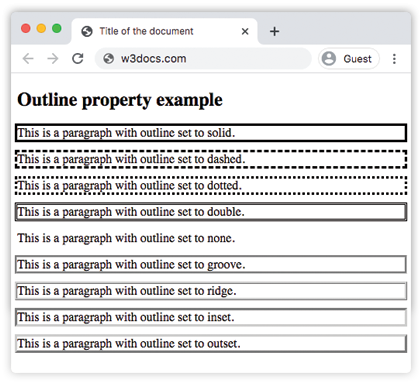
Example of the outline-style property with all the values:
CSS outline-style another code example
<!DOCTYPE html>
<html>
  <head>
    <title>Title of the document</title>
    <style>
      p.dotted {
        outline: 4px dotted gray;
      }
      p.dashed {
        outline: 0.2em dashed rgb(142, 191, 66);
      }
      p.solid {
        outline: 4px solid #ccc;
      }
      p.double {
        outline: 4px double #000;
      }
      p.groove {
        outline: 4px groove #666;
      }
      p.ridge {
        outline: thick ridge #1c87c9;
      }
      p.inset {
        outline: medium inset #1c87c9;
      }
      p.outset {
        outline: 4px outset #1c87c9;
      }
    </style>
  </head>
  <body>
    <h2>Outline property example</h2>
    <p class="dotted">Lorem Ipsum is simply dummy text of the printing...</p>
    <p class="dashed">Lorem Ipsum is simply dummy text of the printing...</p>
    <p class="solid">Lorem Ipsum is simply dummy text of the printing...</p>
    <p class="double">Lorem Ipsum is simply dummy text of the printing...</p>
    <p class="groove">Lorem Ipsum is simply dummy text of the printing...</p>
    <p class="ridge">Lorem Ipsum is simply dummy text of the printing...</p>
    <p class="inset">Lorem Ipsum is simply dummy text of the printing...</p>
    <p class="outset">Lorem Ipsum is simply dummy text of the printing...</p>
  </body>
</html>This second example uses the outline shorthand to set the style, width, and color together — for instance outline: 4px dotted gray.
Example of the outline-style property with the "groove" value:
Example of the outline-style property with the groove value
<!DOCTYPE html>
<html>
  <head>
    <title>Title of the document</title>
    <style>
      p {
        color: #7f7fa7;
        text-align: center;
        outline-width: 8px;
        outline-style: groove;
        padding: 10px;
      }
    </style>
  </head>
  <body>
    <h1>Outline property example</h1>
    <p>This is a paragraph with outline set to groove.</p>
  </body>
</html>Example of the outline-style property with the "ridge" value:
Example of the outline-style property with the ridge value
<!DOCTYPE html>
<html>
  <head>
    <title>Title of the document</title>
    <style>
      p {
        color: #69afad;
        text-align: center;
        outline-width: 8px;
        outline-style: ridge;
        padding: 10px;
      }
    </style>
  </head>
  <body>
    <h1>Outline property example</h1>
    <p>This is a paragraph with outline set to ridge.</p>
  </body>
</html>Example of the outline-style property with the "inset" value:
Example of the outline-style property with the inset value
<!DOCTYPE html>
<html>
  <head>
    <title>Title of the document</title>
    <style>
      p {
        color: #69afad;
        text-align: center;
        outline-width: 8px;
        outline-style: inset;
        padding: 10px;
      }
    </style>
  </head>
  <body>
    <h1>Outline property example</h1>
    <p>This is a paragraph with outline set to inset.</p>
  </body>
</html>Example of the outline-style property with the "outset" value:
Example of the outline-style property with the outset value:
<!DOCTYPE html>
<html>
  <head>
    <title>Title of the document</title>
    <style>
      p {
        color: #69afad;
        text-align: center;
        outline-width: 8px;
        outline-style: outset;
        padding: 10px;
      }
    </style>
  </head>
  <body>
    <h1>Outline property example</h1>
    <p>This is a paragraph with outline set to outset.</p>
  </body>
</html>Example of the outline-style property with the "dotted" value:
Example of the outline-style property with the dotted value:
<!DOCTYPE html>
<html>
  <head>
    <title>Title of the document</title>
    <style>
      p {
        color: #69afad;
        text-align: center;
        outline-width: 4px;
        outline-style: dotted;
        padding: 10px;
      }
    </style>
  </head>
  <body>
    <h1>Outline property example</h1>
    <p>This is a paragraph with outline set to dotted.</p>
  </body>
</html>Example of the outline-style property with the "dashed" value:
Example of the outline-style property with the dashed value:
<!DOCTYPE html>
<html>
  <head>
    <title>Title of the document</title>
    <style>
      p {
        color: #69afad;
        text-align: center;
        outline-width: 4px;
        outline-style: dashed;
        padding: 10px;
      }
    </style>
  </head>
  <body>
    <h1>Outline property example</h1>
    <p>This is a paragraph with outline set to dashed.</p>
  </body>
</html>Values
| Value | Description | Play it |
|---|---|---|
| none | Will show no outline. This is the default value of this property. | Play it » |
| hidden | Same as none for outlines (the value exists for consistency with border-style). | Play it » |
| dotted | The outline is specified as a series of dots. | Play it » |
| dashed | The outline is specified as a series of dashes. | Play it » |
| solid | The outline is specified as a solid lines. | Play it » |
| double | The outline is specified as a double solid lines. | Play it » |
| groove | Specifies a 3D grooved outline. | Play it » |
| ridge | Specifies a 3D ridged outline. | Play it » |
| inset | Specifies an embedded outline. | Play it » |
| outset | Specifies an embossed outline. | Play it » |
| initial | Sets the property to its default value. | Play it » |
| inherit | Inherits the property from its parent element. |
Tips and common gotchas
outline-stylealone may be invisible. With no width or color set, the default outline width ismediumand the color iscurrentColor, so it usually does show — but if you setoutline-width: 0it will not appear. Use the outline shorthand to be explicit.- Don't just delete focus outlines.
outline: noneremoves the keyboard focus ring. If a design requires it gone, replace it with a custom outline or abox-shadowfocus style so keyboard users can still see focus. - Use
outline-offsetfor breathing room. Because the outline sits flush against the border by default, theoutline-offsetproperty pushes it outward (or inward with a negative value) without affecting layout. - Outline vs. border. Reach for an outline when you need an indicator that must not change the box size or position; reach for a border when the line is part of the element's layout.
Related properties
- outline — shorthand for
outline-width,outline-style, andoutline-color. - outline-color — sets the outline's color.
- outline-width — sets the outline's thickness.
- border — the space-consuming counterpart to outlines.