CSS border-bottom-color Property
CSS border-bottom-color property is used to specify the color of the bottom border element's. See examples and try it yourself.
The CSS border-bottom-color property sets the color of an element's bottom border only. It is one of the four single-side color properties, alongside border-top-color, border-right-color, and border-left-color.
A border has three ingredients: a style, a width, and a color. A border is invisible until you give it a style, so border-bottom-color does nothing on its own. Before (or together with) it you must declare a style via border-style or border-bottom-style — otherwise the style defaults to none and no border is painted, no matter what color you set.
When to use it
Reach for border-bottom-color when you want to tint just the bottom edge and leave the other three sides untouched. Common cases:
- Underline-style headings and links — a bottom border that recolors on
:hoveror:focuswithout shifting layout (unliketext-decoration). - Tab bars and active states — a colored bottom border marks the selected tab.
- Recoloring one side of a uniform border — set all four sides with the border-color shorthand, then override the bottom with
border-bottom-color.
The default value is currentColor, which means that if you never set a color, the border takes the element's text color. The bottom border color can also be set as part of the border-color shorthand (its third value) or the border-bottom shorthand.
| Initial Value | currentColor |
|---|---|
| Applies to | All elements. |
| Inherited | No |
| Animatable | Yes. The color of the border-bottom is animatable. |
| Version | CSS1. |
| DOM Syntax | object.style.borderBottomColor = "blue"; |
Syntax
Syntax of CSS border-bottom-color Property
border-bottom-color: color | transparent | initial | inherit;Example of the border-bottom-color property:
Example of CSS border-bottom-color Property with color value
<!DOCTYPE html>
<html>
  <head>
    <style>
      h2 {
        border-bottom-style: solid;
        border-bottom-color: #1c87c9;
        border-bottom-width: 5px;
      }
    </style>
  </head>
  <body>
    <h2> A heading with a solid blue bottom border</h2>
  </body>
</html>Result
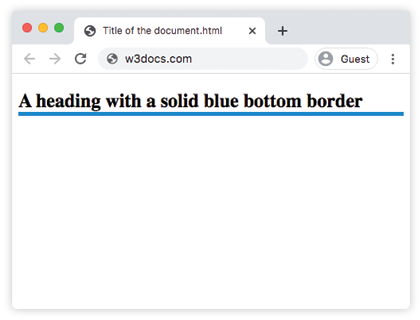
Example of the border-bottom-color property, where colors are added to different HTML elements to show the color effect:
Example of CSS border-bottom-color property with border-style property
<!DOCTYPE html>
<html>
  <head>
    <style>
      h2 {
        border-bottom-style: groove;
        border-bottom-color: #8ebf42;
        border-bottom-width: 5px;
      }
      div {
        border-style: inset;
        border-bottom-color: #ccc;
        border-bottom-width: 8px;
      }
      p {
        border-style: double;
        border-bottom-color: #1c87c9;
        border-bottom-width: 8px;
      }
    </style>
  </head>
  <body>
    <h2>A heading with a groove green bottom border.</h2>
    <div>A div element with an inset gray bottom border.</div>
    <p>A paragraph with a double blue border.</p>
  </body>
</html>Example of the border-bottom-color property with the "transparent" value:
Example of CSS border-bottom-color Property with transparent value
<!DOCTYPE html>
<html>
  <head>
    <style>
      div {
        border: #666 dashed;
        border-bottom-color: transparent;
        padding: 8px;
      }
    </style>
  </head>
  <body>
    <h2>Example of transparent border-bottom-color</h2>
    <div>This is an example of a div element which has a transparent border-bottom-color.</div>
  </body>
</html>Note that transparent is not the same as not having a border: the bottom border still occupies the space defined by border-bottom-width, it is simply invisible. This is handy for reserving layout space that you reveal on hover or focus.
You can set hexadecimal, RGB, RGBA, HSL, HSLA or color names as a value for the border-bottom-color property.
Learn more about HTML Colors.
Example of the border-bottom-color property with the "color" value:
Example of CSS border-bottom-color Property with hexadecimal, RGB, HSL and named color values
<!DOCTYPE html>
<html>
  <head>
    <style>
      p {
        border: 5px solid #666;
        width: 60%;
        padding: 5px;
      }
      .name {
        border-bottom-color: lightblue;
      }
      .hex {
        border-bottom-color: #1c87c9;
      }
      .rgb {
        border-bottom-color: rgba(0, 0, 0, 0.15);
      }
      .hsl {
        border-bottom-color: hsl(89, 43%, 51%);
      }
    </style>
  </head>
  <body>
    <p class="name">Bottom border with a named color.</p>
    <p class="hex">Bottom border with a hexadecimal value.</p>
    <p class="rgb">Bottom border with a RGB color value.</p>
    <p class="hsl">Bottom border with a HSL color value.</p>
  </body>
</html>border-bottom-color accepts a single color value. If you list several colors, only the first valid one is used. To color all four sides at once, use the border-color shorthand instead.
Values
| Value | Description | Play it |
|---|---|---|
| color | Indicates the bottom border color. Default color is the color of the element. Color names, hexadecimal color codes, rgb(), rgba(), hsl(), hsla() can be used. Required value. | Play it » |
| transparent | Indicates that the border color should be transparent. The bottom border will still take up the space defined by the border-width value. | Play it » |
| initial | Sets the property to its default value. | Play it » |
| inherit | Inherits the property from its parent element. |
Related properties
- border-bottom — shorthand for the bottom border's width, style, and color in one declaration.
- border-bottom-style and border-bottom-width — the other two pieces a bottom border needs.
- border-color — set the color of all four sides at once.
- border-top-color, border-right-color, border-left-color — color the other three edges.