CSS break-before Property
The CSS break-before property defines whether any break before the principal box is allowed, avoided or forced. Read about the property and find examples.
The CSS break-before property controls whether a page, column, or region break should be inserted before an element. It is the modern, multi-context replacement for the print-only page-break-before property: the same keyword now works for paged media (printing/PDF), multi-column layouts (column-count), and CSS regions.
This page covers what break-before does, when each value is useful, how it interacts with neighbouring break rules, and a runnable example.
Why break-before matters
Two very different layout problems need the same kind of control:
- Printing. When a long document is sent to a printer or exported to PDF, the browser decides where one page ends and the next begins.
break-before: pagelets you force a new sheet — for example, so every chapter<h1>starts at the top of a fresh page. - Multi-column text. In a
column-countlayout the content flows from one column into the next.break-before: columnforces a heading or figure to start a brand-new column instead of being stranded at the bottom of the previous one.
The keyword avoid does the opposite: it asks the browser not to break right before the element, which is how you keep a heading glued to the paragraph that follows it.
How break-before is computed
When two adjacent elements each request a break (one with break-after, the next with break-before), the browser combines them and the strongest break wins:
- Forced breaks (
always,page,column,left,right) always happen. avoidis only a hint — the browser may still break if it has no other choice (for instance, an element taller than a single page).- If neither side forces a break,
autolets the browser decide.
Note that break-before only takes effect on elements that generate a box and sit in a fragmentation context (a printed document, a multi-column container, or a region). On a normal on-screen single-column page it has no visible effect.
Related properties
- break-after — the same control on the trailing edge of an element.
- break-inside — prevents an element (a table row, a figure, a card) from being split across a break.
- columns and column-rule — set up the multi-column layout that
break-before: columnworks inside.
| Initial Value | auto |
|---|---|
| Applies to | Block-level elements. |
| Inherited | No. |
| Animatable | Discrete. |
| Version | CSS3 |
| DOM Syntax | object.style.breakBefore = "auto"; |
Syntax
break-before: auto | avoid | always | page | column | left | right | initial | inherit;Example: avoid a break in a multi-column layout
In the multi-column block below, the <hr> between the two sections sets break-before: avoid, asking the browser not to start a new column right before the rule. Resize the result so the text wraps into three columns to see the effect:
<!DOCTYPE html>
<html>
  <head>
    <title>The title of the document</title>
    <style>
      .multicol {
        background-color: #eee;
        padding: 10px;
        column-count: 3;
        column-rule: 2px dotted #ccc;
      }
      .multicol hr {
        break-before: avoid;
      }
    </style>
  </head>
  <body>
    <h2>Break-before example</h2>
    <div class="multicol">
      <h2>Lorem ipsum</h2>
      <p>Lorem Ipsum is simply dummy text of the printing and typesetting industry. Lorem Ipsum has been the industry's standard dummy text ever since the 1500s when an unknown printer took a galley of type and scrambled it to make a type specimen book. It has survived not only five centuries, but also the leap into electronic typesetting, remaining essentially unchanged. </p>
      <hr />
      <h2>Lorem ipsum</h2>
      <p>Lorem Ipsum is simply dummy text of the printing and typesetting industry. Lorem Ipsum has been the industry's standard dummy text ever since the 1500s when an unknown printer took a galley of type and scrambled it to make a type specimen book. It has survived not only five centuries, but also the leap into electronic typesetting, remaining essentially unchanged.</p>
    </div>
  </body>
</html>Result
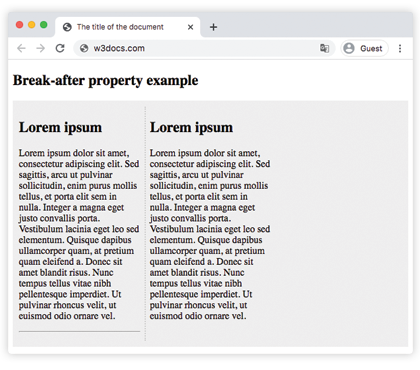
Example: force a page break when printing
A common print requirement is to start each chapter on its own page. Apply break-before: page to the chapter heading and the rule takes effect in the print preview (Ctrl/Cmd + P) or when exporting to PDF:
.chapter {
  break-before: page;
}<h1 class="chapter">Chapter 1</h1>
<p>Intro text…</p>
<h1 class="chapter">Chapter 2</h1>
<p>This heading begins on a new printed page.</p>Because the break only applies to paged media, it has no effect on a normal scrolling screen — open the print dialog to see it.
Values
| Value | Description |
|---|---|
| auto | Default. Allows any break before the principal box. |
| avoid | Avoids any break before the principal box. |
| always | Forces a break before the principal box. |
| page | Forces a page break before the principal box. |
| column | Forces a column break before the principal box. |
| left | Forces one or two page breaks before the principal box so that the next page is formatted as a left page. |
| right | Forces one or two page breaks before the principal box so that the next page is formatted as a right page. |
| initial | Sets this property to its default value. |
| inherit | Inherits this property from its parent element. |