CSS zoom Property
CSS zoom Property is used to scale the elements of your website. This property is non-standard and is supported by only some browsers including.
The CSS zoom property scales an element and its contents, magnifying or shrinking it by a given factor. A value of 2 doubles the rendered size, 0.5 halves it, and normal (the default) leaves it untouched.
This page covers the zoom syntax, every accepted value, how it differs from transform: scale(), its browser support, and when to reach for each.
How zoom differs from transform: scale()
The two properties look interchangeable, but they behave very differently:
zoomscales layout and paint. A zoomed element takes up its new, larger box in the document flow, so it pushes neighboring elements aside. The browser also re-runs layout, so text reflows crisply at the new size.transform: scale()scales paint only. The element keeps its original box for layout purposes — it grows visually but overlaps its neighbors instead of pushing them, and the scaled pixels can look slightly blurry.
Use zoom when you want the surrounding layout to respond to the new size. Use transform: scale() (the standardized, fully supported choice) for hover effects, animations, and anything that must not disturb the flow.
zoom is non-standard and unsupported in older Firefox versions. For production sites that must work everywhere, prefer transform: scale() to resize an element instead.
| Initial Value | normal |
|---|---|
| Applies to | All elements. |
| Inherited | No. |
| Animatable | Yes. |
| Version | Non-standard |
| DOM Syntax | object.style.zoom = "4"; |
Syntax
CSS zoom values
zoom: normal | number | percentage | reset | initial | inherit;The number and percentage forms are the ones you will use in practice: zoom: 1.5 and zoom: 150% mean the same thing.
Example of the zoom property
The example below renders three identical circles, each scaled by a different factor, so you can compare normal, a percentage, and a unitless number side by side.
<!DOCTYPE html>
<html>
  <head>
    <title>Title of the document</title>
    <style>
      div.element {
        width: 30px;
        height: 30px;
        border-radius: 50%;
        text-align: center;
        vertical-align: middle;
        display: inline-block;
        zoom: 2;
      }
      div#grey {
        background-color: #666;
        zoom: normal;
      }
      div#blue {
        background-color: #1c87c9;
        zoom: 300%;
      }
      div#green {
        background-color: #8ebf42;
        zoom: 5;
      }
    </style>
  </head>
  <body>
    <h2>Zoom property example</h2>
    <div id="grey" class="element"></div>
    <div id="blue" class="element"></div>
    <div id="green" class="element"></div>
  </body>
</html>Result
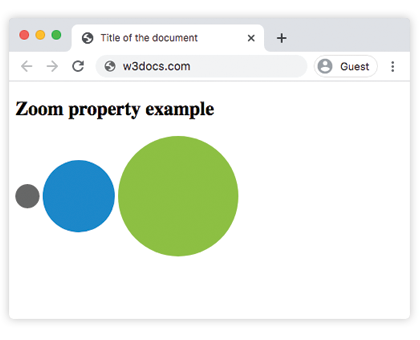
The image shows three circles scaled by different factors: the grey circle uses normal (1x), the blue circle uses 300% (3x), and the green circle uses 5 (5x). Notice how the larger circles push the surrounding layout outward, demonstrating zoom's layout-scaling behavior.
Values
| Value | Description |
|---|---|
| normal | Specifies the normal size of the element. |
| number | Zoom factor. Equivalent to the corresponding percentage (1.0 = 100% = normal). Values larger than 1.0 zoom in. Values smaller than 1.0 zoom out. |
| percentage | Specifies a value in percentage. 100% is equivalent to normal. |
| reset | Do not magnify the element if the user applies non-pinch-based zooming to the document. |
| initial | Makes the property use its default value. |
| inherit | Inherits the property from its parents element. |
Browser support
zoom originated in Internet Explorer and was later picked up by Chrome, Edge, Safari, and Opera. Firefox added support relatively recently and ignored it for years, so treat it as a progressive enhancement rather than a load-bearing layout tool. Because it is non-standard, always provide a transform: scale() fallback for anything critical.
Related properties
transform— the standard, fully supported way to scale, rotate, skew, and translate elements.transition— animate the change when you scale on hover or focus.width— set an explicit size instead of a scale factor.overflow— control what happens when a zoomed element grows past its container.