CSS column-rule-color Property
The column-rule-color CSS property specifies the color of the columns’ rule. Find some examples and set your own colors.
The CSS column-rule-color property sets the color of the rule (the divider line) drawn between the columns of a multi-column layout. The rule itself is created with column-rule-style; if no style is set, the rule — and therefore its color — is not displayed.
This property only takes effect on multicol elements, that is, elements laid out into columns with column-count or column-width (or the columns shorthand). It is one of the CSS3 properties.
The color of the rule can also be set together with its width and style through the column-rule shorthand property, which is the common way to declare all three at once.
By default the value is currentColor, so an unset rule color matches the element's text color. You can find web colors in our HTML colors section and pick your own with the Color Picker tool.
When to use it
Use column-rule-color when you want the divider between columns to differ from the text color — for example a subtle gray rule between dark body text, or a brand accent line. Because it is purely decorative, the rule does not take up layout space (it sits inside the column-gap), so changing its color never reflows your content.
| Initial Value | currentColor |
|---|---|
| Applies to | Multicol elements. |
| Inherited | No. |
| Animatable | Yes. Color of rule is animatable. |
| Version | CSS3 |
| DOM Syntax | object.style.columnRuleColor = "#666"; |
Syntax
Syntax of CSS column-rule-color Property
column-rule-color: color | initial | inherit;You can pass any valid CSS color: a named color, a hexadecimal code, or an rgb(), rgba(), hsl(), or hsla() value.
Examples
Color name value
Example of CSS column-rule-color Property with lightgreen value
<!DOCTYPE html>
<html>
  <head>
    <title>Title of the document</title>
    <style>
      div {
        column-count: 3;
        column-gap: 20px;
        column-rule-style: dashed;
        column-rule-color: lightgreen;
      }
    </style>
  </head>
  <body>
    <h1>The column-rule-color example</h1>
    <div>
      Lorem Ipsum is dummy text of the printing and typesetting industry. Lorem Ipsum has been the industry's standard dummy text ever since the 1500s when an unknown printer took a galley of type and scrambled it to make a type specimen book. It has survived not only five centuries, but also the leap into electronic typesetting, remaining essentially unchanged. It was popularised in the 1960s with the release of Letraset sheets containing Lorem Ipsum passages, and more recently with desktop publishing software like Aldus PageMaker including versions of Lorem Ipsum.
    </div>
  </body>
</html>Remember to also set column-rule-style — without a style (such as solid, dashed, or double), the rule is not drawn and its color has no visible effect.
Hexadecimal value
Example of CSS column-rule-color Property with hexadecimal value
<!DOCTYPE html>
<html>
  <head>
    <title>Title of the document</title>
    <style>
      div {
        column-count: 3;
        column-gap: 40px;
        column-rule-style: solid;
        column-rule-color: #8ebf42;
      }
    </style>
  </head>
  <body>
    <h1>The column-rule-color example</h1>
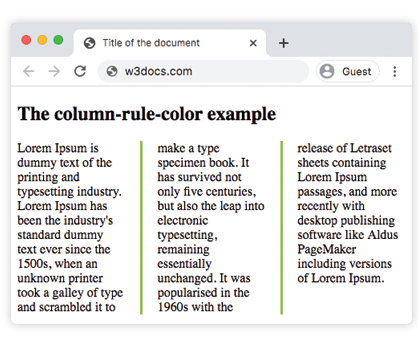
    <div>
      Lorem Ipsum is dummy text of the printing and typesetting industry. Lorem Ipsum has been the industry's standard dummy text ever since the 1500s, when an unknown printer took a galley of type and scrambled it to make a type specimen book. It has survived not only five centuries, but also the leap into electronic typesetting, remaining essentially unchanged. It was popularised in the 1960s with the release of Letraset sheets containing Lorem Ipsum passages, and more recently with desktop publishing software like Aldus PageMaker including versions of Lorem Ipsum.
    </div>
  </body>
</html>Result:
RGB value
Example of CSS column-rule-color Property with RGB value
<!DOCTYPE html>
<html>
  <head>
    <title>Title of the document</title>
    <style>
      div {
        column-count: 3;
        column-gap: 40px;
        column-rule-style: double;
        column-rule-color: rgb(234, 211, 21);
      }
    </style>
  </head>
  <body>
    <h1>The column-rule-color example</h1>
    <div>
      Lorem Ipsum is dummy text of the printing and typesetting industry. Lorem Ipsum has been the industry's standard dummy text ever since the 1500s, when an unknown printer took a galley of type and scrambled it to make a type specimen book. It has survived not only five centuries, but also the leap into electronic typesetting, remaining essentially unchanged. It was popularised in the 1960s with the release of Letraset sheets containing Lorem Ipsum passages, and more recently with desktop publishing software like Aldus PageMaker including versions of Lorem Ipsum.
    </div>
  </body>
</html>HSL value
Example of CSS column-rule-color Property with HSL value
<!DOCTYPE html>
<html>
  <head>
    <title>Title of the document</title>
    <style>
      div {
        column-count: 3;
        column-gap: 30px;
        column-rule-style: solid;
        column-rule-color: hsl(351, 97%, 57%);
      }
    </style>
  </head>
  <body>
    <h1>The column-rule-color example</h1>
    <div>
      Lorem Ipsum is dummy text of the printing and typesetting industry. Lorem Ipsum has been the industry's standard dummy text ever since the 1500s, when an unknown printer took a galley of type and scrambled it to make a type specimen book. It has survived not only five centuries, but also the leap into electronic typesetting, remaining essentially unchanged. It was popularised in the 1960s with the release of Letraset sheets containing Lorem Ipsum passages, and more recently with desktop publishing software like Aldus PageMaker including versions of Lorem Ipsum.
    </div>
  </body>
</html>Values
| Value | Description | Play it |
|---|---|---|
| color | Sets the color of the rule. Color names, hexadecimal color codes, rgb(), rgba(), hsl(), hsla() can be used. | |
| initial | Sets the property to its default value. | |
| inherit | Inherits the property from its parent element. |
Related properties
The column rule is controlled by three longhand properties, usually combined with the shorthand:
column-rule— shorthand for setting style, width, and color at once.column-rule-style— the line style; required for the rule (and its color) to appear.column-rule-width— the thickness of the rule.
See also column-gap, which defines the space the rule sits within, and the columns shorthand for building the multi-column layout itself.