CSS outline-width Property
The outline-width CSS property is used to set an outline’s width of an element. See property values and examples.
The outline-width property defines the thickness of an outline — the line drawn just outside an element's border. It works much like border-width, but with one important difference: an outline does not take up space in the box model, so changing outline-width never shifts the layout of surrounding elements.
Because the outline sits outside the border and is excluded from the box, the width and height of an element do not include the outline. This is exactly why outlines are the browser's default way of showing keyboard focus — the focus ring can appear and disappear without nudging the page around.
This property accepts the following values: medium, thin, thick, a <length>, initial, inherit, revert, and unset.
When to use outline-width
- Focus indicators. When you customize the focus ring with the
:focusor:focus-visiblepseudo-classes,outline-widthcontrols how prominent that ring is. Keeping a visible focus outline matters for accessibility — never set it to0or remove the outline without providing another visible focus style. - Highlighting without reflow. Because the outline is outside the box, a thicker outline on hover or focus won't push neighbors around the way a thicker border would.
- Debugging layout. A quick
outline: 1px solid redis a popular way to visualize element boxes without affecting their size.
outline-width only takes effect once outline-style is set to a value other than none (the default). If the style is none, the outline has no width regardless of what you set here. The outline shorthand sets width, style, and outline-color at once.
The three keywords map to browser-defined thicknesses rather than fixed pixel values, so they can differ slightly between browsers. In practice thin is roughly 1px, medium (the default) is roughly 3px, and thick is roughly 5px. When you need an exact, predictable value, use a <length> such as 2px or 0.2em.
Note that outline-width does not accept percentages or negative values.
| Initial Value | medium |
|---|---|
| Applies to | All elements. |
| Inherited | No. |
| Animatable | Yes. The width of the outline is animatable. |
| Version | CSS2 |
| DOM Syntax | Object.style.outlineWidth = "thick"; |
Syntax
CSS outline-width syntax
outline-width: medium | thin | thick | length | initial | inherit | revert | unset;Multiple values example
CSS outline-width code example
<!DOCTYPE html>
<html>
  <head>
    <title>Title of the document</title>
    <style>
      .p1 {
        outline-style: solid;
        outline-width: 5px;
      }
      .p2 {
        outline-style: solid;
        outline-width: 0.4em;
      }
      .p3 {
        outline-style: solid;
        outline-width: thin;
      }
      .p4 {
        outline-style: solid;
        outline-width: medium;
      }
      .p5 {
        outline-style: solid;
        outline-width: thick;
      }
      .p6 {
        outline-style: solid;
        outline-width: 0.1cm;
      }
      .p7 {
        outline-style: solid;
        outline-width: 1mm;
      }
    </style>
  </head>
  <body>
    <h2>Outline-width property example</h2>
    <p class="p1">This is a paragraph with outline set to 5px.</p>
    <p class="p2">This is a paragraph with outline set to 0.4em.</p>
    <p class="p3">This is a paragraph with outline set to thin.</p>
    <p class="p4">This is a paragraph with outline set to medium.</p>
    <p class="p5">This is a paragraph with outline set to thick.</p>
    <p class="p6">This is a paragraph with outline set to 0.1cm.</p>
    <p class="p7">This is a paragraph with outline set to 1 mm.</p>
  </body>
</html>Result
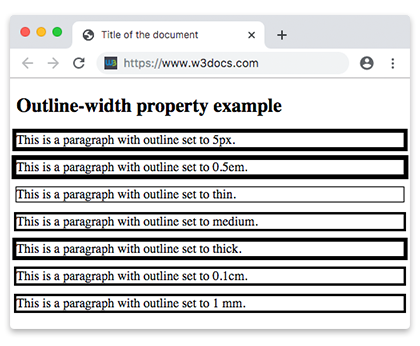
In the following example, the first element does not have a border, the second one has. Notice that the outline of the second element is drawn outside of its border, with a gap that you could widen using outline-offset.
Outline with a border
CSS outline-width another code example
<!DOCTYPE html>
<html>
  <head>
    <title>Title of the document</title>
    <style>
      div.ex1 {
        outline-style: solid;
        outline-width: thick;
      }
      div.ex2 {
        border: 2px solid #1c87c9;
        outline-style: solid;
        outline-width: thick;
      }
    </style>
  </head>
  <body>
    <h2>Outline property example</h2>
    <div class="ex1">Lorem Ipsum is simply dummy text of the printing...</div>
    <br />
    <div class="ex2">Lorem Ipsum is simply dummy text of the printing...</div>
  </body>
</html>Basic outline example
Example of the CSS outline-width property
<!DOCTYPE html>
<html>
  <head>
    <title>Title of the document</title>
    <style>
      div {
        border: 2px solid #1c87c9;
        outline-style: dotted;
        outline-width: 3px;
      }
    </style>
  </head>
  <body>
    <h2>Outline property example</h2>
    <div>Lorem Ipsum is simply dummy text of the printing...</div>
  </body>
</html>Combining outline-width and outline-style
Example of the CSS outline-width property with the outline-style property
<!DOCTYPE html>
<html>
  <head>
    <title>Title of the document</title>
    <style>
      div {
        border: 2px solid #1c87c9;
        outline-style: dashed;
        outline-width: thick;
      }
    </style>
  </head>
  <body>
    <h2>Outline property example</h2>
    <div>Lorem Ipsum is simply dummy text of the printing...</div>
  </body>
</html>Values
| Value | Description | Play it |
|---|---|---|
| medium | Defines a medium outline. This is the default value of this property. | Play it » |
| thin | Defines a thin outline. | Play it » |
| thick | Defines a thick outline. | Play it » |
| length | Defines the thickness of outline. | Play it » |
| initial | Sets the property to its default value. | Play it » |
| inherit | Inherits the property from its parent element. | |
| revert | Reverts the property to the value set by the user agent or previous cascade. | |
| unset | Resets the property to its inherited value or initial value, depending on inheritance. |
Related properties
- outline — shorthand for width, style, and color in one declaration.
- outline-style — required for the width to be visible.
- outline-color — sets the color of the outline.
- outline-offset — adds space between the outline and the element's border.
- border-width — the box-model counterpart that does affect layout.