CSS color Property
The CSS color property describes the color of the text content and text decorations. Please, try yourself the CSS color Property examples and see the results.
The CSS color property sets the foreground color of an element — that is, the color of its text content and any text decorations (underlines, overlines, line-through). It does not affect backgrounds, borders, or images; for those you use dedicated properties such as background-color.
This page covers the color syntax, every value format you can pass to it (named colors, hex, RGB/RGBA, HSL/HSLA), how color inherits, and how to keep text readable. You can browse web color values in our HTML colors section, look up keywords in CSS color names, and pick a custom shade with our Color Picker tool.
Because color is inherited, setting it on a container cascades to all descendant text unless a child overrides it — so you often only need to declare it once on body. The default value is currentcolor, a keyword that resolves to whatever color is currently in effect, which is handy for keeping borders or SVG fills in sync with the text color.
| Initial Value | currentcolor |
|---|---|
| Applies to | All elements. It also applies to ::first-letter and ::first-line. |
| Inherited | Yes. |
| Animatable | Yes. The color is animatable. |
| Version | CSS1 |
| DOM Syntax | object.style.color = "#1c87c9"; |
Syntax
Syntax of CSS color Property
color: color | initial | inherit;Example of the color property:
Example of CSS color Property
<!DOCTYPE html>
<html>
  <head>
    <title>Title of the document</title>
    <style>
      .blue {
        color: #1c87c9;
      }
    </style>
  </head>
  <body>
    <h2>Color property example</h2>
    <p>This is some paragraph for example.</p>
    <p class="blue">This is some paragraph with blue color.</p>
    <p>This is some paragraph for example.</p>
  </body>
</html>Result
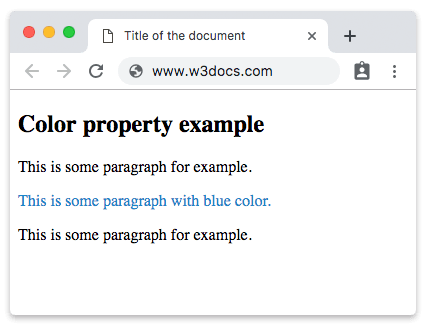
You can set hexadecimal, RGB, HSL, or color names as a value for the color property. Note: The initial value is currentcolor, which means it inherits the text color from its parent element.
Example of the color property with a named color value:
Example of CSS color Property with named color value
<!DOCTYPE html>
<html>
  <head>
    <title>Title of the document</title>
    <style>
      .blue {
        color: blue;
      }
    </style>
  </head>
  <body>
    <h2>Color property example</h2>
    <p>This is some paragraph for example.</p>
    <p class="blue">This is some paragraph with a named blue color.</p>
    <p>This is some paragraph for example.</p>
  </body>
</html>Example of the color property with a hexadecimal value:
Example of CSS color Property with hexadecimal value
<!DOCTYPE html>
<html>
  <head>
    <title>Title of the document</title>
    <style>
      .color {
        color: #8ebf42;
      }
    </style>
  </head>
  <body>
    <h2>Color property example.</h2>
    <p>This is some paragraph for example</p>
    <p class="color">This is some paragraph with a hexadecimal color value (#8ebf42 for green).</p>
    <p>This is some paragraph for example.</p>
  </body>
</html>Example of the color property with an RGB value:
Example of CSS color Property with RGB value
<!DOCTYPE html>
<html>
  <head>
    <title>Title of the document</title>
    <style>
      .color {
        color: rgb(142, 191, 66);
      }
    </style>
  </head>
  <body>
    <h2>Color property example.</h2>
    <p>This is some paragraph for example</p>
    <p class="color">This is some paragraph with a RGB color value.</p>
    <p>This is some paragraph for example.</p>
  </body>
</html>Example of the color property with an HSL value:
Example of CSS color Property with HSL value
<!DOCTYPE html>
<html>
  <head>
    <title>Title of the document</title>
    <style>
      .color {
        color: hsl(89, 43%, 51%);
      }
    </style>
  </head>
  <body>
    <h2>Color property example.</h2>
    <p>This is some paragraph for example</p>
    <p class="color">This is some paragraph with an HSL color value.</p>
    <p>This is some paragraph for example.</p>
  </body>
</html>Choosing a color format
All four formats above can describe the same color — the choice is about readability and what you need to control:
- Named colors (
blue,tomato,rebeccapurple) are the most readable but limited to a fixed list of keywords. Good for quick prototypes. - Hexadecimal (
#8ebf42) is the most common in production. The three pairs are red, green, and blue in base-16. A 4th or 8th digit adds alpha:#8ebf4280is ~50% opaque. - RGB (
rgb(142, 191, 66)) uses the same channels as hex but in decimal, which is easier to read and to generate from code. - HSL (
hsl(89, 43%, 51%)) describes hue (0–360°), saturation, and lightness. It is the most intuitive when you want to tweak a color by hand — bump the lightness for a hover state without touching the hue.
Transparency with RGBA and HSLA
Add an alpha channel with rgba() or hsla() to make text semi-transparent. The alpha is a number from 0 (fully transparent) to 1 (fully opaque):
<!DOCTYPE html>
<html>
  <head>
    <title>Title of the document</title>
    <style>
      .faded {
        color: rgba(28, 135, 201, 0.5);
      }
    </style>
  </head>
  <body>
    <h2>Color property example</h2>
    <p class="faded">This paragraph is 50% transparent blue.</p>
  </body>
</html>To fade a whole element (text, borders, background, and children together) instead of just the text color, use the opacity property.
Choosing a text color is also an accessibility decision. The text and its background must have enough contrast for readers with low vision: WCAG asks for a contrast ratio of at least 4.5:1 for normal text and 3:1 for large text. Light gray on white may look elegant but often fails this test.
Values
| Value | Description | Play it |
|---|---|---|
| color | Describes the color of the text and text decorations. Color names, hexadecimal color codes, rgb(), rgba(), hsl(), hsla() can be used. | Play it » |
| initial | It makes the property use its default value. | Play it » |
| inherit | It inherits the property from its parent element. |