CSS ::first-line Pseudo Element
Use the ::first-line CSS pseudo-element for selecting and styling the first line in a block-level container. Read about the pseudo-element and try examples.
The ::first-line pseudo-element applies styles to the first line of a block-level container. It does not select inline-level elements, such as images or inline-tables.
It is most often used for typographic touches that newspapers and magazines apply to the opening line of an article — a different color, small caps, or extra letter-spacing — without wrapping that line in extra markup. Because the "first line" depends on the element's width, font size, and the user's viewport, the part that gets styled is recalculated by the browser as the layout changes.
Only a specific set of CSS properties can be applied to ::first-line. The complete list is detailed in the Allowable Properties section below.
The ::first-letter pseudo-element inherits only the properties applicable to ::first-line. For all other properties, it inherits from the parent element. If both pseudo-elements are used, styles defined on ::first-letter override those inherited from ::first-line.
The ::first-line pseudo-element can also be written with a single colon (:first-line), which is supported by all browsers.
Version
Allowable Properties
The ::first-line pseudo-element accepts only some CSS properties. Let’s see them:
- All the properties that are related to font: font, font-kerning, font-style, font-variant, font-variant-numeric, font-variant-east-asian, font-variant-caps, font-variant-alternates, font-variant-ligatures, font-feature-settings, font-language-override, font-weight, font-size, font-size-adjust, font-stretch, and font-family.
- All the properties related to background: background-color, background-clip, background-image, background-origin, background-position, background-repeat, background-size, background-attachment, and background-blend-mode.
- Some properties used for styling text: text-shadow, text-decoration, text-decoration-color, text-decoration-line, and text-decoration-style.
- The CSS color property.
- word-spacing, line-height, letter-spacing, text-transform, and white-space.
Specificity and Inheritance of the ::first-line Pseudo-element
Text on the first line inherits only the properties applicable to the ::first-line pseudo-element. For all other properties, it inherits from the parent element. For example, the ::first-letter pseudo-element inherits the styles applied by the ::first-line pseudo-element.
The ::first-line pseudo-element has higher specificity than the base element selector, so its styles override normal declarations on the element. However, standard CSS !important rules still apply according to normal cascade rules.
Syntax
CSS ::first-line syntax example
::first-line {
  css declarations;
}Example of the ::first-line pseudo element:
CSS ::first-line code example
<!DOCTYPE html>
<html>
  <head>
    <title>Title of the document</title>
    <style>
      p::first-line {
        color: #85d6de;
        text-transform: uppercase;
      }
    </style>
  </head>
  <body>
    <h2>::first-line selector example</h2>
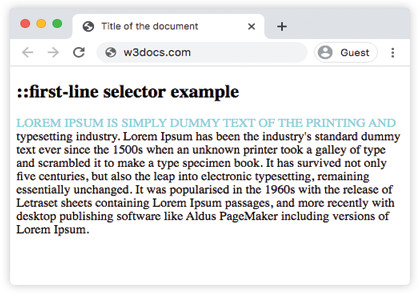
    <p>Lorem Ipsum is simply dummy text of the printing and typesetting industry. Lorem Ipsum has been the industry's standard dummy text ever since the 1500s when an unknown printer took a galley of type and scrambled it to make a type specimen book. It has survived not only five centuries, but also the leap into electronic typesetting, remaining essentially unchanged. It was popularised in the 1960s with the release of Letraset sheets containing Lorem Ipsum passages, and more recently with desktop publishing software like Aldus PageMaker including versions of Lorem Ipsum.</p>
  </body>
</html>In this example, only the words that fall on the first rendered line of the paragraph turn light blue and uppercase. Resize the window and the styled portion changes automatically, because ::first-line follows the line that the browser actually lays out, not a fixed number of characters.
Result
Things to Keep in Mind
- Only block-level containers respond. Applying
::first-lineto an inline element (such as a<span>or an<a>that has not been madedisplay: block) has no effect. - The line is dynamic. There is no way to target a fixed number of characters — if the viewport, font, or padding changes, the browser recomputes which text belongs to the first line and restyles it accordingly.
- Property support is restricted. Layout-affecting properties (such as
margin,padding,border, orwidth) are ignored on::first-line. Use only the properties listed in Allowable Properties. - Order matters with
::first-letter. When you style both, declare them so the intended winner is clear:::first-letterstyles override the matching properties inherited from::first-line. For drop-cap styling, see the ::first-letter pseudo-element.