CSS border-spacing property
Border-spacing is a CSS property which is used to set the distance between adjusted cells. Find some examples here.
The border-spacing CSS property sets the distance between the borders of neighbouring table cells. It is the CSS equivalent of the old HTML cellspacing attribute, but with more control: you can set horizontal and vertical gaps independently.
This page covers what border-spacing does, when it actually takes effect, its accepted values, and several runnable examples.
When border-spacing applies
border-spacing only works in the separated borders model — that is, when border-collapse is set to separate (the default). In this model every cell keeps its own border, so there is a real gap between cells that the property can control.
If you switch to the collapsing model (border-collapse: collapse), adjacent borders merge into a single shared border and there is no gap to size, so border-spacing is ignored. Whenever the spacing seems to do nothing, check that border-collapse is not set to collapse.
Values and syntax
border-spacing accepts one or two length values:
- One value — applies the same gap horizontally and vertically (for example
border-spacing: 20px). - Two values — the first sets the horizontal spacing, the second sets the vertical spacing (for example
border-spacing: 20px 30px).
Lengths can use any CSS unit (px, em, rem, etc.). Negative values are not allowed, and percentages are not accepted.
| Initial Value | 0 |
|---|---|
| Applies to | The table and inline table elements. |
| Inherited | No |
| Animatable | Yes. The spacing amount is animatable. |
| Version | CSS2 |
| DOM Syntax | object.style.borderSpacing = "10px"; |
Syntax
Syntax of CSS border-spacing property
border-spacing: length | initial | inherit;Example of the border-spacing property with one value:
Example of CSS border-spacing property with only one value
<!DOCTYPE html>
<html>
  <head>
    <title>Title of the document</title>
    <style>
      table,
      td,
      th {
        border: 1px solid black;
      }
      .table {
        border-collapse: separate;
        border-spacing: 20px;
      }
    </style>
  </head>
  <body>
    <h2>Example of border-spacing: 20px;</h2>
    <table class="table">
      <tr>
        <th>Firstname</th>
        <th>Lastname</th>
      </tr>
      <tr>
        <td>Mary</td>
        <td>Peterson</td>
      </tr>
      <tr>
        <td>Maxim</td>
        <td>Brown</td>
      </tr>
    </table>
  </body>
</html>Result
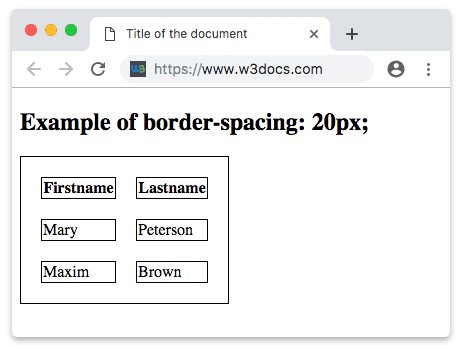
Here is another example that uses two values. The first value sets the horizontal spacing, and the second sets the vertical spacing, so the gap between columns differs from the gap between rows.
Example of the border-spacing property with two values:
Example of CSS border-spacing property with two values
<!DOCTYPE html>
<html>
  <head>
    <title>Title of the document</title>
    <style>
      table {
        border-spacing: 20px 30px;
      }
    </style>
  </head>
  <body>
    <table border="1">
      <thead>
        <tr>
          <th>Heading</th>
          <th>Heading</th>
          <th>Heading</th>
          <th>Heading</th>
        </tr>
      </thead>
      <tbody>
        <tr>
          <td>Some text</td>
          <td>Some text</td>
          <td>Some text</td>
          <td>Some text</td>
        </tr>
        <tr>
          <td>Some text</td>
          <td>Some text</td>
          <td>Some text</td>
          <td>Some text</td>
        </tr>
      </tbody>
    </table>
  </body>
</html>Now let’s give some styling to the table example above. For example, let’s add background-color. It sets the background color of an element.
Example of using the border-spacing property with the background-color property:
Example of CSS border-spacing property with background-color property
<!DOCTYPE html>
<html>
  <head>
    <title>Title of the document</title>
    <style>
      table,
      td,
      th {
        border: 1px solid black;
      }
      .table {
        border-collapse: separate;
        border-spacing: 20px;
        background-color: #eee;
      }
    </style>
  </head>
  <body>
    <h1>Example of border-spacing: 20px;</h1>
    <table class="table">
      <tr>
        <th>Firstname</th>
        <th>Lastname</th>
      </tr>
      <tr>
        <td>Mary</td>
        <td>Peterson</td>
      </tr>
      <tr>
        <td>Maxim</td>
        <td>Brown</td>
      </tr>
    </table>
  </body>
</html>Values
| Value | Description | Play it |
|---|---|---|
| length | Specifies the distance between cells in px, em, etc. | Play it » |
| initial | Sets this property to its default value. | Play it » |
| inherit | Inherits this property from its parent element. |
Related properties
- border-collapse — decide whether cell borders are separated (so
border-spacingworks) or collapsed. - empty-cells — control whether borders and backgrounds are drawn around empty cells in the separated model.
- border-color — set the color of the cell borders that
border-spacingpulls apart. - HTML tables — the markup these styles apply to.