CSS background-color Property
CSS background-color property sets an element background color. The background of an element is the total size of the element. Try the examples.
The CSS background-color property sets the background color of an element. The color fills the element's content, padding, and border boxes, but not the margin — margins are always transparent and show the parent's background through them.
This page covers the property's syntax, the color formats you can use, the special transparent and initial keywords, how the color animates between states, and the accessibility rule that keeps text readable.
How to set a background color
You can pass any valid CSS color value. The most common formats are:
- Named colors —
red,tomato,rebeccapurple. - HEX —
#ff0000(or the 3-digit shorthand#f00), with an optional alpha pair#ff000080. - rgb() / rgba() —
rgb(255, 0, 0),rgba(255, 0, 0, 0.5)for partial transparency. - hsl() / hsla() —
hsl(0, 100%, 50%), often easier to tweak by hand than HEX.
You can pick values visually with our Color Picker tool, or read the full reference of HTML Colors.
background-color is the simplest part of the background shorthand; if you only need a solid color, set it on its own rather than writing out the whole shorthand.
Always keep a high enough contrast ratio between the background color and the text placed over it. WCAG asks for at least 4.5:1 for normal text (3:1 for large text) so people with low vision can read the page. Use a contrast checker when picking dark-on-light or light-on-dark combinations.
| Initial Value | transparent |
|---|---|
| Applies to | All elements. It also applies to ::first-letter and ::first-line. |
| Inherited | No. |
| Animatable | Yes. The color of the background is animatable. |
| Version | CSS1 |
| DOM Syntax | object.style.backgroundColor = "#FFFFFF"; |
Syntax
Syntax of CSS background-color property
background-color: color | transparent | initial | inherit;Example of the background-color property:
Example of CSS background-color property
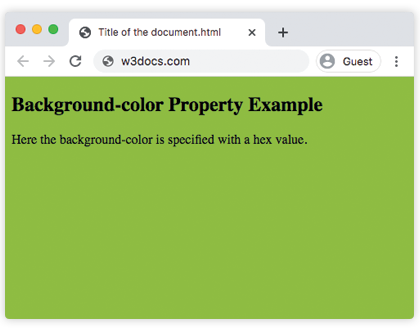
<!DOCTYPE html>
<html>
  <head>
    <style>
      body {
        background-color: #8ebc42;
      }
    </style>
  </head>
  <body>
    <h2>Background-color Property Example</h2>
    <p>Here the background-color is specified with a hex value.</p>
  </body>
</html>
Using transparency
Any color format with an alpha channel lets the color sit semi-transparent over whatever is behind the element:
background-color: rgba(255, 0, 0, 0.5);     /* semi-transparent red */
background-color: hsla(120, 100%, 50%, 0.5); /* semi-transparent green */
background-color: #0000ff80; /* semi-transparent blue (8-digit hex) */The fourth value (alpha) ranges from 0 (fully transparent) to 1 (fully opaque). Unlike the opacity property, an alpha background color only affects the background — text and child elements stay fully opaque.
Example of the background-color property with the "transparent" value:
Example of CSS background-color property with transparent value
<!DOCTYPE html>
<html>
  <head>
    <style>
      body {
        background-color: transparent;
      }
    </style>
  </head>
  <body>
    <h2>Background-color Property Example</h2>
    <p>In this example the background-color is set to transparent. This is the default value.</p>
  </body>
</html>Example of the animated version of the background-color property:
Example of CSS background-color property with animation
<!DOCTYPE html>
<html>
  <head>
    <style>
      body {
        background-color: #eee;
        animation: mymove 5s infinite;
      }
      @keyframes mymove {
        30% {
          background-color: #1c87c9;
        }
        100% {
          background-color: #eee;
        }
      }
    </style>
  </head>
  <body>
    <h2> Animation of background-color property</h2>
    <p>
      In this example it gradually changes the background color from grey to blue, and back to grey.
    </p>
  </body>
</html>Because background-color is animatable, the browser interpolates smoothly between the two colors. It works the same way with CSS transitions — for example, fading a button's background on :hover.
Inheritance
background-color is not inherited. Each element starts out transparent, so a child does not copy its parent's background — it simply lets the parent's background show through unless you give it its own. This is why setting a color on <body> appears to "fill the page": child elements are transparent and the body's color shows behind them.
Browser support
background-color has been part of the spec since CSS1 and is supported in every browser, including all versions of Internet Explorer. The 4- and 8-digit HEX-with-alpha notation (#rrggbbaa) is the only newer addition and needs a reasonably modern browser; rgba() and hsla() are safe everywhere.
Values
| Value | Description | Play it |
|---|---|---|
| transparent | This is the default value and it defines the background color as transparent. It means that there is no background color. | Play it » |
| color | Defines the background color. Color names, hexadecimal color codes, rgb(), rgba(), hsl(), hsla() can be used. | Play it » |
| initial | Sets the property to its default value. | Play it » |
| inherit | Inherits the property from its parent element. |