CSS writing-mode Property
Use the writing-mode CSS property to define the direction of the text in which content flows. Read about property values and try examples.
The CSS writing-mode property sets whether lines of text are laid out horizontally or vertically, and in which direction blocks and lines progress.
This page explains what the property does, the values it accepts, when you actually reach for it, and how it interacts with related properties like text-orientation and direction.
What writing-mode controls
writing-mode changes the block flow direction — the direction in which block-level boxes (paragraphs, headings, etc.) stack — and the inline base direction in which characters flow within a line. In a normal English page, blocks stack top-to-bottom and text within a line flows left-to-right (horizontal-tb). Switching to a vertical value rotates that whole model: lines run top-to-bottom and stack either right-to-left or left-to-right.
Because it remaps the meaning of "start", "end", "block", and "inline", writing-mode works hand in hand with CSS logical properties (margin-block, padding-inline, inset-block, and so on), which automatically follow the active writing mode instead of being tied to physical sides.
When would I use it?
- Vertical East Asian scripts (traditional Chinese, Japanese, Korean) that are written top-to-bottom, columns running right-to-left — use
vertical-rl. - Rotated UI labels, such as a sideways column header in a table or a vertical axis label on a chart.
- Editorial or "magazine" layouts that intentionally turn a heading or callout on its side.
For vertical modes you almost always pair writing-mode with text-orientation to decide whether individual Latin characters stay upright or are rotated 90°.
Modern browsers fully support the writing-mode property without vendor prefixes.
| Initial Value | horizontal-tb |
|---|---|
| Applies to | All elements except table row groups, table column groups, table rows, table columns, ruby base container, ruby annotation container. |
| Inherited | Yes. |
| Animatable | No. |
| Version | CSS3 |
| DOM Syntax | object.style.writingMode = "vertical-lr"; |
Syntax
CSS writing-mode values
writing-mode: horizontal-tb | vertical-rl | vertical-lr | sideways-rl | sideways-lr;The default is horizontal-tb. The property is inherited, so setting it on a container applies to all descendants unless they override it.
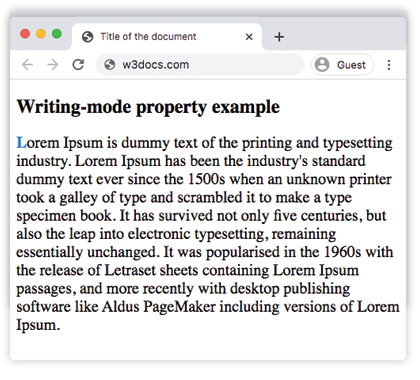
Example of the writing-mode property with the horizontal-tb value:
CSS writing-mode code example
<!DOCTYPE html>
<html>
  <head>
    <title>Title of the document</title>
    <style>
      p {
        font-size: 20px;
        writing-mode: horizontal-tb;
      }
      p::first-letter {
        color: #1c87c9;
        font-weight: bold;
      }
    </style>
  </head>
  <body>
    <h2>Writing-mode property example</h2>
    <p>
      Lorem Ipsum is dummy text of the printing and typesetting industry. Lorem Ipsum has been the industry's standard dummy text ever since the 1500s when an unknown printer took a galley of type and scrambled it to make a type specimen book. It has survived not only five centuries, but also the leap into electronic typesetting, remaining essentially unchanged. It was popularised in the 1960s with the release of Letraset sheets containing Lorem Ipsum passages, and more recently with desktop publishing software like Aldus PageMaker including versions of Lorem Ipsum.
    </p>
  </body>
</html>Result
Another example where the content flows vertically from top to bottom and right to left.
Example of the writing-mode property with the vertical-rl value:
CSS writing-mode vertical-rl example
<!DOCTYPE html>
<html>
  <head>
    <title>The title of the document</title>
    <style>
      p {
        font-size: 20px;
        writing-mode: vertical-rl;
      }
      p::first-letter {
        color: #1c87c9;
        font-weight: bold;
      }
    </style>
  </head>
  <body>
    <h2>Writing-mode property example</h2>
    <p>
      Lorem Ipsum is dummy text of the printing and typesetting industry. Lorem Ipsum has been the industry's standard dummy text ever since the 1500s when an unknown printer took a galley of type and scrambled it to make a type specimen book. It has survived not only five centuries, but also the leap into electronic typesetting, remaining essentially unchanged. It was popularised in the 1960s with the release of Letraset sheets containing Lorem Ipsum passages, and more recently with desktop publishing software like Aldus PageMaker including versions of Lorem Ipsum.
    </p>
  </body>
</html>In the following example, the content flows vertically from top to bottom and left to right.
Example of the writing-mode property with the vertical-lr value:
CSS writing-mode vertical-lr example
<!DOCTYPE html>
<html>
  <head>
    <title>The title of the document</title>
    <style>
      p {
        font-size: 20px;
        writing-mode: vertical-lr;
      }
      p::first-letter {
        color: #1c87c9;
        font-weight: bold;
      }
    </style>
  </head>
  <body>
    <h2>Writing-mode property example</h2>
    <p>
      Lorem Ipsum is dummy text of the printing and typesetting industry. Lorem Ipsum has been the industry's standard dummy text ever since the 1500s, when an unknown printer took a galley of type and scrambled it to make a type specimen book. It has survived not only five centuries, but also the leap into electronic typesetting, remaining essentially unchanged. It was popularised in the 1960s with the release of Letraset sheets containing Lorem Ipsum passages, and more recently with desktop publishing software like Aldus PageMaker including versions of Lorem Ipsum.
    </p>
  </body>
</html>Pairing with text-orientation
Inside a vertical writing mode, text-orientation decides how each glyph is rotated. The most common combination keeps CJK characters upright while still flowing the line vertically:
.vertical {
  writing-mode: vertical-rl;
  text-orientation: upright; /* keep characters upright instead of rotated 90° */
}Without text-orientation: upright, Latin letters and numbers are rotated 90° clockwise by default in a vertical mode.
Values
horizontal-tb is the only horizontal value. The remaining values are all vertical and differ in the direction lines stack and how glyphs are oriented.
| Value | Description |
|---|---|
| horizontal-tb | Default. The content flows horizontally from left to right, and lines stack from top to bottom. |
| vertical-rl | The content flows vertically from top to bottom, and lines stack from right to left. |
| vertical-lr | The content flows vertically from top to bottom and horizontally from left to right. |
| sideways-rl | Deprecated in CSS Writing Modes Level 3. The content flows vertically from top to bottom and all the glyphs are set sideways toward the right. |
| sideways-lr | Deprecated in CSS Writing Modes Level 3. The content flows vertically from top to bottom and all the glyphs are set sideways toward the left. |
| initial | Makes the property use its default value. |
| inherit | Inherits the property from its parent element. |
Related properties
text-orientation— controls how individual glyphs are rotated inside a vertical writing mode.direction— sets the inline base direction (LTR vs RTL) for the text.text-align— aligns inline content; itsstart/endkeywords respect the writing mode.transform— an alternative way to rotate elements visually, without changing the layout model.