CSS border-radius Property
The border-radius property is used to make rounded corners for the outer border edge of an element. See what trick you can do with it with examples.
The border-radius property is used to make rounded corners for the outer border edge of an element. It works whether or not the element has a visible border, and it clips the background and box shadow to the rounded shape as well. This page covers the shorthand syntax, the one-to-four value rules, percentage versus length units, the elliptical slash syntax, and common real-world use cases.
The border-radius property is one of the CSS3 properties.
This property is a shorthand property for the border-top-left-radius, border-top-right-radius, border-bottom-right-radius and border-bottom-left-radius properties which are used for setting the four corners of an element separately. But the border-radius property can be used to define all the four corners at the same time. It can have from one to four values.
If four values are provided, they apply to the top-left, top-right, bottom-right, and bottom-left corners respectively. If the bottom-left value is omitted, it defaults to the top-right value. If the bottom-right value is omitted, it defaults to the top-left value. If only two values are provided, the first applies to the top-left and bottom-right corners, and the second applies to the top-right and bottom-left corners. If only one value is provided, it applies to all four corners.
The border-radius property is specified as:
- one, two, three, or four length or percentage values that are used to set a single radius for the corners.
- followed optionally by a slash ( / ) and one, two, three, or four length or percentage values. This is used to set an additional radius, so you can have elliptical corners.
The first set of (1-4) values define the horizontal radius for all four corners. An optional second set of values, preceded by a slash, define the vertical radii for all four corners. If only one set of values is provided, these values will be used to determine both the vertical and horizontal radii equally.
When you use a percentage, it is resolved against the element's own size: the horizontal radius is a percentage of the box's width and the vertical radius a percentage of its height. This is why border-radius: 50% turns a square into a perfect circle, while the same value on a rectangle produces an ellipse.
| Initial Value | 0 |
|---|---|
| Applies to | All elements. It also applies to ::first-letter. |
| Inherited | No |
| Animatable | Yes. Each of the properties of the shorthand are animatable. |
| Version | CSS3 |
| DOM Syntax | object.style.borderRadius = "20px"; (Note: JavaScript uses camelCase borderRadius, unlike the hyphenated CSS property name.) |
Syntax
Syntax of CSS border-radius Property
border-radius: <length> | <percentage> [ / <length> | <percentage> ]? | initial | inherit;Example of the border-radius property:
Example of CSS border-radius Property
<!DOCTYPE html>
<html>
  <head>
    <title>Title of the document</title>
    <style>
      div {
        height: 40px;
        width: 50%;
        background: #ccc;
        border: 4px solid #1c87c9;
        border-radius: 10px;
      }
    </style>
  </head>
  <body>
    <h2>Border-radius example</h2>
    <div></div>
  </body>
</html>Result
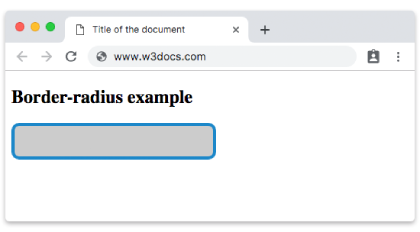
See an example with percent and pixel values:
Example of the border-radius property with percent and pixel values:
Example of CSS border-radius Property with percent and pixel values
<!DOCTYPE html>
<html>
  <head>
    <title>Title of the document</title>
    <style>
      .radius-pixel {
        height: 40px;
        background: #ccc;
        border: 4px solid #1c87c9;
        border-radius: 12px;
      }
      .radius-percent {
        width: 120px;
        height: 120px;
        margin-top: 20px;
        background: #ccc;
        border: 4px solid #1c87c9;
        border-radius: 50%;
      }
    </style>
  </head>
  <body>
    <h2>Border-radius example with percent and pixel values</h2>
    <div class="radius-pixel"></div>
    <div class="radius-percent"></div>
  </body>
</html>A pixel value gives the same fixed corner radius no matter how the element is resized, which is what you usually want for buttons, cards, and inputs. A percentage scales with the element, so border-radius: 50% on a square element produces a circle — a common trick for avatars and badges.
You can also set the border-radius for an element with background color or background image.
Example of the border-radius property with background-color and background-image properties:
Example of CSS border-radius Property with background color and background image properties
<!DOCTYPE html>
<html>
  <head>
    <title>Title of the document</title>
    <style>
      .radius-bg {
        width: 250px;
        height: 200px;
        background: #ccc;
        border: 4px solid #1c87c9;
        border-radius: 12px;
      }
      .radius-img {
        width: 250px;
        height: 200px;
        margin-top: 20px;
        background-color: lightgray;
        background: url('https://api.w3docs.com/uploads/media/default/0001/01/6ef5dc22756f45ab51d0c510ad0371191ec4ff04.jpeg');
        background-position: left top;
        background-repeat: repeat;
        border: 2px solid #1c87c9;
        border-radius: 25px;
      }
    </style>
  </head>
  <body>
    <h1> Border-radius example with background color</h1>
    <div class="radius-bg"></div>
    <h2> Border-radius example with background image</h2>
    <div class="radius-img"></div>
  </body>
</html>Note: In older browsers, background images may not clip to the rounded corners. Use background-clip: border-box; to ensure consistent behavior.
Now let’s see an example full of various boxes with different border-radius values which form the shape of the boxes.
Example of the border-radius property with multiple values:
Example of CSS border-radius Property with different values(%,px)
<!DOCTYPE html>
<html>
  <head>
    <title>Title of the document</title>
    <style>
      div {
        width: 250px;
        height: 150px;
        border: solid 3px #1c87c9;
        background: #1c87c9;
      }
      .radius_1 {
        border-radius: 25px;
      }
      .radius_2 {
        border-radius: 25% 10%;
      }
      .radius_3 {
        border-radius: 10% 30% 50% 70%;
      }
      .radius_4 {
        border-radius: 10% / 50%;
      }
      .radius_5 {
        border-radius: 10px 100px / 120px;
      }
      .radius_6 {
        border-radius: 25% 10%;
      }
      .radius_7 {
        border-radius: 50% 20% / 10% 40%;
      }
      .radius_8 {
        border-radius: 50%;
      }
    </style>
  </head>
  <body>
    <h1> Border-radius examples</h1>
    <div class="radius_1"></div>
    <br />
    <div class="radius_2"></div>
    <br />
    <div class="radius_3"></div>
    <br />
    <div class="radius_4"></div>
    <br />
    <div class="radius_5"></div>
    <br />
    <div class="radius_6"></div>
    <br />
    <div class="radius_7"></div>
    <br />
    <div class="radius_8"></div>
  </body>
</html>The slash syntax (for example border-radius: 10px 100px / 120px) separates horizontal radii from vertical radii, which is how you create asymmetric, elliptical corners rather than simple quarter-circles.
Common use cases
- Rounded buttons and cards: a small fixed value such as
border-radius: 6pxsoftens corners without distorting the shape. - Pill-shaped buttons: a large value like
border-radius: 9999pxfully rounds the short sides into a capsule. - Circles and avatars:
border-radius: 50%on a square element (equal width and height) produces a perfect circle. - Decorative blobs: four different percentage values, optionally with the
/syntax, create organic, leaf-like shapes.
Values
| Value | Description | Play it |
|---|---|---|
| length | Sets the rounding size of the corners. | Play it » |
| % | Sets the rounding size of the corners in percent. | Play it » |
| initial | Makes the property use its default value. | Play it » |
| inherit | Inherits the property from its parent element. |