CSS grid-template-columns Property
Use the grid-template-columns CSS property to define the size and the width of columns. See how to use this CSS property values.
The grid-template-columns property defines the number of columns in a CSS grid layout and the width (track size) of each one. You set it on the grid container — the element with display: grid — and each value in the list creates one explicit column track.
This page covers the track-sizing keywords and functions you can pass to it (fr, repeat(), minmax(), auto, fit-content()), when to reach for each, and the gotchas that trip people up. For the row equivalent, see grid-template-rows; to lay out columns and rows together, see grid-template.
| Initial Value | none |
|---|---|
| Applies to | Grid containers. |
| Inherited | No. |
| Animatable | Yes. Columns are animatable. |
| Version | CSS Grid Layout Module Level 1 |
| DOM Syntax | object.style.gridTemplateColumns = "40px 40px 40px"; |
Syntax
CSS grid-template-columns
grid-template-columns: none | auto | max-content | min-content | minmax() | <length> | <percentage> | <flex> | fit-content | repeat | initial | inherit;Example of the grid-template-columns property:
CSS grid-template-columns code example
<!DOCTYPE html>
<html>
  <head>
    <title>Title of the document</title>
    <style>
      .example {
        display: grid;
        grid-template-columns: 1fr 1fr 1fr 1fr;
        gap: 10px;
        background-color: #ccc;
        padding: 10px;
        margin-top: 20px;
      }
      .example > div {
        background-color: #eee;
        text-align: center;
        padding: 30px 0;
        font-size: 30px;
      }
    </style>
  </head>
  <body>
    <h2>Grid-template-columns property example</h2>
    <div class="example">
      <div>1</div>
      <div>2</div>
      <div>3</div>
      <div>4</div>
      <div>5</div>
      <div>6</div>
      <div>7</div>
      <div>8</div>
    </div>
  </body>
</html>Here 1fr 1fr 1fr 1fr creates four equal-width columns. The fr unit ("fraction") splits the leftover space in the container after gaps are subtracted, so the four tracks always stay equal no matter the screen width. The eight items wrap onto two implicit rows because there are only four columns.
Result
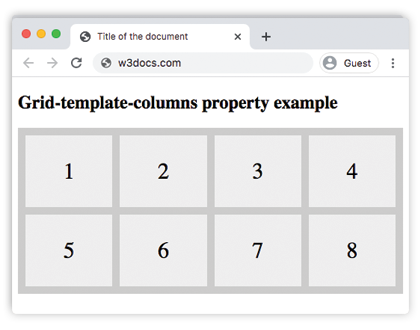
Example of the grid-template-columns applied to grid-container:
CSS grid-template-columns length example
<!DOCTYPE html>
<html>
  <head>
    <title>Title of the document</title>
    <style>
      .grid-container {
        display: grid;
        grid-template-columns: 40px 150px auto 80px;
        gap: 10px;
        background-color: #ccc;
        padding: 10px;
      }
      .grid-container > div {
        background-color: #eee;
        text-align: center;
        padding: 30px 0;
        font-size: 30px;
      }
    </style>
  </head>
  <body>
    <h2>Grid-template-columns property example</h2>
    <div class="grid-container">
      <div>1</div>
      <div>2</div>
      <div>3</div>
      <div>4</div>
      <div>5</div>
      <div>6</div>
      <div>7</div>
      <div>8</div>
    </div>
  </body>
</html>Mixing fixed and flexible tracks is the most common real-world pattern. Above, the first column is exactly 40px, the second 150px, the fourth 80px, and the third (auto) absorbs whatever space is left.
Track-sizing keywords and functions
You rarely list every column by hand. These keywords and functions keep the value short and responsive.
repeat() — avoid repeating yourself
repeat(count, size) expands to count tracks of the given size. grid-template-columns: repeat(4, 1fr) is identical to 1fr 1fr 1fr 1fr. Combined with auto-fill/auto-fit, it fits as many tracks as the container allows — the basis of responsive card grids:
/* As many 200px+ columns as fit; each grows to fill the row. */
grid-template-columns: repeat(auto-fit, minmax(200px, 1fr));minmax() — set a floor and a ceiling
minmax(min, max) lets a track grow and shrink between two bounds. minmax(200px, 1fr) never gets narrower than 200px but stretches to share leftover space. Use it to stop columns from collapsing on small screens.
fr — share the leftover space
The fr unit distributes the space remaining after fixed sizes and gaps. 2fr 1fr makes the first column twice as wide as the second. Unlike percentages, fr already accounts for the gap, so columns don't overflow the container.
auto, max-content, min-content, fit-content()
auto sizes a track to its content but lets it stretch; max-content makes it as wide as its longest unbroken content; min-content shrinks it to the narrowest its content allows; fit-content(300px) behaves like auto but never exceeds the given cap.
Try it together
<!DOCTYPE html>
<html>
  <head>
    <title>grid-template-columns with repeat and minmax</title>
    <style>
      .cards {
        display: grid;
        grid-template-columns: repeat(auto-fit, minmax(120px, 1fr));
        gap: 10px;
        background-color: #ccc;
        padding: 10px;
      }
      .cards > div {
        background-color: #6b9b37;
        color: #fff;
        text-align: center;
        padding: 30px 0;
        font-size: 24px;
      }
    </style>
  </head>
  <body>
    <h2>Responsive columns</h2>
    <div class="cards">
      <div>1</div>
      <div>2</div>
      <div>3</div>
      <div>4</div>
      <div>5</div>
      <div>6</div>
    </div>
  </body>
</html>Resize the preview: the number of columns changes automatically while each card stays at least 120px wide.
Values
| Value | Description | Play it |
|---|---|---|
| none | This is the default value of the property. | Play it » |
| auto | The track size is determined by its content, but can grow to fill available space. | Play it » |
| max-content | The size of each column depends on the largest item in the column. | Play it » |
| min-content | The size of each column depends on the smallest item in the column. | Play it » |
| minmax(min, max) | The size range is greater than or equal to "min" and less than or equal to "max". | Play it » |
<length> | The size of the columns is specified by length value. | Play it » |
<percentage> | The size of the columns is specified by percentages. | Play it » |
<flex> | A non-negative dimension with the unit "fr" that specifies the track’s flex factor. Each <flex>-sized track shares remaining space in proportion to its flex factor. | Play it » |
| fit-content | Represents the min(max-content, max(auto, argument)), which is similar to auto (i.e. minmax(auto, max-content)), but the size is greater than the auto minimum. | Play it » |
| repeat | Represents a repeated fragment of the track list, allowing a large number of columns that exhibit a recurring pattern to be written in a more compact form. | Play it » |
| initial | Makes the property use its default value. | Play it » |
| inherit | Inherits the property from its parent element. | Play it » |
Related properties
grid-template-rows— the same idea for horizontal tracks (rows).grid-template-areas— name regions of the grid and place items by name.grid-template— shorthand that sets rows, columns, and areas at once.grid-auto-columns— sizes implicit columns created beyond your explicit template.grid— the full shorthand for an entire grid definition.