CSS visibility Property
The visibility CSS property defines whether the element is visible to the user or hidden. Find some examples and try them for yourself.
The CSS visibility property controls whether an element is shown or hidden without changing the layout — a hidden element keeps the exact space it would occupy if it were visible. This page covers the three core values (visible, hidden, collapse), how visibility differs from display and opacity, the accessibility implications of hiding content, and runnable examples for each value.
What visibility does
The most-used value is hidden. When you set visibility: hidden, the element becomes invisible but still takes up its box in the layout — surrounding content does not move to fill the gap. The element is also removed from the tab order and is not announced by screen readers, so it is genuinely hidden from assistive technology, not just visually.
One unusual feature: visibility is inherited, but a child can override it. If a parent has visibility: hidden, a descendant with visibility: visible will reappear even though its ancestor is hidden.
The collapse value is special-cased for table-related elements (<tr>, <col>, row groups, column groups). On those, it removes the row or column entirely — the way display: none would — so the rest of the table reflows to close the gap, but the table's column widths stay computed as if the row were still there. On non-table elements, collapse simply behaves like hidden.
Browser support for collapse on table elements is inconsistent: some engines render it identically to hidden (the row stays visible-space). If you need a row to truly disappear cross-browser, use display: none on the <tr> instead.
visibility vs. display vs. opacity
These three properties all "hide" an element, but they behave differently — choosing the wrong one is a common bug.
| Property | Keeps layout space? | In accessibility tree? | Receives events? |
|---|---|---|---|
visibility: hidden | Yes | No | No |
display: none | No (collapses) | No | No |
opacity: 0 | Yes | Yes | Yes |
Use visibility: hidden when you want to reserve the element's space but hide its content (for example, toggling a placeholder without the page jumping). Use display: none when you want the element to disappear and the layout to close up. Use opacity: 0 only when you want a still-interactive, still-readable-by-screen-readers element — for instance, an element you are fading in or out.
Because visibility is animatable, you can combine it with opacity for a fade-out that ends in a fully hidden, non-interactive element:
.fade {
  opacity: 1;
  visibility: visible;
  transition: opacity 0.3s, visibility 0s linear 0.3s;
}
.fade.is-hidden {
  opacity: 0;
  visibility: hidden;
}| Initial Value | visible |
|---|---|
| Applies to | All elements (collapse only applies to table-related elements). |
| Inherited | Yes. |
| Animatable | Yes. |
| Version | CSS2 |
| DOM Syntax | Object.style.visibility = "collapse"; |
Syntax
Syntax of CSS visibility Property
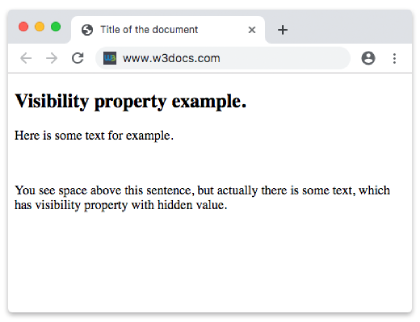
visibility: visible | hidden | collapse | initial | inherit | revert | revert-layer;Example of the visibility property with the "hidden" value:
Example of CSS visibility Property with hidden value
<!DOCTYPE html>
<html>
  <head>
    <title>Title of the document</title>
    <style>
      p {
        visibility: hidden;
      }
    </style>
  </head>
  <body>
    <h2>Visibility property example.</h2>
    <div>Here is some text for example.</div>
    <p>Text, which will not be displayed in browser.</p>
    <div>
      You see space above this sentence, but actually there is some text, which has visibility property with hidden value.
    </div>
  </body>
</html>Result
Example of the visibility property with the "visible" and "hidden" values:
Example of CSS visibility Property with visible and hidden values
<!DOCTYPE html>
<html>
  <head>
    <title>Title of the document</title>
    <style>
      .test1 {
        visibility: visible;
      }
      .test2 {
        visibility: hidden;
      }
    </style>
  </head>
  <body>
    <h2>Visibility property example</h2>
    <p class="test1">Lorem Ipsum is simply dummy text.</p>
    <p class="test2">Lorem Ipsum is simply dummy text.</p>
    <p>The space above is a hidden text.</p>
  </body>
</html>Example of the visibility property with the "collapse" value:
Example with CSS visibility Property with collapse value
<!DOCTYPE html>
<html>
  <head>
    <title>Title of the document</title>
    <style>
      .collapse {
        visibility: collapse;
      }
      table {
        border: 2px solid #666;
      }
      td {
        border: 1px solid #ccc;
      }
    </style>
  </head>
  <body>
    <h2>Visibility property example</h2>
    <p>Here the "collapse" value is applied.</p>
    <table>
      <tr>
        <td>10</td>
        <td class="collapse">100</td>
        <td>1000</td>
      </tr>
      <tr>
        <td>20</td>
        <td>200</td>
        <td>2000</td>
      </tr>
      <tr class="collapse">
        <td>30</td>
        <td>300</td>
        <td>3000</td>
      </tr>
      <tr>
        <td>40</td>
        <td>400</td>
        <td>4000</td>
      </tr>
    </table>
  </body>
</html>Values
| Value | Description | Play it |
|---|---|---|
| visible | In this case the tag is visible. This is the default value of this property. | Play it » |
| hidden | This value only visually hides the elements. | Play it » |
| collapse | Used with particular table elements (rows, row groups, columns, column groups) to remove entire rows or columns. This value has the same meaning as "hidden" when used with other elements. | Play it » |
| initial | Makes the property use its default value. | Play it » |
| inherit | Inherits the property from its parents element. | |
| revert | Reverts the property to its inherited value or initial value, depending on what is applicable. | Play it » |
| revert-layer | Reverts the property to the value set in the previous layer of the cascade. | Play it » |
Related properties
- CSS
display— hide an element and remove its space from the layout. - CSS
opacity— make an element transparent while keeping it interactive. - CSS
overflow— control content that spills outside its box. - CSS
position— move elements out of the normal flow.