CSS border-top-color Property
The border-top-color property is used for defining the color of the top border of an element. See all property values with examples.
The CSS border-top-color property defines the color of an element's top border only. Use it when you want the top edge to differ from the other three sides — for example, a colored accent bar above a card or a section header.
A border has three parts: its style, width, and color. The border-top-color property controls only the color. By itself it does nothing visible, because the default border-style is none, which removes the border entirely. So you must first declare a style for the top edge — using border-style or border-top-style — before the color has anything to paint.
To set all four border colors at once instead of just the top, use the border-color shorthand. The matching properties for the other sides are border-right-color, border-bottom-color, and border-left-color.
The default border width is medium. You can change it with border-width or border-top-width.
| Initial Value | currentColor |
|---|---|
| Applies to | All elements. It also applies to ::first-letter. |
| Inherited | No |
| Animatable | Yes. The color of the top border is animatable. |
| Version | CSS1 |
| DOM Syntax | object.style.borderTopColor = "black"; |
Syntax
Syntax of CSS border-top-color Property
border-top-color: color | transparent | initial | inherit;Example of the border-top-color property:
Example of CSS border-top-color Property
<!DOCTYPE html>
<html>
  <head>
    <title>Title of the document</title>
    <style>
      div {
        width: 300px;
        padding: 20px;
        border-style: solid;
        border-color: #666;
        border-top-color: #1c87c9;
      }
    </style>
  </head>
  <body>
    <h2>Border-top-color example</h2>
    <div>Example for the border-top-color property with different top border color.</div>
  </body>
</html>Result
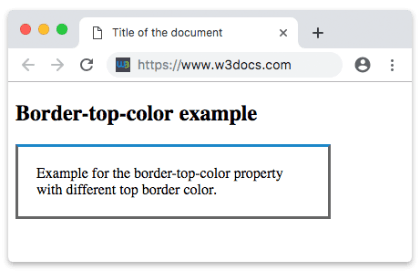
Example of the border-top-color property with the "transparent" value:
Example of CSS border-top-color Property with transparent value
<!DOCTYPE html>
<html>
  <head>
    <title>Title of the document</title>
    <style>
      h2 {
        padding-bottom: 8px;
        text-align: center;
        border: 12px groove #1c87c9;
        border-top-color: transparent;
      }
    </style>
  </head>
  <body>
    <h2>A heading with a transparent top border</h2>
  </body>
</html>Hexadecimal, RGB, RGBA, HSL, HSLA or color names can be applied as a value for the border-top-color property.
Example of the border-top-color property with a named color value:
Example of CSS border-top-color Property with darkred (named color) value
<!DOCTYPE html>
<html>
  <head>
    <title>Title of the document</title>
    <style>
      div {
        padding: 10px;
        width: 50%;
        border: solid #666;
        border-top-color: darkred;
      }
    </style>
  </head>
  <body>
    <div>Border-top-color property with a named color value.</div>
  </body>
</html>Example of the border-top-color property with a hexadecimal value:
Example of CSS border-top-color Property with hexadecimal value
<!DOCTYPE html>
<html>
  <head>
    <title>Title of the document</title>
    <style>
      div {
        padding: 10px;
        width: 50%;
        border: solid #666;
        border-top-color: #1c87c9;
      }
    </style>
  </head>
  <body>
    <div>Border-top-color property with a hexadecimal value.</div>
  </body>
</html>Example of the border-top-color property with a RGB value:
Example of CSS border-top-color Property with RGB value
<!DOCTYPE html>
<html>
  <head>
    <title>Title of the document</title>
    <style>
      div {
        padding: 10px;
        width: 50%;
        border: solid #666;
        border-top-color: rgb(142, 191, 66);
      }
    </style>
  </head>
  <body>
    <div>Border-top-color property with a RGB value.</div>
  </body>
</html>Example of the border-top-color property with a HSL value:
Example of CSS border-top-color Property with HSL value
<!DOCTYPE html>
<html>
  <head>
    <title>Title of the document</title>
    <style>
      div {
        padding: 10px;
        width: 50%;
        border: solid #666;
        border-top-color: hsl(24, 80%, 50%);
      }
    </style>
  </head>
  <body>
    <div>Border-top-color property with a HSL value.</div>
  </body>
</html>Values
| Value | Description | Play it |
|---|---|---|
| color | Defines the color of the top border. Default color is the color of the current element. Color names, hexadecimal color codes, rgb(), rgba(), hsl(), hsla() can be used. Required value. | Play it » |
| transparent | Applies a transparent color to the top border. The top border will still take up the space defined by the border-width value. | Play it » |
| initial | Sets the property to its default value. | Play it » |
| inherit | Inherits the property from its parent element. |
Things to remember
- Color alone is not enough. Because
border-styledefaults tonone, the top border stays invisible until you set a style (solid,dashed,groove, etc.). Always pairborder-top-colorwith a style. currentColoris the default. If you never setborder-top-color, the border uses the element'scolorvalue. Changing the textcolorwill also change an un-styled border's color.transparentstill reserves space. A transparent top border keeps itsborder-top-width, so the layout does not shift — useful for hover effects that swap a transparent border for a visible one.- Any color format works. Color names, hex (
#1c87c9),rgb(),rgba(),hsl(), andhsla()are all valid. Usergba()/hsla()when you need partial transparency.
Related properties
- border-top — shorthand for the top border's width, style, and color in one declaration.
- border-top-style and border-top-width — the other two parts of the top border.
- border-color — sets the color of all four borders at once.
- border-bottom-color, border-right-color, border-left-color — the per-side color properties for the other edges.