CSS @import Rule
The CSS @import at rule allows to import style rules from other style sheets and to support media queries. See values and try examples.
The CSS @import at-rule pulls the style rules from one external style sheet into another. It lets you split your CSS across several files (for example, one file per component or per theme) and combine them from a single entry point, and it can load a sheet conditionally based on a media query.
The keyword @import must be followed by the location of the sheet you want to include, written either as a url() or as a plain string. Both of the lines below do the same thing:
@import url("theme.css");
@import "theme.css";Where the rule must go
@import is only valid at the very top of a style sheet. It must appear before every other rule except @charset and @layer (a bare @layer statement with no block). If you place an @import after a normal rule such as a selector block, the browser ignores it.
@charset "utf-8";   /* allowed first */
@import "reset.css"; /* imports must come before any styles */

body {
  margin: 0;
}

@import "late.css"; /* invalid — ignored, because a rule already appeared */@import cannot be used inside conditional group at-rules such as @media or @supports. To load a sheet only under certain conditions, attach the condition to the @import itself (see Media queries below).
@import vs. the <link> element
You can also pull in a style sheet from HTML with <link rel="stylesheet" href="theme.css">. The two approaches produce the same result, but they differ in performance:
- A
<link>tag is discovered by the browser while it parses the HTML, so the file can start downloading immediately and in parallel with other resources. - An
@importis found only after the parent style sheet has been downloaded and parsed. This creates a request chain (HTML → main.css → imported.css) that can delay rendering.
For top-level style sheets, prefer <link>. Reach for @import when you specifically want CSS-level composition — for example, building a single bundle out of several partials or importing a sheet into a named cascade layer.
| Initial Value | - |
|---|---|
| Applies to | - |
| Inherited | No. |
| Animatable | No. |
| Version | CSS2 |
| DOM Syntax | N/A |
Syntax
Syntax of CSS @import Rule
@import <url> | <string> [ <media-query-list> ]? ;Example of the @import rule:
Example of CSS @import Rule
<!DOCTYPE html>
<html>
  <head>
    <title>Title of the document </title>
    <style>
      @import url('https://fonts.googleapis.com/css?family=Coiny');
      @import url('https://fonts.googleapis.com/css?family=Lobster');
      .p1 {
        font-family: 'Coiny', cursive;
      }
      .p2 {
        font-family: 'Lobster', cursive;
      }
    </style>
  </head>
  <body>
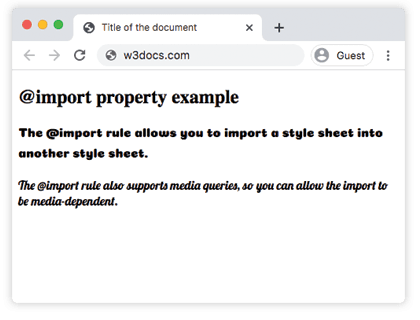
    <h2>@import at-rule example</h2>
    <p class="p1">The @import rule allows you to import a style sheet into another style sheet.</p>
    <p class="p2">The @import rule also supports media queries, so you can allow the import to be media-dependent.</p>
  </body>
</html>Result
The Difference Between Relative URL and Absolute URL
The <url> and <string> data types are accepted by the @import rule for determining the file that should be imported. This can be provided as an absolute or a relative URL.
The code example below uses a relative URL. This means that the URL is relative to the location of the current style sheet. Here we don’t need to provide a path. Instead, we only provide the name of the file.
CSS @import Rule
@import "relative.css";In the next example the URL is still relative, though we have provided some path information:
CSS @import Rule
@import "../css/relative.css";As you can see the following code example includes the full path with the domain name. This means that the URL is absolute.
CSS @import Rule
@import "http://www.examples.fr/css/absolute.css";Media queries
@import accepts a media query after the URL, so the sheet is only applied when the condition matches. This is how you make an import media-dependent without wrapping it in @media (which is not allowed).
The sheet below loads only when the page is printed:
@import "print.css" print;You can use any media query, including feature queries such as width:
@import "wide.css" screen and (min-width: 768px);The browser still downloads the file regardless of the condition — the media query only decides whether the rules are applied, not whether the file is fetched.
Importing into a cascade layer
A modern feature lets you assign an imported sheet to a named cascade layer with layer(). Everything in the imported file then participates in that layer's priority, which is a clean way to keep third-party CSS from overriding your own:
@import "bootstrap.css" layer(framework);You can also guard an import with a feature query using supports(), so the sheet loads only if the browser understands a given declaration:
@import "grid.css" supports(display: grid);Values
| Value | Description |
|---|---|
| url | A <url> or <string> showing the location of the resource to import. URL can be relative or absolute. |
| string list-of-mediaqueries | A comma-separated list of media queries conditioning the application of the CSS rules defined in the linked URL. |