CSS z-index Property
Use the z-index CSS property for specifying the stack order of the element. Read about property values and try examples.
The CSS z-index property controls the stacking order of overlapping elements — which one appears in front and which one is hidden behind. The name comes from the imaginary z-axis: the x-axis runs left to right, the y-axis top to bottom, and the z-axis points out of the screen toward you. An element with a higher z-index sits closer to the viewer and covers elements with a lower value.
This page covers what z-index does, why it only works on positioned elements, how stacking contexts decide which values are even compared, and the most common reasons a z-index "doesn't work."
How stacking works
By default, when elements overlap, the one that comes later in the HTML source is painted on top. z-index lets you override that order explicitly. For example, z-index: 10 will sit above z-index: 1, regardless of source order, and negative values like z-index: -1 push an element behind its parent.
But z-index is not a global ranking. Values are only compared within the same stacking context. A stacking context is a self-contained layer: every element inside it is stacked relative to its siblings, and the whole group is then stacked as one unit inside its parent context. The page root (<html>) creates the first stacking context, and certain properties create new ones (see below).
The z-index property has no effect on static elements (the default). It only applies to positioned elements — those with position set to relative, absolute, fixed, or sticky — and to flex/grid items.
| Initial Value | auto |
|---|---|
| Applies to | Positioned elements. |
| Inherited | No. |
| Animatable | Yes. |
| Version | CSS2 |
| DOM Syntax | object.style.zIndex = "-1"; |
Syntax
Syntax of CSS z-index Property
z-index: auto | number | initial | inherit;Example of the z-index property with a negative value:
Example of CSS z-index Property with negative value
<!DOCTYPE html>
<html>
  <head>
    <title>Title of the document</title>
    <style>
      img {
        position: absolute;
        left: 0;
        top: 10px;
        z-index: -1;
      }
    </style>
  </head>
  <body>
    <h2>Z-index property example</h2>
    <img src="https://api.w3docs.com/uploads/media/default/0001/01/0710cad7a1017902166203def268a0df2a5fd545.png" alt="W3docs logo" width="200" height="100" />
  </body>
</html>Example of the z-index property with a positive value:
Example of CSS z-index Property with number value
<!DOCTYPE html>
<html>
  <head>
    <title>Title of the document</title>
    <style>
      #blue,
      #green,
      #grey {
        position: absolute;
        width: 150px;
        height: 150px;
        color: #eee;
        opacity: 0.95;
        padding: 15px;
        line-height: 100px;
        text-align: center;
      }
      #blue {
        z-index: 1;
        background-color: #1c87c9;
        top: 60px;
        left: 50px;
        line-height: 1;
      }
      .black {
        height: 80px;
        width: 160px;
        background-color: #000;
        line-height: 100px;
        bottom: 20px;
        position: absolute;
        z-index: 10;
      }
      #green {
        z-index: 2;
        background-color: #8ebf42;
        top: 100px;
        left: 170px;
      }
      #grey {
        background-color: #666;
        top: 200px;
        left: 100px;
      }
    </style>
  </head>
  <body>
    <h2>Z-index property example</h2>
    <div class="container">
      <div id="blue">
        Blue
        <div class="black">Black</div>
      </div>
      <div id="green">Green</div>
      <div id="grey">Grey</div>
    </div>
  </body>
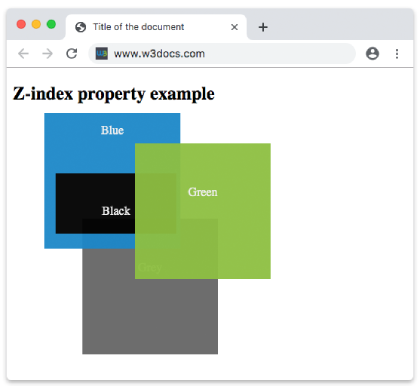
</html>Here the boxes overlap because they are all absolutely positioned. The blue box (z-index: 1) sits below the green box (z-index: 2), and the grey box has no z-index so it falls back to source order. Note that the black box (z-index: 10) is nested inside the blue box: its z-index: 10 is only compared against other children of blue, so it cannot rise above the green box even though 10 > 2. This is the stacking-context rule in action.
Result
Values
| Value | Description | Play it |
|---|---|---|
| auto | The stack level of the generated box is equal to its parents. This is the default value of this property. | Play it » |
| number | The stack level of the generated box specified by numbers. Negative values are valid. | Play it » |
| initial | Makes the property use its default value. | Play it » |
| inherit | Inherits the property from its parents element. |
What creates a new stacking context
Understanding stacking contexts is the key to mastering z-index. A new context is created by, among others:
- The root
<html>element. - A positioned element (
relative,absolute,fixed,sticky) with az-indexother thanauto. - A flex or grid child with a
z-indexother thanauto. - An element with
opacityless than1(see opacity). - An element with a
transform,filter,perspective,clip-path, ormaskvalue other thannone(see transform). - An element with
position: fixedorposition: sticky. - An element with
isolation: isolate. - An element with
will-changeset to a property that would create a context.
Once an element forms a stacking context, the z-index of its descendants is "trapped" inside it — they can never escape to compete with elements outside the parent.
Why your z-index "isn't working"
These are the usual culprits, in order of how often they bite:
- The element is
static.z-indexis silently ignored unlesspositionisrelative,absolute,fixed, orsticky(or the element is a flex/grid item). Set a position first. - A parent forms a stacking context. A modal at
z-index: 9999can still hide behind another element if its ancestor sits in a lower-stacked context. The fix is to raise the ancestor'sz-index, not the descendant's. - An ancestor has
opacityortransform. Even a harmless-lookingopacity: 0.99ortransform: translateZ(0)(often added for "GPU acceleration") creates a stacking context and can trap children. - You're fighting source order. Without
z-index, later elements win. Reordering the HTML is sometimes simpler than az-indexarms race.
Avoid huge "magic numbers" like z-index: 999999. They make stacking order impossible to reason about. Keep a small, documented scale (for example 1, 10, 100, 1000 for content, dropdowns, sticky bars, and modals).
Example: isolating a stacking context
The isolation: isolate property creates a new stacking context without changing positioning or opacity. It's the cleanest way to contain a component's z-index values:
.card {
  /* z-index values inside .card now stay inside .card */
  isolation: isolate;
}Related properties
- position — required for
z-indexto take effect. - opacity — values below
1create a stacking context. - transform — non-
nonevalues create a stacking context.