CSS pointer-events Property
Use the pointer-events property which specifies whether or not an element can respond to touch events. See property values and examples.
The pointer-events property controls whether an element can be the target of pointer events — mouse clicks, hover, touch, and pen input. When it is set to none, the element becomes "transparent" to the pointer: clicks, hovers, and other interactions pass straight through it to whatever sits underneath.
This page explains the property's values, where it actually works in HTML versus SVG, the common real-world use cases, and the gotchas that trip people up.
Originally defined for SVG, pointer-events is now a standard CSS property.
Many values apply only to SVG elements. For ordinary HTML elements, only auto and none are widely supported — the SVG-specific values (fill, stroke, visiblePainted, etc.) have no effect on HTML.
When You Would Use It
- Click-through overlays. A decorative or loading overlay covers the page, but you want clicks to reach the content behind it. Set
pointer-events: noneon the overlay. - Disabling a control visually. Combine
pointer-events: nonewith reducedopacityto make a button or link look and behave as disabled (links have no nativedisabledattribute, so this is a common pattern). - Letting events fall through specific SVG shapes. A shape drawn on top of others can be made non-interactive so the shapes underneath stay clickable.
- Re-enabling a child inside a disabled parent. Set
noneon a wrapper andautoon one child to make only that child interactive.
Important Notes
Setting pointer-events: none on an element prevents it from being the target of pointer events, but it does not stop event listeners on that element from firing. If a child element has pointer-events re-enabled (auto), the child can still be targeted. Events targeting the child then bubble up through the parent and trigger any listeners attached to it.
pointer-events: none only blocks pointer input. It does not remove the element from the tab order, so keyboard users can still reach a "disabled" link or button via the Tab key. For genuine accessibility, also remove the element from the tab order (tabindex="-1") or use the real disabled attribute on form controls.
| Initial Value | auto |
|---|---|
| Applies to | All elements. |
| Inherited | No. |
| Animatable | No. |
| Version | Scalable Vector Graphics (SVG) 1.1 (Second Edition). |
| DOM Syntax | object.style.pointerEvents = "auto"; |
Syntax
CSS pointer-events syntax
pointer-events: auto | none | visiblePainted | visibleFill | visibleStroke | visible | painted | fill | stroke | all | initial | inherit;Example of the pointer-events property:
CSS pointer-events code example
<!DOCTYPE html>
<html>
  <head>
    <title>Title of the document</title>
    <style>
      div.example {
        pointer-events: none;
      }
      div.example2 {
        pointer-events: auto;
      }
      div.example:hover,
      div.example2:hover {
        outline: 2px solid #1c87c9;
      }
    </style>
  </head>
  <body>
    <h2>The Pointer-events Property</h2>
    <h3>Pointer-events: none</h3>
    <div class="example">
      Click here: <a href="https://www.w3docs.com/learn-javascript.html">JavaScript Tutorial</a>
    </div>
    <h3>Pointer-events: auto</h3>
    <div class="example2">
      Click here: <a href="https://www.w3docs.com/learn-css.html">CSS Tutorial</a>
    </div>
  </body>
</html>Result
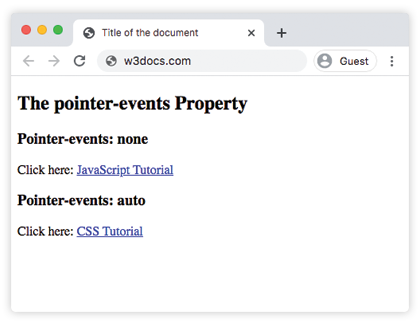
In the example above, hover over each box. The first <div> (pointer-events: none) does not respond — its link is not clickable and no outline appears on hover. The second <div> (pointer-events: auto) behaves normally.
Common Pattern: a Disabled Link
Because anchors have no disabled attribute, pointer-events: none is the usual way to make a link non-clickable. Pair it with opacity so the state is visible:
.btn-link.is-disabled {
  pointer-events: none;
  opacity: 0.5;
  cursor: default;
}Remember the accessibility caveat above: the link is still reachable by keyboard unless you also set tabindex="-1".
Example with the <svg> tag
In SVG, pointer-events can route clicks through stacked shapes. In the next example the path with class .c uses pointer-events: none, so clicks pass through it to the shapes underneath, while .d uses pointer-events: all to catch events even where its fill is transparent:
CSS pointer-events none value example
<!DOCTYPE html>
<html>
  <head>
    <title>Title of the document</title>
    <style>
      .a {
        fill: #ccc;
      }
      .b {
        fill: #8ebf42;
      }
      .c {
        fill: #1c87c9;
        pointer-events: none;
      }
      .d {
        stroke: #666;
        fill: none;
        pointer-events: all;
      }
      .box:hover {
        stroke: #000;
        stroke-width: 5;
      }
    </style>
  </head>
  <body>
    <h2>Pointer-events property example</h2>
    <svg width="300" height="300">
      <g transform="translate(20, 20)">
        <path class="a box" d="M 0 0 L 100 0 L 100 100 L 0 100 z" />
        <path class="b box" d="M 50 50 l 100 0 l 0 100 l -100 0 z" />
        <path class="c box" d="M 100 100 l 100 0 l 0 100 l -100 0 z" />
        <path class="d box" d="M 150 150 l 100 0 l 0 100 l -100 0 z" />
      </g>
    </svg>
  </body>
</html>Values
| Value | Description |
|---|---|
| none | The element never reacts to the pointer events. |
| auto | The element accepts pointer events such as clicks, hover, etc. This is the default value of this property. |
| initial | Makes the property use its default value. |
| inherit | Inherits the property from its parent element. |
SVG only Values
| Value | Description |
|---|---|
| visiblePainted | The element can only be the target of a pointer event when the visibility property is set to visible, the mouse cursor is over the interior or perimeter of the element, and the fill or stroke property is set to a value other than none. |
| visibleFill | The element can only be the target of a pointer event when the visibility property is set to visible and the mouse cursor is over the interior of the element. |
| visibleStroke | The element can only be the target of a pointer event when the visibility property is set to visible and the mouse cursor is over the perimeter of the element. |
| visible | The element can only be the target of a pointer event when the visibility property is set to visible and the mouse cursor is over either the interior or the perimeter of the element. |
| painted | The element can only be the target of a pointer event when the mouse cursor is over the interior or perimeter of the element and the fill or stroke property is set to a value other than none. |
| fill | The element can only be the target of a pointer event when the pointer is over the interior of the element. |
| stroke | The element can only be the target of a pointer event when the pointer is over the perimeter of the element. |
| all | The element can only be the target of a pointer event when the pointer is over the interior or the perimeter of the element. |
Related Properties
cursor— change the mouse cursor shown over an element (usecursor: not-allowedto reinforce a disabled look).visibility—visibility: hiddenalso removes an element from pointer interaction, but it hides the element too.opacity— commonly paired withpointer-events: noneto render a disabled state.user-select— controls whether text inside an element can be selected.