CSS outline-color Property
The outline-color CSS property is used to set the color of an element’s outline. See property values and examples.
The CSS outline-color property sets the color of an element's outline — the line drawn just outside the border edge.
An outline is similar to a border, but with two important differences:
- It does not take up space. The width and height of an element do not include the outline, so adding or changing an outline never shifts the surrounding layout (unlike a border, which is part of the box model).
- It cannot have individual sides. An outline wraps the whole element at once; you can't set a different color on just the top or left, the way you can with border-color.
Because outlines sit outside the box and don't reflow the page, they are the standard way to show keyboard focus. When a user tabs through links, buttons, and form fields, the browser draws a focus outline so they can see where they are. That makes outline-color an accessibility tool first and a decorative one second — be careful before removing or hiding focus outlines.
Why use outline-color
You'll reach for outline-color mainly to:
- Style focus states — give
:focusor:focus-visiblea high-contrast, on-brand outline color instead of the browser default. - Highlight an element without changing its size or nudging its neighbors.
- Debug layout — a temporary bright outline shows an element's exact extent without affecting the box model.
outline-color has no visible effect on its own. An outline only renders when it also has a style, so pair it with the outline shorthand or the outline-style property (its default style is none).
Accepted color values
You can set the outline color with any standard CSS color: a color name (red), a hexadecimal code (#1c87c9), or the functional notations rgb(), rgba(), hsl(), and hsla(). The keyword currentColor is also handy — it makes the outline match the element's text color. For the full list of color formats, see the HTML colors section.
| Initial Value | invert |
|---|---|
| Applies to | All elements. |
| Inherited | No. |
| Animatable | Yes. Color is animatable. |
| Version | CSS2 |
| DOM Syntax | object.style.outlineColor = "#8ebf42"; |
Syntax
CSS outline-color syntax
outline-color: invert | color | initial | inherit;Example of the outline-color property:
CSS outline-color code example
<!DOCTYPE html>
<html>
  <head>
    <title>Title of the document</title>
    <style>
      p {
        border: 3px solid #ccc;
        outline-style: double;
        outline-color: invert;
      }
    </style>
  </head>
  <body>
    <h2>Outline-color property example</h2>
    <p>Invert default value is applied.</p>
  </body>
</html>Result
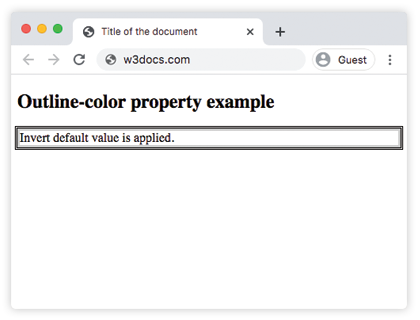
Example of the outline-color property with hexadecimal, RGB, RGBA, HSL, HSLA colors:
CSS outline-color all values example
<!DOCTYPE html>
<html>
  <head>
    <title>Title of the document</title>
    <style>
      .p1 {
        outline-style: solid;
        outline-color: #1c87c9;
      }
      .p2 {
        outline-style: solid;
        outline-color: hsl(65, 100%, 50%);
      }
      .p3 {
        outline-style: solid;
        outline-color: hsla(84, 49%, 50%, 1);
      }
      .p4 {
        outline-style: solid;
        outline-color: rgb( 224, 0, 0);
      }
      .p5 {
        outline-style: solid;
        outline-color: rgba(204, 204, 204, 1);
      }
    </style>
  </head>
  <body>
    <h2>Outline-color property example</h2>
    <p class="p1">This is a paragraph with hexadecimal blue outline.</p>
    <p class="p2">This is a paragraph with hsl yellow outline.</p>
    <p class="p3">This is a paragraph with hsla green outline.</p>
    <p class="p4">This is a paragraph with rgb red outline.</p>
    <p class="p5">This is a paragraph with rgba grey outline.</p>
  </body>
</html>Each paragraph keeps its layout identical to the others — only the outline color changes — because the outline lives outside the box and adds no width or height.
Example of styling a focus outline:
The most common real-world use of outline-color is making keyboard focus visible and on-brand. Here a link gets a thick blue focus outline instead of the browser default:
<!DOCTYPE html>
<html>
  <head>
    <title>Title of the document</title>
    <style>
      a:focus-visible {
        outline-style: solid;
        outline-width: 3px;
        outline-color: #1c87c9;
        outline-offset: 2px;
      }
    </style>
  </head>
  <body>
    <h2>Focus outline example</h2>
    <p>Press <kbd>Tab</kbd> to move focus to the link below:</p>
    <a href="#">Focus me with the keyboard</a>
  </body>
</html>The outline-offset property pushes the outline a few pixels away from the element so it doesn't touch the text. Use :focus-visible rather than :focus so the outline appears for keyboard users but not on mouse clicks.
Avoid outline: none or outline-color: transparent on focusable elements unless you replace the focus indicator with something equally visible. Removing it makes the page unusable for keyboard-only users.
Values
| Value | Description | Play it |
|---|---|---|
| invert | Inverts any color that is applied to the background. This value ensures the visibility of the outline regardless of background color. This is the default value of this property. | Play it » |
| color | Defines the outline color. Color names, hexadecimal color codes, rgb(), rgba(), hsl(), hsla(), or the currentColor keyword can be used. | Play it » |
| initial | Sets the property to its default value. | Play it » |
| inherit | Inherits the property from its parent element. |
Related properties
outline-color is one of the three longhands that make up the outline shorthand:
- outline-style — sets the line style (
solid,dashed,double, …). Required for the outline to show. - outline-width — sets the thickness of the line.
- outline-offset — sets the gap between the outline and the border edge.
Writing outline: 3px solid #1c87c9; is shorthand for setting all three of width, style, and color at once.