CSS margin-right Property
Use this property to set the margin space on the right side of an element. See property values and examples.
The CSS margin-right property sets the width of the margin area on the right side of an element — the transparent space between the element's right border and its neighboring content or its containing block.
It is one of the four individual margin properties — alongside margin-top, margin-bottom, and margin-left — that the margin shorthand sets all at once. Reach for margin-right when you only want to adjust the gap on the right, such as separating an inline icon from the text after it, or pushing a floated element away from content beside it.
This page covers the property's syntax, every accepted value (including auto, %, and negative lengths), and the rules you should know before using it.
Negative values are allowed. A negative margin-right pulls the following content closer (or overlapping), which is occasionally useful for overlap effects but can cause layout surprises.
| Initial Value | 0 |
|---|---|
| Applies to | All elements. It also applies to ::first-letter. |
| Inherited | No. |
| Animatable | Yes. Right margin of the element is animatable. |
| Version | CSS2 |
| DOM Syntax | object.style.marginRight = "50px"; |
Syntax
margin-right: length | auto | initial | inherit;Examples
A fixed length in pixels
The simplest case: reserve a fixed amount of space on the right. Here the paragraph keeps a 400px gap on its right side, so it no longer stretches to the full container width.
<!DOCTYPE html>
<html>
  <head>
    <title>Title of the document</title>
    <style>
      .right {
        margin-right: 400px;
      }
    </style>
  </head>
  <body>
    <h2>Margin-right property example</h2>
    <p>Lorem Ipsum is simply dummy text of the printing and typesetting industry.</p>
    <p class="right">Lorem Ipsum is simply dummy text of the printing and typesetting industry.</p>
  </body>
</html>Result
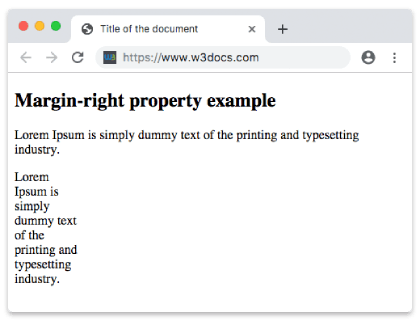
A percentage value
When the value is a percentage, it is calculated relative to the width of the containing block — not the element's own width. So margin-right: 50% leaves a gap equal to half of the parent's content width.
<!DOCTYPE html>
<html>
  <head>
    <title>Title of the document</title>
    <style>
      .right {
        margin-right: 50%;
      }
    </style>
  </head>
  <body>
    <h2>Margin-right property example</h2>
    <p>Lorem Ipsum is simply dummy text of the printing and typesetting industry.</p>
    <p class="right">Lorem Ipsum is simply dummy text of the printing and typesetting industry.</p>
  </body>
</html>The auto value
For a block-level element, margin-right: auto lets the browser fill the available space on the right. On its own it has little visible effect, but combined with margin-left: auto it is the classic trick for horizontally centering a fixed-width block. Setting only margin-right: auto (with margin-left: 0) pushes a block to the left edge.
<!DOCTYPE html>
<html>
  <head>
    <title>Title of the document</title>
    <style>
      .right {
        margin-right: auto;
      }
    </style>
  </head>
  <body>
    <h2>Margin-right property example</h2>
    <p>
      Lorem Ipsum is simply dummy text of the printing and typesetting industry. Lorem Ipsum is simply dummy text of the printing and typesetting industry.
    </p>
    <p class="right">
      Lorem Ipsum is simply dummy text of the printing and typesetting industry. Lorem Ipsum is simply dummy text of the printing and typesetting industry. Lorem Ipsum is simply dummy text of the printing and typesetting industry.
    </p>
  </body>
</html>Values
| Value | Description | Play it |
|---|---|---|
| auto | Sets the right margin. It is the default value of this property. | Play it » |
| length | Defines a right margin in px, pt, cm, etc. Default value is 0. | Play it » |
| % | Sets the right margin in % of containing element. | Play it » |
| initial | Makes the property use its default value. | Play it » |
| inherit | Inherits the property from its parents element. |
Things to keep in mind
- Margins are transparent. Unlike padding, the margin sits outside the border and never shows the element's background color.
- Right margins do not collapse. Margin collapsing only happens between adjacent vertical margins (
margin-top/margin-bottom). Horizontal margins likemargin-rightalways add up. - Percentages reference width. A
%value is resolved against the width of the containing block, even though it controls horizontal space. - Shorthand alternative. If you set more than one side at once, the
marginshorthand is shorter:margin: 0 400px 0 0is the same asmargin-right: 400pxplus zeros elsewhere.