CSS background-image Property
The CSS background-image property sets one or more background images for an element, including url() images and gradients. Learn the syntax, layering, gotchas, and practice with live examples.
The CSS background-image property sets one or more background images for an element. The image can be a real image file referenced with url(), or a CSS-generated image such as a gradient.
By default, a background image is placed at the top-left corner of the element and tiled (repeated both horizontally and vertically) to fill the available space. You control that behaviour with the related properties background-repeat, background-position, background-size, and background-attachment — or all at once with the background shorthand.
The painting area covers the element's content, padding, and border box, but not the margin. You can change which box is used with background-clip and where positioning starts with background-origin.
When to use it
Reach for background-image instead of an inline <img> when the image is decorative rather than content — backgrounds, textures, hero sections, gradients, and icons that aren't part of the page's meaning. Because backgrounds aren't read by screen readers, never put information-carrying images here; use an <img> with alt text for those.
A few things worth knowing up front:
- Always pair it with a
background-coloras a fallback. If the image fails to load (or is still downloading), the color shows instead and keeps text readable. - Multiple images stack. When you list several images separated by commas, the first one is painted on top and each following image sits behind it.
- Gradients are images too.
linear-gradient()andradial-gradient()produce CSS images, so they belong inbackground-image, notbackground-color.
| Initial Value | none |
|---|---|
| Applies to | All elements. It also applies to ::first-letter and ::first-line. |
| Inherited | No. |
| Animatable | No. |
| Version | CSS1 + some new values in CSS3 |
| DOM Syntax | object.style.backgroundImage = "url(img_tree.png)"; |
Syntax
Syntax of CSS background-image Property
background-image: url | none | linear-gradient | radial-gradient | repeating-linear-gradient | repeating-radial-gradient | initial | inherit;Example of the background-image property:
Example of CSS background-image Property
<!DOCTYPE html>
<html>
  <head>
    <title>The title of the document</title>
    <style>
      body {
        background-image: url("/uploads/media/default/0001/02/55a2f152f59bf42a99b576d44a4578ec9daa0ab6.png");
        background-color: #8ebf42;
      }
    </style>
  </head>
  <body>
    <h2>Background-image property example</h2>
    <p>Hello World!</p>
  </body>
</html>Result
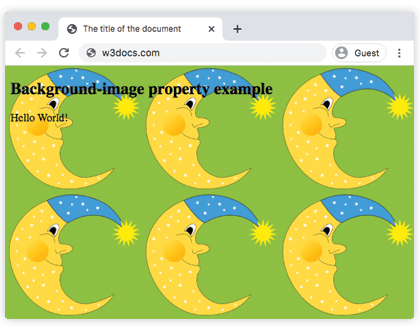
In the next example two images are used at once. They are layered with background-position and background-repeat, and background-attachment: fixed keeps them in place while the page scrolls.
Example of the background-image property with other background properties:
Example of CSS background-image Property with 2 images
<!DOCTYPE html>
<html>
  <head>
    <title>The title of the document</title>
    <style>
      body {
        padding: 100px;
        background-image: url("/uploads/media/default/0001/02/55a2f152f59bf42a99b576d44a4578ec9daa0ab6.png"), url("/uploads/media/default/0001/01/b408569013c0bb32b2afb0f0d45e93e982347951.jpeg");
        background-attachment: fixed;
        background-position: 5px 50px;
        background-repeat: no-repeat, repeat;
      }
    </style>
  </head>
  <body>
    <h2>Background-image property example</h2>
    <p>The background image is positioned 5px from the left, and 50px down from the top.</p>
  </body>
</html>Note the comma-separated lists above: background-repeat: no-repeat, repeat applies no-repeat to the first image and repeat to the second, in the same order the images are listed. This per-image mapping is how multiple backgrounds are configured.
In the next example a linear-gradient() with two color stops is used as the background image for a <div> element. Because a gradient is an image, no url() is involved:
Example of the background-image property with the "linear-gradient" value:
Example of CSS background-image Property with linear-gradient value
<!DOCTYPE html>
<html>
  <head>
    <style>
      div {
        height: 300px;
        background-image: linear-gradient(#eee, #1c87c9);
      }
    </style>
  </head>
  <body>
    <h2>Linear gradient as a background image example</h2>
    <p>This linear gradient starts at the top. It starts gray, transitioning to blue:</p>
    <div></div>
  </body>
</html>Example of the background-image property with the "repeating-radial-gradient" value:
Example of CSS background-image Property with repeating-radial-gradient value
<!DOCTYPE html>
<html>
  <head>
    <title>The title of the document</title>
    <style>
      div {
        height: 300px;
        background-color: #cccccc;
        background-image: repeating-radial-gradient(#8ebf42, #eee 15%, #ccc 30%);
      }
    </style>
  </head>
  <body>
    <h2>Radial gradient as a background image example</h2>
    <div></div>
  </body>
</html>Common gotchas
- The image is invisible because the element has no height. A background needs a box to paint on. An empty
<div>collapses to zero height, so give it an explicitheight(as in the gradient examples) or some content. - A
404background fails silently. Unlike<img>, a brokenurl()produces no error or broken-icon — the area just stays empty (or shows thebackground-color). Double-check the path if nothing appears. - Use
background-color, notbackground-image, for a solid color. Gradients go inbackground-image; flat colors belong inbackground-color. - Tiling looks wrong? Add
background-repeat: no-repeatand size the image withbackground-size(for examplecoverto fill the box).
Values
| Value | Description |
|---|---|
| url | Defines the url of the image. It can be specified more than one image separated by commas. |
| none | There will not be any background image. It is the default value. |
| linear-gradient | A linear gradient is specified as the background image. |
| radial-gradient | A radial gradient is specified as the background image. |
| repeating-linear-gradient | Repeats a linear gradient. |
| repeating-radial-gradient | Repeats a radial gradient. |
| initial | Sets the property to its default value. |
| inherit | Inherits the property from its parent element. |