CSS break-after Property
The CSS break-after property defines whether the break after principal box is allowed, avoided or forced. See the values of this property and try examples.
The break-after CSS property controls how a fragmentation break behaves after a given box. A fragmentation break is the point where content is split across two fragments — two printed pages, two columns of a multi-column layout, or two CSS regions. With break-after you can force a break ("start the next section on a fresh page/column") or prevent one ("keep this heading attached to the text that follows it").
It supports the following values: auto, avoid, always, all, page, column, region, avoid-page, avoid-column, and avoid-region.
When applied to an element inside a multicol container that is also inside a paged context, always (and all) forces both a column break and a page break at the same boundary.
When to use break-after
Reach for break-after whenever the natural flow of content would split in an awkward place:
- Print stylesheets. Start every top-level section on a new sheet of paper with
break-after: page, or stop an invoice total from being orphaned at the top of the next page. - Multi-column text. Push a sub-heading to the top of the next column instead of leaving it stranded at the bottom of the current one.
- CSS Regions / paged media viewers. Control where content flows from one container to the next.
break-after only does something inside a fragmentation context — a printed/paged document, a column-count/column-width container, or a region chain. On an ordinary scrolling page it has no visible effect, which is why the example below uses a multi-column container.
How break properties resolve
Each element boundary is influenced by three properties:
break-afteron the preceding element.- break-before on the current element.
- break-inside on the parent element.
When multiple break properties apply, the following resolution rules determine the outcome:
- Forced breaks (e.g.,
page,column,always) take priority over avoid breaks. - If multiple forced breaks apply,
break-beforetakes precedence overbreak-after, which takes precedence overbreak-inside. - If any applicable value is an avoid break (
avoid,avoid-page,avoid-column, oravoid-region), the break will not be applied.
| Initial Value | auto |
|---|---|
| Applies to | Block-level elements. |
| Inherited | No. |
| Animatable | discrete |
| Version | CSS3 |
| DOM Syntax | object.style.breakAfter = "always"; |
Syntax
Syntax of CSS break-after Property
break-after: auto | avoid | always | all | page | column | region | avoid-page | avoid-column | avoid-region | initial | inherit;Example of break-after with a column break
In a three-column container, the <hr> element is given break-after: column. Instead of letting the columns balance automatically, the browser ends the current column right after the rule and continues the rest of the content in the next column — so the second "Lorem ipsum" block always starts at the top of a new column.
<!DOCTYPE html>
<html>
  <head>
    <title>The title of the document</title>
    <style>
      .multicol {
        background-color: #eee;
        padding: 10px;
        column-count: 3;
        column-rule: 2px dotted #ccc;
      }
      .multicol hr {
        break-after: column;
      }
    </style>
  </head>
  <body>
    <h2>Break-after property example</h2>
    <div class="multicol">
      <h2>Lorem ipsum</h2>
      <p>Lorem ipsum dolor sit amet, consectetur adipiscing elit. Sed sagittis, arcu ut pulvinar sollicitudin, enim purus mollis tellus, et porta elit sem in nulla. Integer a magna eget justo convallis porta. Vestibulum lacinia eget leo sed elementum. Quisque dapibus ullamcorper quam, at pretium quam eleifend a. Donec sit amet blandit risus. Nunc tempus tellus vitae nibh pellentesque imperdiet. Ut pulvinar rhoncus velit, ut euismod odio ornare vel.</p>
      <hr />
      <h2>Lorem ipsum</h2>
      <p>Lorem ipsum dolor sit amet, consectetur adipiscing elit. Sed sagittis, arcu ut pulvinar sollicitudin, enim purus mollis tellus, et porta elit sem in nulla. Integer a magna eget justo convallis porta. Vestibulum lacinia eget leo sed elementum. Quisque dapibus ullamcorper quam, at pretium quam eleifend a. Donec sit amet blandit risus. Nunc tempus tellus vitae nibh pellentesque imperdiet. Ut pulvinar rhoncus velit, ut euismod odio ornare vel.</p>
    </div>
  </body>
</html>Result
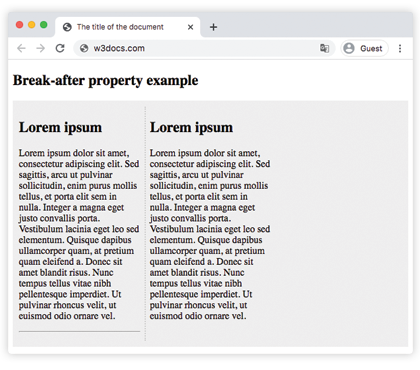
Example of break-after with a page break
This is the most common real-world use: a print stylesheet that starts each chapter on its own page. Open your browser's print preview (Ctrl/Cmd + P) to see each <section> begin on a fresh sheet.
<!DOCTYPE html>
<html>
  <head>
    <title>The title of the document</title>
    <style>
      @media print {
        section {
          break-after: page;
        }
      }
    </style>
  </head>
  <body>
    <section>
      <h2>Chapter 1</h2>
      <p>This chapter prints on its own page.</p>
    </section>
    <section>
      <h2>Chapter 2</h2>
      <p>Because the previous section has break-after: page,
         this chapter starts at the top of the next printed page.</p>
    </section>
    <section>
      <h2>Chapter 3</h2>
      <p>And so does this one.</p>
    </section>
  </body>
</html>Values
| Value | Description |
|---|---|
| auto | Allows any break (page, column, region) after the principal box. |
| avoid | Avoids any break after the principal box. |
| always | Forces a break after the principal box. |
| all | Forces a break after the principal box and all enclosing boxes of the same type (e.g., all columns or all pages). |
| page | Forces a page break after the principal box. |
| column | Forces a column break after the principal box. |
| region | Forces a region break after the principal box. |
| avoid-page | Avoids a page break after the principal box. |
| avoid-column | Avoids a column break after the principal box. |
| avoid-region | Avoids a region break after the principal box. |
| initial | Sets this property to its default value. |
| inherit | Inherits this property from its parent element. |
Related properties
- break-before — controls the break before a box (takes precedence over
break-afterat the same boundary). - break-inside — keeps a single box from being split across a fragment.
- page-break-after — the older, print-only alias kept for backwards compatibility.
- columns and column-count — set up the multi-column context that column breaks act inside.