CSS border-right-color Property
The border-right-color property is used for defining the color of the right border of an element. See all property values with examples.
The CSS border-right-color property defines the color of an element's right border. It lets you style the right edge independently from the other three sides, which is useful for dividers, callouts, and asymmetric box designs.
A border has three ingredients — width, style, and color — and all three must be present for the border to render. A color on its own paints nothing, because a border with no style defaults to none. So whenever you set border-right-color, make sure a style is also in place via border-style or border-right-style. The default width is medium; adjust it with border-width or border-right-width.
If you want to set every side at once, reach for the border-color shorthand instead, which accepts up to four values for the top, right, bottom, and left edges.
| Initial Value | currentColor |
|---|---|
| Applies to | All elements. It also applies to ::first-letter. |
| Inherited | No |
| Animatable | Yes. The color of the right border is animatable. |
| Version | CSS1 |
| DOM Syntax | object.style.borderRightColor = "black"; |
Syntax
border-right-color: color | transparent | initial | inherit;The value is a single <color>, or one of the CSS-wide keywords. Note that unlike the border-color shorthand, this property never takes more than one value — it only ever affects the right side.
Example of the border-right-color property
In the example below, a uniform grey border is applied to a box, then only the right edge is recolored blue:
<!DOCTYPE html>
<html>
  <head>
    <title>Title of the document</title>
    <style>
      div {
        width: 300px;
        padding: 20px;
        border-style: solid;
        border-color: #ccc;
        border-right-color: #1c87c9;
      }
    </style>
  </head>
  <body>
    <h2>Border-right-color example</h2>
    <div>Example for the border-right-color property with different right border color.</div>
  </body>
</html>Example with the "transparent" value
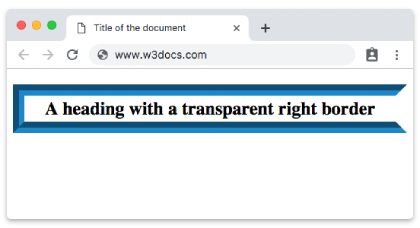
The transparent keyword hides the right border's color while keeping the space it occupies. This is handy for creating arrows and triangles, or for keeping layouts from shifting when a border is toggled on and off:
<!DOCTYPE html>
<html>
  <head>
    <title>Title of the document</title>
    <style>
      h2 {
        padding: 3px;
        text-align: center;
        border: 15px groove #1c87c9;
        border-right-color: transparent;
      }
    </style>
  </head>
  <body>
    <h2>A heading with a transparent right border</h2>
  </body>
</html>You can set hexadecimal, RGB, RGBA, HSL, HSLA or color names as a value for the border-right-color property.
Result
The four value formats below all produce the same effect — they only differ in how the color is written.
Example with a named color
<!DOCTYPE html>
<html>
  <head>
    <title>Title of the document</title>
    <style>
      div {
        padding: 3px;
        border-right-style: solid;
        border-right-color: black;
      }
    </style>
  </head>
  <body>
    <div>Border-right-color property with a named color value.</div>
  </body>
</html>Example with a hexadecimal value
<!DOCTYPE html>
<html>
  <head>
    <title>Title of the document</title>
    <style>
      div {
        padding: 3px;
        border-right-style: solid;
        border-right-color: #1c87c9;
      }
    </style>
  </head>
  <body>
    <div>Border-right-color property with a hexadecimal value.</div>
  </body>
</html>Example with an RGB value
<!DOCTYPE html>
<html>
  <head>
    <title>Title of the document</title>
    <style>
      div {
        padding: 3px;
        border-right-style: solid;
        border-right-color: rgb(142, 191, 66);
      }
    </style>
  </head>
  <body>
    <div>Border-right-color property with a RGB value.</div>
  </body>
</html>Example with an HSL value
<!DOCTYPE html>
<html>
  <head>
    <title>Title of the document</title>
    <style>
      div {
        padding: 3px;
        border-right-style: solid;
        border-right-color: hsl(89, 43%, 51%);
      }
    </style>
  </head>
  <body>
    <div>Border-right-color property with a HSL value.</div>
  </body>
</html>If you omit border-right-style (or border-style), the color has no visible effect — an unstyled border defaults to none and renders nothing at all.
Values
| Value | Description | Play it |
|---|---|---|
| color | Defines the color of the right border. Default color is the color of the current element. Color names, hexadecimal color codes, rgb(), rgba(), hsl(), hsla() can be used. Required value. | Play it » |
| transparent | Applies a transparent color to the right border. The right border will still take up the space defined by the border-width value. | Play it » |
| initial | Sets the property to its default value. | Play it » |
| inherit | Inherits the property from its parent element. |