CSS table-layout Property
Use the table-layout CSS property which is used to lay out table cells, rows and columns. Learn about property values and see examples.
The CSS table-layout property sets the algorithm a browser uses to calculate the widths of table cells, rows, and columns. It has two possible algorithms — auto and fixed — and the choice between them changes both how a table is sized and how fast it renders.
This page explains how each algorithm works, when to reach for fixed, and the gotchas (such as text overflow) that come with it.
How the two algorithms work
auto (the default) lets the content decide column widths. The browser must read every cell in every row before it can lay anything out, then widen each column to fit its longest piece of content. This gives a natural-looking table, but it also means a table can shift around as more content arrives, and very long words can stretch a column wider than you intended.
fixed ignores the content of most cells and sizes columns from the table's own width, any explicit column widths (on the first row's cells or on <col> elements), plus borders and cell spacing. Because the layout no longer depends on every cell, the browser can render the table in a single pass.
There are two practical reasons to choose fixed:
- Performance. With
auto, a large table can't be painted until the whole table has been parsed and measured.fixedrenders row by row as it streams in, so a long table appears faster and the page feels quicker to load. - Predictability. Column widths stay exactly where you put them and don't jump around when cell content changes — useful for data tables with a known structure.
The trade-off: with fixed, content that's wider than its column doesn't widen the column. By default it overflows the cell. You usually pair fixed with word-wrap / overflow-wrap, text-overflow, or overflow to control what happens to oversized content.
| Initial Value | auto |
|---|---|
| Applies to | Table and inline-table elements. |
| Inherited | No. |
| Animatable | No. |
| Version | CSS2 |
| DOM Syntax | object.style.tableLayout = "fixed"; |
Syntax
CSS table-layout syntax
table-layout: auto | fixed | initial | inherit;Examples
Example of the table-layout property with the "fixed" value:
CSS table-layout code example
<!DOCTYPE html>
<html>
  <head>
    <title>Title of the document</title>
    <style>
      th,
      td {
        border: 2px solid #666;
      }
      table.t1 {
        table-layout: fixed;
        width: 40%;
      }
    </style>
  </head>
  <body>
    <h2>Table-layout property example</h2>
    <h3>Table-layout: fixed; width: 40%</h3>
    <table class="t1">
      <tr>
        <th>Country</th>
        <th>Capital</th>
        <th>City</th>
      </tr>
      <tr>
        <td>Russia</td>
        <td>Moscow</td>
        <td>Saint Petersburg</td>
      </tr>
      <tr>
        <td>England</td>
        <td>London</td>
        <td>Manchester</td>
      </tr>
      <tr>
        <td>The Netherlands</td>
        <td>Amsterdam</td>
        <td>The Hague</td>
      </tr>
    </table>
  </body>
</html>Result
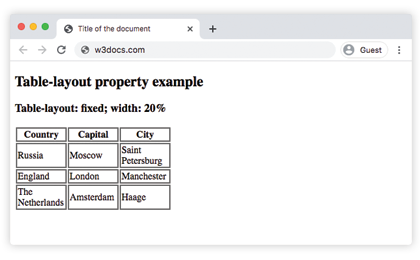
Example of the table-layout property with the "auto" and "fixed" values:
CSS table-layout values example
<!DOCTYPE html>
<html>
  <head>
    <title>Title of the document</title>
    <style>
      th,
      td {
        border: 2px solid #666;
      }
      table.t1 {
        table-layout: fixed;
        width: 250px;
      }
      table.t2 {
        table-layout: auto;
        width: 100%;
      }
    </style>
  </head>
  <body>
    <h2>Table-layout property example</h2>
    <h3>Table-layout: fixed; width: 250px</h3>
    <table class="t1">
      <tr>
        <th>Country</th>
        <th>Capital</th>
        <th>City</th>
      </tr>
      <tr>
        <td>Russia</td>
        <td>Moscow</td>
        <td>Saint Petersburg</td>
      </tr>
      <tr>
        <td>England</td>
        <td>London</td>
        <td>Manchester</td>
      </tr>
      <tr>
        <td>The Netherlands</td>
        <td>Amsterdam</td>
        <td>The Hague</td>
      </tr>
    </table>
    <h3>Table-layout: auto; width: 100%</h3>
    <table class="t2">
      <tr>
        <th>Country</th>
        <th>Capital</th>
        <th>City</th>
      </tr>
      <tr>
        <td>Russia</td>
        <td>Moscow</td>
        <td>Saint Petersburg</td>
      </tr>
      <tr>
        <td>England</td>
        <td>London</td>
        <td>Manchester</td>
      </tr>
      <tr>
        <td>The Netherlands</td>
        <td>Amsterdam</td>
        <td>The Hague</td>
      </tr>
    </table>
  </body>
</html>With table-layout: fixed, the first table keeps its three equal 250px-wide columns no matter how long the city names get, while the auto table stretches to fit "Saint Petersburg". This is the core difference: fixed honors your widths, auto honors the content.
Controlling overflow with table-layout: fixed
Because fixed columns won't grow to fit long content, a word longer than the column escapes the cell. The fix is to wrap or clip it. The snippet below shows three common approaches side by side:
<!DOCTYPE html>
<html>
  <head>
    <title>Title of the document</title>
    <style>
      table {
        table-layout: fixed;
        width: 300px;
        border-collapse: collapse;
      }
      td {
        border: 2px solid #666;
        width: 100px;
        padding: 4px;
      }
      .clip {
        white-space: nowrap;
        overflow: hidden;
        text-overflow: ellipsis;
      }
      .wrap {
        overflow-wrap: break-word;
      }
    </style>
  </head>
  <body>
    <table>
      <tr>
        <td>Overflows by default</td>
        <td class="clip">Supercalifragilisticexpialidocious</td>
        <td class="wrap">Supercalifragilisticexpialidocious</td>
      </tr>
    </table>
  </body>
</html>The middle cell clips the long word with an ellipsis (text-overflow: ellipsis), while the right cell breaks it onto multiple lines (overflow-wrap: break-word).
Values
| Value | Description | Play it |
|---|---|---|
| auto | Uses an automatic layout algorithm when the table and its cells fit the content. This is the default value of this property. | Play it » |
| fixed | Uses fixed table layout algorithm. The widths of table, col and the first row of cells set the table and column widths. | Play it » |
| initial | Sets the property to its default value. | Play it » |
| inherit | Inherits the property from its parent element. |
Related properties
table-layout works alongside the other CSS properties that style tables:
border-collapse— choose between separated and collapsed cell borders.border-spacing— set the gap between cells when borders are separated.empty-cells— show or hide borders and backgrounds on cells with no content.width— set the overall table width that thefixedalgorithm builds on.white-space— control wrapping of text inside fixed-width cells.