CSS text-transform Property
Use the text-transform property which controls capitalization effects of an element's text. See property values and try examples.
The CSS text-transform property controls the capitalization of an element's text — it can force text to ALL UPPERCASE, all lowercase, or Capitalize Each Word, without changing the underlying HTML. This is purely a presentational change: the source text stays exactly as you wrote it, so screen readers, copy-paste, and form submissions still see the original casing.
This page covers every value of text-transform, the gotchas of the capitalize value, language-specific case mapping, and runnable examples for each value.
Why use text-transform instead of typing the cases?
Keeping the casing in CSS rather than in the markup keeps your content clean and flexible:
- One source of truth. Write headings and labels in normal sentence case; let CSS uppercase them only where the design calls for it. Change the design later in one place.
- Localization-friendly. Translators edit readable text, not shouting capitals.
- Accessibility & SEO. Search engines and assistive tech read the real text, not the styled glyphs. Visually uppercasing a
<button>label this way still exposes a normal-case accessible name.
Language-specific case mapping
text-transform follows the casing rules of the content's language (the lang attribute), not a naive ASCII conversion. A few notable cases:
- Turkic languages — Turkish (
tr), Azerbaijani (az), Crimean Tatar (crh), Volga Tatar (tt), and Bashkir (ba) have dotted and dotless i, giving two case pairs: i/İ and ı/I. - German (
de) — the ß becomes SS in uppercase. - Greek (
el) — when a whole word is uppercased, the vowel accent is dropped (ά → Α), except for the disjunctive eta (ή/Ή).
Browser support for these language-specific rules varies, so test if your audience relies on them.
The full-width and full-size-kana values are experimental. full-width has partial WebKit support, while full-size-kana has very limited support.
| Initial Value | none |
|---|---|
| Applies to | All elements. It also applies to ::first-letter and ::first-line. |
| Inherited | Yes. |
| Animatable | No. |
| Version | CSS1 |
| DOM Syntax | object.style.textTransform = "capitalize"; |
Syntax
text-transform: none | capitalize | uppercase | lowercase | full-width | full-size-kana | initial | inherit;The "uppercase" value
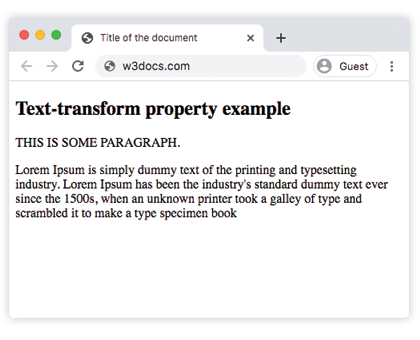
uppercase converts every character to its uppercase form — the most common use is for headings, buttons, and labels. In the example below the paragraph and <div> text are forced to uppercase while the HTML keeps its normal casing:
<!DOCTYPE html>
<html>
  <head>
    <title>Title of the document</title>
    <style>
      p {
        text-transform: uppercase;
      }
    </style>
  </head>
  <body>
    <h2>Text-transform property example</h2>
    <p>This is some paragraph.</p>
    <div>
      Lorem Ipsum is simply dummy text of the printing and typesetting industry. Lorem Ipsum has been the industry's standard dummy text ever since the 1500s, when an unknown printer took a galley of type and scrambled it to make a type specimen book.
    </div>
  </body>
</html>Result
The "capitalize" and "lowercase" values
capitalize uppercases the first letter of every word and leaves the rest of each word untouched. A "word" boundary is any whitespace, punctuation, or symbol, so quotes and hyphens start new words too (e.g. mother-in-law becomes Mother-In-Law). Two common gotchas:
- It only touches the first letter —
iPhonestaysIPhone, notIphone, because the existing casing of the remaining letters is preserved. - A digit doesn't count as a letter, so the first letter after a number is not capitalized.
3rdstays3rd, never3Rd.
lowercase is the opposite of uppercase: it forces every character to lowercase. In the example below the first <div> uses capitalize and the second uses lowercase:
<!DOCTYPE html>
<html>
  <head>
    <style>
      .a {
        text-transform: capitalize
      }
      .b {
        text-transform: lowercase
      }
    </style>
  </head>
  <body>
    <h2>Text-transform property example</h2>
    <div class="a">"Text transform property"</div>
    <br />
    <div class="b">
      "THIS IS SOME PARAGRAPH FOR EXAMPLE".
    </div>
  </body>
</html>The "none" value
none is the default — text is displayed exactly as written, with no capitalization effect. You mainly use it to cancel a text-transform that an element would otherwise inherit, since the property is inherited by default.
<!DOCTYPE html>
<html>
  <head>
    <title>Title of the document</title>
    <style>
      h1 {
        color: red;
      }
      h2 {
        text-transform: none;
      }
    </style>
  </head>
  <body>
    <h1>Example with text-transform property</h1>
    <h2>
        Example of the text-transform property with the "none" value:
    </h2>
  </body>
</html>The "initial" value
initial resets the property to its CSS-defined default (none), regardless of any inherited value. The example below resets text-transform on a paragraph:
<!DOCTYPE html>
<html>
  <head>
    <title>Title of the document</title>
    <style>
      h1 {
        color: red;
      }
      p.text {
        text-transform: initial;
      }
    </style>
  </head>
  <body>
    <h1>Example with text-transform property</h1>
    <h2>text-transform: initial:</h2>
    <p class="text">
      Example of the text-transform property with the "initial" value:
    </p>
  </body>
</html>Values
| Value | Descriptions | Play it |
|---|---|---|
| none | No capitalization effects. This is default value of this property. | Play it » |
| capitalize | Makes the first character of each word uppercase. | Play it » |
| uppercase | Makes all characters of each word uppercase. | Play it » |
| lowercase | Makes all characters of each word lowercase. | Play it » |
| full-width | Makes the writing of a character (ideograms and Latin scripts) inside a square, allowing them to be aligned in Chinese or Japanese. | Play it » |
| full-size-kana | Converts all small Kana characters to the full-size Kana, to compensate for legibility issues at the small font sizes typically used in ruby. | Play it » |
| initial | Makes the property use its default value. | Play it » |
| inherit | Inherits the property from its parents element. |
Related properties
text-transform is one of several CSS tools for shaping how text looks. Combine it with these related properties:
- text-decoration — underline, overline, or strike-through text.
- font-variant — render text as small-caps (a true typographic variant, unlike a visual uppercase).
- letter-spacing and word-spacing — pairs nicely with uppercased headings, which often read better with extra tracking.
- text-align — control horizontal alignment of the transformed text.
- ::first-letter and ::first-line —
text-transformalso applies to these pseudo-elements, useful for drop-cap effects.