CSS line-height Property
Use the line-height CSS property to specify the height of the lines of the text. Definition of the property, values and examples.
The line-height property specifies the height of a line box, controlling the vertical spacing between lines of text. It is one of the most important properties for readability: lines packed too tightly are hard to scan, while lines spread too far apart make a paragraph feel disconnected.
This page covers the syntax, every accepted value type, why unitless values are usually the right choice, and the accessibility and inheritance gotchas to watch out for.
line-height behaves differently depending on the element type:
- On block-level elements, the
line-heightproperty sets the minimum line-height of the line boxes inside the element. - On non-replaced inline elements, it sets the height used in calculating the line box height.
- On replaced inline elements such as buttons or other input elements,
line-heighttypically does not affect the line box height calculation.
Negative values are valid.
The default line-height is about 110% to 120% for the majority of the browsers.
The line-height property sets the leading of lines of a text. If the line-height value is greater than the font-size value of an element, the difference will be the leading of text.
| Initial Value | normal |
|---|---|
| Applies to | All elements. |
| Inherited | Yes. |
| Animatable | Yes. Height of the lines is animatable. |
| Version | CSS1 |
| DOM Syntax | object.style.lineHeight = "40px"; |
Syntax
Syntax of CSS line-height Property
line-height: normal | number | length | percentage | calc | initial | inherit;Example with normal value:
Example of CSS line-height Property with normal value
<!DOCTYPE html>
<html>
  <head>
    <title>Title of the document</title>
    <style>
      div {
        line-height: normal;
      }
    </style>
  </head>
  <body>
    <h2>Line-height property example</h2>
    <h3>line-height: normal (default)</h3>
    <div>This is a paragraph with a standard line-height.
      <br /> The standard line height in most browsers is about 110% to 120%.
    </div>
  </body>
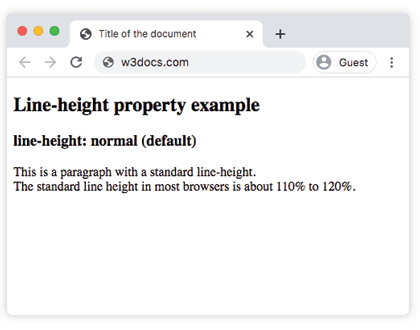
</html>Result
Example with length value:
Example of CSS line-height Property with px value
<!DOCTYPE html>
<html>
  <head>
    <title>Title of the document</title>
    <style>
      div {
        line-height: 10px;
      }
    </style>
  </head>
  <body>
    <h2>Line-height property example</h2>
    <h3>line-height: 10px</h3>
    <div>This is a paragraph with a specified line-height.
      <br /> The line height here is set to 10 pixels.
    </div>
  </body>
</html>Example with percentage value:
Example of CSS line-height Property with %(percentage) value
<!DOCTYPE html>
<html>
  <head>
    <title>Title of the document</title>
    <style>
      div {
        line-height: 200%;
      }
    </style>
  </head>
  <body>
    <h2>Line-height property example</h2>
    <h2>line-height: 200%</h2>
    <div>This is a paragraph with a bigger line-height.
      <br /> The line height here is set to 200%.
    </div>
  </body>
</html>Example with multiple values:
Example of CSS line-height Property with cm,px,%(percentage) ,normal and number values
<!DOCTYPE html>
<html>
  <head>
    <title>Title of the document</title>
    <style>
      div.a {
        line-height: 1;
      }
      div.b {
        line-height: 50px;
      }
      div.c {
        line-height: 0.5cm;
      }
      div.d {
        line-height: 1cm;
      }
      div.e {
        line-height: 200%;
      }
      div.f {
        line-height: normal;
      }
    </style>
  </head>
  <body>
    <h2>Line-height property example</h2>
    <h3>line-height: 1</h3>
    <div class="a">This is a paragraph with a specified line-height.
      <br /> The line height here is set to 1.
    </div>
    <h3>line-height: 50px</h3>
    <div class="b">This is a paragraph with a specified line-height.
      <br /> The line height here is set to 50 pixels.
    </div>
    <h3>line-height: 0.5cm</h3>
    <div class="c">This is a paragraph with a specified line-height.
      <br /> The line height here is set to 0.5 centimeter.
    </div>
    <h3>line-height: 1cm</h3>
    <div class="d">This is a paragraph with a specified line-height.
      <br /> The line height here is set to 1 centimeter.
    </div>
    <h3>line-height: 200%</h3>
    <div class="e">This is a paragraph with a bigger line-height.
      <br /> The line height here is set to 200%.
    </div>
    <h3>line-height: normal</h3>
    <div class="f">This is a paragraph with a standard line-height.
      <br /> The standard line height in most browsers is about 110% to 120%.
    </div>
  </body>
</html>Choosing a value: unitless vs. units
This is the single most important decision when setting line-height, and it comes down to how the value is inherited:
- A unitless number (e.g.
line-height: 1.5) is inherited as the factor itself. Each descendant multiplies the factor by its ownfont-size, so the spacing always scales correctly. - A length or percentage (e.g.
1.5emor150%) is computed once on the element where it is declared and the resulting pixel value is inherited. Descendants with a differentfont-sizekeep that fixed pixel height, which can cause text to overlap.
Compare the two on a parent whose child has a larger font:
<!DOCTYPE html>
<html>
  <head>
    <style>
      /* Recommended: each element scales the factor by its own font-size */
      .good { line-height: 1.5; }
      /* Problematic: computed pixel height is inherited as-is */
      .bad  { line-height: 150%; }
      .child { font-size: 3em; }
    </style>
  </head>
  <body>
    <div class="good">
      Parent text. <span class="child">Big inherited line scales fine.</span>
    </div>
    <div class="bad">
      Parent text. <span class="child">Big inherited line may overlap.</span>
    </div>
  </body>
</html>Rule of thumb: use a unitless number for body text. Reach for a fixed length (px/em) only when you deliberately want a constant line box, such as vertically centering a single line of text by matching line-height to the element's height.
Accessibility
The WCAG 1.4.12 text-spacing success criterion expects content to remain readable when users override line spacing to at least 1.5× the font size. A unitless line-height of 1.5 or more on body text is a safe, accessible default, and avoids breaking layouts when a user applies their own spacing.
Values
| Value | Description | Play it |
|---|---|---|
| normal | Defines a normal line height. It is the default value of this property. | Play it » |
| length | Defines a fixed line height in px, cm, em, etc. | Play it » |
| number | Defines a number which is multiplied with the current font size to set the line height. | Play it » |
| % | Defines a line height in percent of current font size. | Play it » |
| calc | Defines a line height using a calculation. | Play it » |
| initial | Makes the property use its default value. | Play it » |
| inherit | Inherits the property from its parents element. |
Note: Using the em unit is widely recommended for scalable line-heights.