CSS border-bottom-width Property
Use border-bottom-width property to define the width of an element’s bottom border. See how to use this CSS property values.
The border-bottom-width property sets the width (thickness) of the bottom border of an element. It controls only the bottom edge — to style all four sides at once, use the border-width shorthand instead.
This page covers what values border-bottom-width accepts, why it needs a border style to show, the difference between the thin/medium/thick keywords and explicit lengths, and how it relates to the other per-side width properties.
Why the width often shows nothing
To see the effect of border-bottom-width, you must also set a border style with the border-style or border-bottom-style property. The initial border style is none, and a border with none style is never rendered no matter how wide you make it — so the width has no visible effect on its own.
/* Invisible: no style set */
.box { border-bottom-width: 10px; }

/* Visible: width + style together */
.box { border-bottom-width: 10px; border-bottom-style: solid; }Accepted values
You can set the width in two ways:
- Length — any CSS length such as
4px,0.25em, or0.1rem. This is the most predictable option because the result is exactly what you specify. Negative lengths are not allowed and are treated as invalid. - Keywords —
thin,medium, orthick. The specification does not define an exact pixel thickness for each keyword; the precise result is implementation-specific. The keywords always follow the patternthin≤medium≤thick, and a given keyword stays constant within a single document. In most browsers they map to roughly1px,3px, and5px.
If you need the width to be consistent across browsers, prefer an explicit length over the keywords.
| Initial Value | medium |
|---|---|
| Applies to | All elements. It also applies to ::first-letter. |
| Inherited | No. |
| Animatable | Yes. The width can be animated. |
| Version | CSS1 |
| DOM Syntax | object.style.borderBottomWidth = "5px"; |
Syntax
Syntax of CSS border-bottom-width Property
border-bottom-width: medium | thin | thick | length | initial | inherit;Example of the border-bottom-width property:
Example of CSS border-bottom-width Property with thick value
<!DOCTYPE html>
<html>
  <head>
    <style>
      p {
        border-style: dotted;
        border-bottom-width: thick;
      }
    </style>
  </head>
  <body>
    <p>
      As you can see, we used border-bottom-width property to set the width of bottom border of this element.
    </p>
  </body>
</html>Result
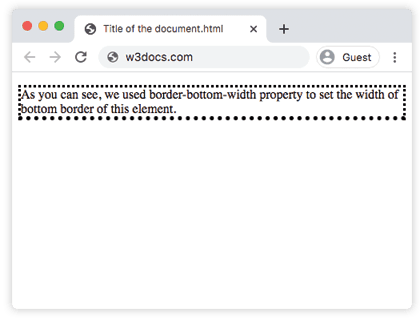
Example of the border-bottom-width property with the "medium" value:
Example of CSS border-bottom-width Property with medium value
<!DOCTYPE html>
<html>
  <head>
    <title>The title of the document</title>
    <style>
      h2 {
        border-bottom-style: groove;
        border-bottom-width: medium;
      }
      div {
        border-style: groove;
        border-bottom-width: medium;
      }
    </style>
  </head>
  <body>
    <h2>A heading with a medium bottom border.</h2>
    <div>A div element with a medium bottom border.</div>
  </body>
</html>Example of the border-bottom-width property that shows the difference between the "thin" and "thick" values:
Example of CSS border-bottom-width Property with thin value
<!DOCTYPE html>
<html>
  <head>
    <title>The title of the document</title>
    <style>
      h2 {
        padding: 5px;
        border-bottom-style: ridge;
        border-bottom-width: thin;
        border-color: #cccccc;
      }
      div {
        padding: 5px;
        border-style: ridge;
        border-bottom-width: thick;
      }
    </style>
  </head>
  <body>
    <h2>A heading with thin bottom border</h2>
    <div>A div element with thick bottom border.</div>
  </body>
</html>Values
| Value | Description | Play it |
|---|---|---|
| medium | Sets a medium bottom border. It is the default value. | Play it » |
| thin | Sets a thin bottom border. | Play it » |
| thick | Sets a thick bottom border. | Play it » |
| length | Sets the bottom border width to a specific length value. | Play it » |
| initial | Sets the property to its default value. | Play it » |
| inherit | Inherits the property value from its parent element. |
Related properties
border-bottom-width is one of four per-side width properties. Use the matching one for each edge, or the shorthand when you want to set several at once:
- border-top-width, border-right-width, border-left-width — the other three single edges.
- border-width — shorthand that sets all four widths in one declaration.
- border-bottom-style and border-bottom-color — the style and color of the same bottom edge.
- border-bottom — shorthand for the bottom edge's width, style, and color together.