CSS :read-only Pseudo Class
The :read-only CSS pseudo-class selects the elements that are not editable. Read about the pseudo-class and try examples.
The :read-only CSS pseudo-class matches any element that the user cannot edit. It is the exact opposite of :read-write: every element is matched by one or the other, never both. Use it to give read-only fields a distinct look — for example, a muted background — so users instantly see which inputs they can change.
What counts as editable
An element is editable (and therefore matched by :read-write, not :read-only) when it is one of:
- An
<input>element that has neither thereadonlynor thedisabledattribute. - A
<textarea>that has neither thereadonlynor thedisabledattribute. - Any other element that has the
contenteditableattribute set totrue.
Everything else is read-only, so :read-only matches an element when:
- it is an
<input>or<textarea>carrying thereadonlyattribute, or - it is a plain element whose
contenteditableattribute isfalseor absent (most of the page — paragraphs, headings, divs, and so on).
One common surprise: a readonly attribute on a <div> or <p> has no effect, because readonly only applies to form controls. Such an element is matched by :read-only simply because it is not editable to begin with — not because of the readonly attribute. To make a non-form element editable, use contenteditable="true".
:read-only can be chained with other selectors (such as :hover) and combined with pseudo-elements (such as ::after).
Version
CSS Basic User Interface Module Level 3
Syntax
CSS :read-only syntax
:read-only {
  css declarations;
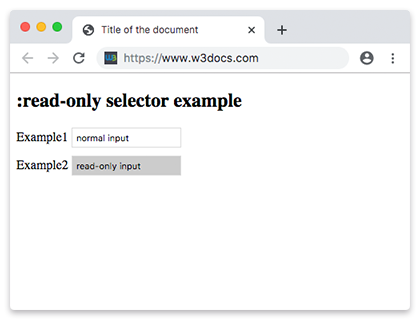
}Example of the :read-only selector:
CSS :read-only code example
<!DOCTYPE html>
<html>
  <head>
    <title>Title of the document</title>
    <style>
      input {
        margin-bottom: 10px;
        border: 1px solid #ddd;
        padding: 5px;
      }
      input:read-only {
        background-color: #ccc;
      }
    </style>
  </head>
  <body>
    <h2>:read-only selector example</h2>
    <form>
      <div>
        <label for="normal">Example1</label>
        <input value="normal input" id="normal" />
      </div>
      <div>
        <label for="read-only">Example2</label>
        <input readonly value="read-only input" id="read-only" />
      </div>
    </form>
  </body>
</html>The contenteditable enumerated attribute indicates if the user can edit the element. When enabled, the browser widget is modified to allow editing. The attribute should have one of the following values:
true(or the empty string), indicating that the element should be editable;false, indicating that the element should not be editable.
Example of the :read-only selector with contenteditable attribute:
Example of CSS :read-only pseudo class with contenteditable attribute
<!DOCTYPE html>
<html>
  <head>
    <title>Title of the document</title>
    <style>
      p:read-only {
        background: #8ebf42;
      }
      p[contenteditable="true"] {
        color: #777777;
      }
    </style>
  </head>
  <body>
    <h2>:read-only selector example</h2>
    <p>Example of a normal paragraph.</p>
    <p contenteditable="true">Example of a contenteditable paragraph! Just click and edit!</p>
  </body>
</html>Example of the :read-only selector with HTML <textarea> tag on hover:
Example of the CSS :read-only selector with HTML <textarea> tag and on hover case
<!DOCTYPE html>
<html>
  <head>
    <title>Title of the document</title>
    <style>
      textarea:read-only {
        background: #ffffff;
      }
      textarea:read-only:hover {
        cursor: not-allowed;
        background: #8ebf42;
      }
    </style>
  </head>
  <body>
    <h2>:read-only selector example</h2>
    <textarea cols="40" rows="5" readonly>Here is an example of :read-only selector on hover.</textarea>
  </body>
</html>Example of the :read-only selector with HTML <div> tag and the :after, :before pseudo-elements:
Example CSS :read-only Pseudo Class with :before, :after pseudo-elements
<!DOCTYPE html>
<html>
  <head>
    <title>Title of the document</title>
    <style>
      div:read-only:hover {
        background-color: #eee;
      }
      div:read-only:before,
      div:read-only:after {
        content: " / ";
        padding: 10px;
        color: #1c87c9;
        font-size: 30px;
      }
    </style>
  </head>
  <body>
    <h2>:read-only selector example</h2>
    <div readonly>Here is an example of :read-only selector on hover.</div>
    <br />
    <div contenteditable="true">Example of a contenteditable paragraph! Just click and edit!</div>
  </body>
</html>