CSS filter Property
The filter CSS property sets filters to the image. Learn about values and see the effects illustrated in the examples.
The CSS filter property applies graphical effects—such as blurring, color shifting, or shadowing—to an element while it is rendered, without changing the underlying source. It is most commonly used on images, but it works on any element, including text, backgrounds, and SVG.
This chapter covers each filter function the property accepts, how to combine several filters in one declaration, and the practical cases where filters beat the alternatives.
When to use the filter property
Reach for filter when you want a visual effect that the browser computes from the element's existing pixels:
- Dim or tint a hero image behind text (
brightness,grayscale,sepia) instead of editing the asset in an image editor. - Soften a background (
blur) so foreground content stays readable. - Draw attention on hover by removing a grayscale filter to reveal full color.
- Add a shadow that follows transparency with
drop-shadow—unlikebox-shadow, it wraps the shape inside a PNG/SVG rather than the rectangular box.
Because filters run on the GPU and only affect presentation, they animate smoothly and never alter the source file, which makes them ideal for transitions and hover states.
The filter property accepts these functions:
noneblur()brightness()contrast()drop-shadow()grayscale()hue-rotate()invert()opacity()saturate()sepia()url()
| Initial Value | none |
|---|---|
| Applies to | All elements. |
| Inherited | No. |
| Animatable | Yes. |
| Version | CSS3 |
| DOM Syntax | object.style.filter = "hue-rotate(360deg)"; |
Syntax
Syntax of CSS filter Property
filter: none | blur() | brightness() | contrast() | drop-shadow() | grayscale() | hue-rotate() | invert() | opacity() | saturate() | sepia() | url() | initial | inherit;Examples
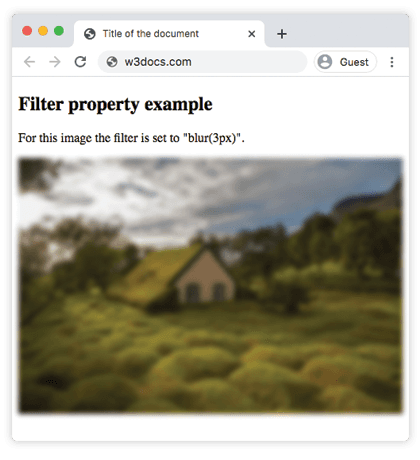
Example of the filter property with the "blur" value:
Example of CSS filter Property with blur value
<!DOCTYPE html>
<html>
  <head>
    <title>Title of the document</title>
    <style>
      img {
        filter: blur(3px);
        max-width: 100%;
      }
    </style>
  </head>
  <body>
    <h2>Filter property example</h2>
    <p>For this image the filter is set to "blur(3px)".</p>
    <p>
      <img src="/uploads/media/default/0001/01/4982c4f43023330a662b9baed5a407e391ae6161.jpeg" alt="Background Image" />
    </p>
  </body>
</html>Result
Example of using the filter property to make the image brighter:
Example of CSS filter Property with brightness value
<!DOCTYPE html>
<html>
  <head>
    <title>Title of the document</title>
    <style>
      img {
        filter: brightness(150%);
        max-width: 100%;
      }
    </style>
  </head>
  <body>
    <h2>Filter property example</h2>
    <p>For this image the filter is set to "brightness(150%)".</p>
    <p>
      <img src="/uploads/media/default/0001/01/4982c4f43023330a662b9baed5a407e391ae6161.jpeg" alt="Background Image" />
    </p>
  </body>
</html>In the following example the "grayscale" value makes the image gray:
Example of the filter property with the "grayscale" value:
Example of CSS filter Property with grayscale value
<!DOCTYPE html>
<html>
  <head>
    <title>Title of the document</title>
    <style>
      img {
        filter: grayscale(80%);
        max-width: 100%;
      }
    </style>
  </head>
  <body>
    <h2>Filter example</h2>
    <p>For this image the filter is set to "grayscale(80%)".</p>
    <p>
      <img src="/uploads/media/default/0001/01/4982c4f43023330a662b9baed5a407e391ae6161.jpeg" alt="Background Image" />
    </p>
  </body>
</html>Here, "saturate" filter is applied to the image where the given value is 300%.
Example of the filter property with the "saturate" value:
Example of CSS filter Property with saturate value
<!DOCTYPE html>
<html>
  <head>
    <title>Title of the document</title>
    <style>
      img {
        filter: saturate(300%);
        max-width: 100%;
      }
    </style>
  </head>
  <body>
    <h2>Filter example</h2>
    <p>For this image the filter is set to "saturate(300%)".</p>
    <p>
      <img src="/uploads/media/default/0001/01/4982c4f43023330a662b9baed5a407e391ae6161.jpeg" alt="Background Image" />
    </p>
  </body>
</html>Example of the filter property with the "sepia" value:
Example of the filter property with the sepia value
<!DOCTYPE html>
<html>
  <head>
    <title>Title of the document</title>
    <style>
      img {
        filter: sepia(70%);
        max-width: 100%;
      }
    </style>
  </head>
  <body>
    <h2>Filter example</h2>
    <p>For this image the filter is set to "sepia(70%)".</p>
    <p>
      <img src="/uploads/media/default/0001/01/4982c4f43023330a662b9baed5a407e391ae6161.jpeg" alt="Background Image" />
    </p>
  </body>
</html>Example of the filter property with the "contrast" value:
Example of the CSS filter Property with contrast value
<!DOCTYPE html>
<html>
  <head>
    <title>Title of the document</title>
    <style>
      img {
        filter: contrast(40%);
        max-width: 100%;
      }
    </style>
  </head>
  <body>
    <h2>Filter example</h2>
    <p>For this image the filter is set to "contrast(40%)".</p>
    <p>
      <img src="/uploads/media/default/0001/01/4982c4f43023330a662b9baed5a407e391ae6161.jpeg" alt="Background Image" />
    </p>
  </body>
</html>Example of the filter property with the "opacity" value:
Example of the CSS filter property with the "opacity" value
<!DOCTYPE html>
<html>
  <head>
    <title>Title of the document</title>
    <style>
      img {
        filter: opacity(0.4);
        max-width: 100%;
      }
    </style>
  </head>
  <body>
    <h2>Filter example</h2>
    <p>For this image the filter is set to "opacity(0.4)".</p>
    <p>
      <img src="/uploads/media/default/0001/01/4982c4f43023330a662b9baed5a407e391ae6161.jpeg" alt="Background Image" />
    </p>
  </body>
</html>Example of the filter property with the "invert" value:
Example of the CSS filter property with the "invert" value
<!DOCTYPE html>
<html>
  <head>
    <title>Title of the document</title>
    <style>
      img {
        filter: invert(0.7);
        max-width: 100%;
      }
    </style>
  </head>
  <body>
    <h2>Filter example</h2>
    <p>For this image the filter is set to "invert(0.7)".</p>
    <p>
      <img src="/uploads/media/default/0001/01/4982c4f43023330a662b9baed5a407e391ae6161.jpeg" alt="Background Image" />
    </p>
  </body>
</html>Example of the filter property with the "hue-rotate" value:
Example of the CSS filter property with the "hue-rotate" value
<!DOCTYPE html>
<html>
  <head>
    <title>Title of the document</title>
    <style>
      img {
        filter: hue-rotate(90deg);
        max-width: 100%;
      }
    </style>
  </head>
  <body>
    <h2>Filter example</h2>
    <p>For this image the filter is set to "hue-rotate(90deg)".</p>
    <p>
      <img src="/uploads/media/default/0001/01/4982c4f43023330a662b9baed5a407e391ae6161.jpeg" alt="Background Image" />
    </p>
  </body>
</html>Example of the filter property with the "drop-shadow" value:
drop-shadow() takes the same arguments as the box-shadow property—offset-x, offset-y, an optional blur radius, and a color—but it follows the non-transparent shape of the image instead of its bounding box. This is why it is the right choice for PNG icons and SVGs with transparency.
<!DOCTYPE html>
<html>
  <head>
    <title>Title of the document</title>
    <style>
      img {
        filter: drop-shadow(8px 8px 10px gray);
        max-width: 100%;
      }
    </style>
  </head>
  <body>
    <h2>Filter example</h2>
    <p>For this image the filter is set to "drop-shadow(8px 8px 10px gray)".</p>
    <p>
      <img src="/uploads/media/default/0001/01/4982c4f43023330a662b9baed5a407e391ae6161.jpeg" alt="Background Image" />
    </p>
  </body>
</html>Combining multiple filters
You can apply several filter functions in a single declaration by listing them, space-separated. They are applied in the order written, so the result of one feeds into the next—reordering them can change the output.
<!DOCTYPE html>
<html>
  <head>
    <title>Title of the document</title>
    <style>
      img {
        filter: grayscale(100%) brightness(120%) blur(2px);
        max-width: 100%;
      }
    </style>
  </head>
  <body>
    <h2>Filter example</h2>
    <p>
      This image is first turned to grayscale, then brightened, then blurred.
    </p>
    <p>
      <img src="/uploads/media/default/0001/01/4982c4f43023330a662b9baed5a407e391ae6161.jpeg" alt="Background Image" />
    </p>
  </body>
</html>Because filter is animatable, pairing it with a transition is a common pattern—for example, fading a grayscale photo to full color on hover:
img {
  filter: grayscale(100%);
  transition: filter 0.3s ease;
}

img:hover {
  filter: grayscale(0%);
}Things to keep in mind
- A filter creates a stacking context and (with anything other than
none) a containing block for descendants—this can affect how absolutely positioned andfixedchildren are laid out. - Heavy
blur()values are expensive. Large blur radii on large elements can hurt scroll performance, especially on mobile. opacity()vs theopacityproperty: the filter function applies opacity as part of the filter pipeline, while the standaloneopacityproperty is simpler and slightly more widely supported—prefer the property unless you are combining it with other filters.- To filter what is behind a translucent element (frosted-glass effect) you need
backdrop-filter, a separate property—filteronly affects the element's own pixels.
Values
| Value | Description | Play it |
|---|---|---|
| none | Applies no effect. This is the default value of this property. | Play it » |
| blur | Applies blur on an image. It is specified by a length value. The larger the value the more blur will be applied. If no value is applied, 0 is used. | Play it » |
| brightness | Makes the image brighter. If the value is 0 the image will be black. 100% is the default value and shows the original image. Values over 100% make the image brighter. | Play it » |
| contrast | Adjusts contrast of an image. If the value is 0 the image will be black. 100% is the default value and shows the original image. Values over 100% apply more contrast to the image. | Play it » |
| drop-shadow | Applies a drop shadow effect on the image. | Play it » |
| grayscale | Changes the image to grayscale. 0% is the value of original image. 100% makes the image grey. Negative values are not allowed. | Play it » |
| hue-rotate | Applies a hue rotation effect on the image. It is specified by degrees. Maximum value is 360 degrees. | Play it » |
| invert | Inverts the samples in the image. 0 is the default value. 100% makes the image fully inverted. | Play it » |
| opacity | Sets the opacity level for the image. It describes the transparency of the image. If the value is 0 the image is completely transparent. 100% is the current state of the image. | Play it » |
| saturate | Applies saturate effect on the image. 0% makes the image completely unsaturated. 100% is default value of the image. Values over 100% make the image super-saturated. | Play it » |
| sepia | Converts the image to sepia. Default value is 0%, 100% makes the image completely sepia. | Play it » |
| url | The url() function takes the location of an SVG file that specifies a filter, and may include an anchor to a specific filter element. | |
| initial | Makes the property use its default value. | |
| inherit | Inherits the property from its parents element. |