CSS border-left-style Property
CSS border-left-style property is used to set the style of an element's left border. See all property values illustrated with examples.
The CSS border-left-style property sets the style of an element's left border. It takes a single keyword chosen from the same set of values available to the border-style shorthand. Unlike border-style, which sets the style for all four sides at once, border-left-style targets only the left edge.
This property pairs with border-left-width and border-left-color, or you can set all three at once with the border-left shorthand. A border is only visible once its style is set to something other than the default none — even a generous width and a bold color render nothing until a style is applied.
The left border's default width is medium. Adjust it with the border-left-width or border-width property.
Not all browsers render the same style identically. Chrome, for example, draws the dots of a dotted border as small squares rather than circles, and the 3D values (groove, ridge, inset, outset) depend on the border color to produce their light-and-shadow effect.
The specification does not specify the amount of spacing between the dots and the dashes.
The specification does not define how borders of different styles connect in the corners.
| Initial Value | none |
|---|---|
| Applies to | All elements. It also applies to ::first-letter. |
| Inherited | No |
| Animatable | No |
| Version | CSS1 |
| DOM Syntax | object.style.borderLeftStyle = "solid"; |
Syntax
Syntax of CSS border-left-style Property
border-left-style: none | hidden | dotted | dashed | solid | double | groove | ridge | inset | outset | initial | inherit;Example of the border-left-style property:
Example of CSS border-left-style Property with solid and dotted values
<!DOCTYPE html>
<html>
  <head>
    <style>
      p {
        border-left-style: solid;
      }
      div {
        border-left-style: dotted;
      }
    </style>
  </head>
  <body>
    <p> Example with solid border-left-style.</p>
    <div>Example with dotted border-left-style.</div>
  </body>
</html>Depending on the value of the border-color, the effects of groove, ridge, inset and outset values can be changed.
Example of the border-left-style property with all the values:
Example of CSS border-left-style Property with hidden,dotted, dashed, solid, double, groove, ridge, inset and outset values
<!DOCTYPE html>
<html>
  <head>
    <title>Title of the document</title>
    <style>
      body {
        background: #c9c5c5;
        font-size: 20px;
        text-align: center;
      }
      main div {
        display: flex;
        align-items: center;
        justify-content: center;
        color: black;
        padding-top: 30px;
        padding-bottom: 30px;
        width: 200px;
        height: 100px;
        margin: 15px;
        font-weight: bold;
        background-color: #8ebf42;
        border: 10px solid;
      }
      .flex-center {
        display: flex;
        justify-content: center;
      }
      /* border-left-style example classes */
      .b1 {
        border-left-style: hidden;
      }
      .b2 {
        border-left-style: dotted;
      }
      .b3 {
        border-left-style: dashed;
      }
      .b4 {
        border-left-style: solid;
      }
      .b5 {
        border-left-style: double;
      }
      .b6 {
        border-left-style: groove;
      }
      .b7 {
        border-left-style: ridge;
      }
      .b8 {
        border-left-style: inset;
      }
      .b9 {
        border-left-style: outset;
      }
    </style>
  </head>
  <body>
    <h1>Border-left-style value examples</h1>
    <main class="flex-center">
      <div class="b1">
        hidden
      </div>
      <div class="b2">
        dotted
      </div>
      <div class="b3">
        dashed
      </div>
    </main>
    <main class="flex-center">
      <div class="b4">
        solid
      </div>
      <div class="b5">
        double
      </div>
      <div class="b6">
        groove
      </div>
    </main>
    <main class="flex-center">
      <div class="b7">
        ridge
      </div>
      <div class="b8">
        inset
      </div>
      <div class="b9">
        outset
      </div>
    </main>
  </body>
</html>Result
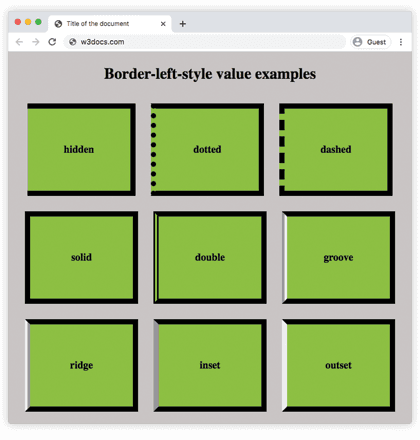
Values
| Value | Description | Play it |
|---|---|---|
| none | Defines that there won't be any border. Default value. | |
| hidden | Same as none, except in border conflict resolution for table elements, where it completely removes the left border from rendering. | |
| dotted | Defines a dotted border. | |
| dashed | Defines a dashed border. | |
| double | Defines a double border. | |
| solid | Defines a solid border. | |
| groove | Defines a 3D grooved border. Its effect can be changed with the value of border-color. | |
| ridge | Defines a 3D ridged border. Its effect can be changed with the value of border-color. | |
| inset | Defines a 3D inset border. Its effect can be changed with the value of border-color. | |
| outset | Defines a 3D outset border. Its effect can be changed with the value of border-color. | |
| initial | Sets the property to its default value. | |
| inherit | Inherits the property from its parent element. |
When to use it
Reach for border-left-style when you want a styled accent on just the left edge — a common pattern for blockquotes, callout cards, and active sidebar items, where a single colored bar marks the element without boxing it in. For the same effect on the other sides, use border-top-style, border-right-style, or border-bottom-style. When all four edges share one style, the border-style shorthand is shorter.