CSS word-break Property
Use the word-break CSS property for specifying where the lines should be broken. Read about property and try examples.
The CSS word-break property controls how words are broken when text reaches the edge of its container. It decides whether the browser is allowed to split a word between characters in order to keep long, unbreakable content from overflowing.
By default, line breaks only happen at "soft wrap opportunities" — spaces, hyphens, and similar break points. A single long string with no spaces (a URL, a hash, a long identifier) won't break at all and will overflow its box. Setting word-break: break-all tells the browser it may break the line at any character, so the text wraps instead of spilling out.
This is especially useful for:
- Long URLs, file paths, or email addresses inside narrow columns.
- User-generated content where you can't predict word length.
- Mixed CJK (Chinese / Japanese / Korean) and Latin text, where break behavior differs between scripts.
word-break is closely related to overflow-wrap (formerly word-wrap) and white-space. The key difference: overflow-wrap: anywhere only breaks a word when it would otherwise overflow, while word-break: break-all breaks eagerly at every line, even when a normal break point was available. Reach for overflow-wrap first for ordinary "don't let this URL overflow" cases, and use word-break when you specifically want character-level wrapping.
This property is one of the CSS3 properties.
| Initial Value | normal |
|---|---|
| Applies to | All elements. |
| Inherited | Yes. |
| Animatable | No. |
| Version | CSS3 |
| DOM Syntax | object.style.wordBreak = "break-all"; |
Syntax
CSS word-break values
word-break: normal | break-all | keep-all | break-word | initial | inherit;Example of the word-break property:
CSS word-break code example
<!DOCTYPE html>
<html>
  <head>
    <title>The title of the document</title>
    <style>
      html,
      body {
        height: 100%;
      }
      body {
        font-family: Helvetica, sans-serif;
        display: flex;
        justify-content: center;
        align-items: center;
        background-color: #8ebf42;
      }
      p {
        word-break: break-all;
        line-height: 1;
        text-transform: uppercase;
        text-align: center;
        font-size: 30px;
        font-weight: bold;
        color: #eee;
        width: 1em;
      }
    </style>
  </head>
  <body>
    <p>element</p>
  </body>
</html>Result
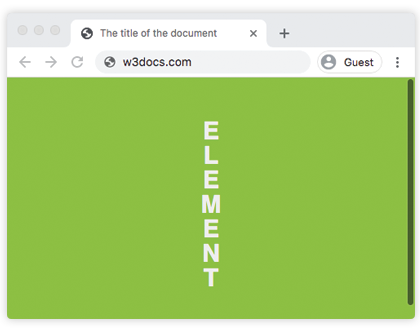
In the example above, the <p> is only 1em wide, so each letter wraps onto its own line — a clear demonstration of break-all ignoring normal break points.
Example of the word-break property with the "break-all" value:
CSS word-break break-all code example
<!DOCTYPE html>
<html>
  <head>
    <title>The title of the document</title>
    <style>
      body {
        font-size: 0.95em;
        line-height: 1.5;
        font-family: 'Helvetica Neue', Helvetica, Arial, sans-serif;
      }
      .container {
        margin: 50px auto;
        max-width: 700px;
      }
      .text {
        padding: 20px;
        background-color: #666;
        color: white;
        text-align: justify;
      }
      .break {
        word-break: break-all;
      }
      strong {
        background-color: #000;
      }
    </style>
  </head>
  <body>
    <h2>Word-break property example</h2>
    <div class="container">
      <h3>Text breaks inside words</h3>
      <p class="text break">
        Lorem Ipsum is simply dummy text of the printing and typesetting industry. Lorem <strong>Ipsum</strong> has been the industry's standard dummy text ever since the 1500s, when an <strong>unknown</strong> printer took a galley of type and scrambled it to make a type specimen book. It has survived not only five centuries, but also the leap into electronic typesetting, <strong>remaining</strong> essentially unchanged.
      </p>
    </div>
  </body>
</html>Values
| Value | Description |
|---|---|
| normal | Uses line break rules. This is the default value of this property. |
| break-all | Breaks between any two characters, regardless of overflow. This can make text difficult to read. |
| keep-all | Word breaks should not be used for Chinese/Japanese/Korean (CJK) text. Non-CJK text behavior is the same as for normal. |
| break-word | Deprecated. Breaks words at arbitrary points if there are no acceptable break points in the line. Use overflow-wrap: anywhere instead. |
| initial | Makes the property use its default value. |
| inherit | Inherits the property from its parents element. |
Tips and common gotchas
break-allhurts readability. Because it can split a word at any character, ordinary prose becomes hard to read. Use it only where the content is non-prose (codes, hashes, URLs) or where you genuinely want every line filled to the edge.- Prefer
overflow-wrapfor "just don't overflow." If your only goal is to stop a long URL from breaking the layout,overflow-wrap: break-wordkeeps normal words intact and only breaks the offending one. break-wordis deprecated. Thebreak-wordvalue ofword-breakis legacy and behaves likeoverflow-wrap: anywhereplusword-break: normal. Don't use it in new code — setoverflow-wrap: anywhereinstead.keep-allis for CJK text. It prevents breaks within Chinese, Japanese, and Korean words. Latin text is treated asnormal, so it has no visible effect on English content.- Combine with
hyphensfor nicer prose. When you want long words to wrap at sensible points with a hyphen, pairoverflow-wrapwithhyphensinstead of forcingbreak-all.
Browser support
word-break is supported in all modern browsers. The normal, break-all, and keep-all values are widely available; the legacy break-word value is supported for backward compatibility but should be avoided.